JuiceFS Operator
JuiceFS 提供了一个 Operator,它是一个专为 Kubernetes 环境设计的控制器,用于自动化管理 JuiceFS 的分布式缓存集群、缓存预热和数据同步等功能,以便在容器环境中更轻易的使用 JuiceFS。
安装 JuiceFS Operator
安装 Helm,然后加入 JuiceFS 官方仓库。
helm repo add juicefs https://juicedata.github.io/charts/
helm repo update
安装之前,阅读 values.yaml 了解各个配置项,该文件包含了所有的默认配置,如果需要修改配置,请在本地创建另一份 values(以下且称 values-mycluster.yaml),并把需要修改的部分加入其中。如果需要在多个 Kubernetes 集群部署 Operator,就创建多个 values 文件,来区分不同的集群配置。
# 根据需要修改 values-mycluster.yaml
helm upgrade --install juicefs-operator juicefs/juicefs-operator -n juicefs-operator --create-namespace -f values-mycluster.yaml
可以使用 kubectl wait 等待 Operator 准备就绪:
kubectl wait -n juicefs-operator --for=condition=Available=true --timeout=120s deployment/juicefs-operator
更新 JuiceFS Operator
如果需要更新 Operator,可以使用以下命令:
helm repo update
helm upgrade juicefs-operator juicefs/juicefs-operator -n juicefs-operator --reuse-values
由于 Helm 的限制,更新时并不会一起更新 CRD,因此请在更新 Operator 之后,手动更新 CRD:
export CHART_VERSION=$(helm show chart juicefs/juicefs-operator | grep appVersion | awk '{print $2}')
kubectl apply -f https://raw.githubusercontent.com/juicedata/juicefs-operator/refs/tags/v${CHART_VERSION}/dist/crd.yaml
缓存组集群
企业版用户可以使用「JuiceFS Operator」来创建和管理分布式缓存集群。相比于其它部署方式,Operator 在使用上更为便捷(支持 GUI 和 CLI 两种交互方式),同时还支持异构节点不同配置、平滑加减节点、自动清理缓存等高级功能。
以下章节介绍的操作通过 CSI Dashboard(0.25.3 及以上版本)和 kubectl 均可完成,选择你喜好的使用方式即可。为了简化文档示例,后续仅介绍基于 kubectl 的操作方法。
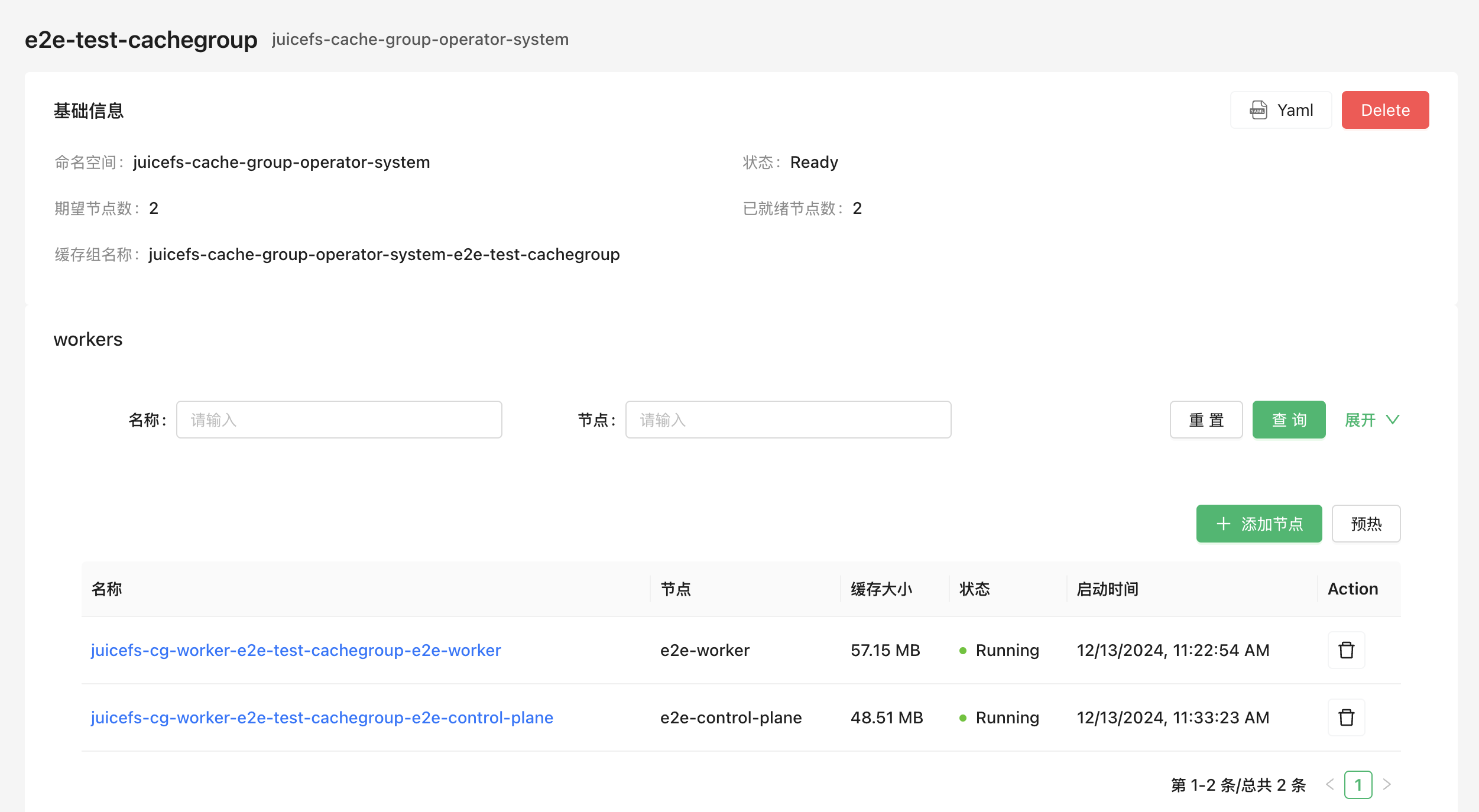
创建缓存组
参考以下示例将缓存组配置保存为一个 YAML 文件(例如 juicefs-cache-group.yaml),这个示例会在所有设置了 juicefs.io/cg-worker: "true" 标签的节点中部署分布式缓存(当然你也可以设置任意的标签)。关于更多配置项的说明请参考「缓存组配置项」小节。
apiVersion: v1
kind: Secret
metadata:
  name: juicefs-secret
  namespace: juicefs-cache-group
type: Opaque
stringData:
  name: juicefs-xx
  token: xx
  access-key: xx
  secret-key: xx
  # envs: '{"BASE_URL": "http://<IP or HOST>/static"}'
---
apiVersion: juicefs.io/v1
kind: CacheGroup
metadata:
  name: cachegroup-sample
  namespace: juicefs-cache-group
spec:
  secretRef:
    name: juicefs-secret
  cacheGroup: juicefs-cache-group-cachegroup-sample # 自定义缓存组名称,默认为 `${NAMESPACE}-${NAME}`
  worker:
    template:
      nodeSelector:
        juicefs.io/cg-worker: "true"
      image: juicedata/mount:ee-5.1.1-1faf43b
      opts:
        - cache-size=204800
        - free-space-ratio=0.01
        - group-weight=100
      cacheDirs:
        - type: HostPath
          path: /mnt/cache
      resources:
        requests:
          cpu: 100m
          memory: 128Mi
        limits:
          cpu: 1
          memory: 1Gi
然后通过 kubectl apply 命令创建缓存组:
kubectl apply -f juicefs-cache-group.yaml
如果 Kubernetes 节点还没有设置 juicefs.io/cg-worker: "true" 标签,需要加上这个标签:
kubectl label node node1 juicefs.io/cg-worker=true
获取缓存组状态
通过以下命令获取缓存组状态,确认缓存组已经处于「Ready」状态:
kubectl get cachegroups -n juicefs-cache-group
NAME                CACHE GROUP                              PHASE   BACK UP   WAITING DELETED   READY   AGE
cachegroup-sample   juicefs-cache-group-cachegroup-sample   Ready   <none>    <none>            1/1     10s
使用缓存组
完成以上步骤以后,便已经在 K8s 中启动了一个 JuiceFS 分布式缓存集群,其缓存组名为 juicefs-cache-group-cachegroup-sample。为了让应用程序的 JuiceFS 客户端使用该缓存集群,需要让 JuiceFS 客户端加入这个缓存组,并添加 --no-sharing 挂载参数,这样一来,应用程序的 JuiceFS 客户端虽然加入了缓存组,但却不参与缓存数据的构建,避免了客户端频繁创建、销毁所导致的缓存数据不稳定。
以动态配置为例,按照下方示范修改挂载参数即可,有关如何调整挂载配置的介绍详见「挂载参数」。
apiVersion: storage.k8s.io/v1
kind: StorageClass
metadata:
  name: juicefs-sc
mountOptions:
  - cache-group=juicefs-cache-group-cachegroup-sample
  - no-sharing
增删缓存节点
缓存组 Operator 支持平滑增删缓存节点,确保调整过程中不会对缓存命中率造成太大影响。
在「创建缓存组」的示例中,要求 Kubernetes 节点必须有 juicefs.io/cg-worker: "true" 这个标签,因此增删缓存节点所需的操作就是给 Kubernetes 节点增删对应的标签。例如通过 kubectl 命令增加或删除节点:
# 增加节点
kubectl label node node1 juicefs.io/cg-worker=true
kubectl label node node2 juicefs.io/cg-worker=true

# 删除节点
kubectl label node node1 juicefs.io/cg-worker-
当节点发生变更时,缓存组 Operator 会以平滑的形式增删节点,具体逻辑如下:
-
当新增节点时,缓存组 Operator 会自动创建新的 Worker Pod,并添加
group-backup挂载参数。如果新的 Worker Pod 接收到应用请求,并且发现缓存未命中,这个 Worker Pod 会将请求转发给其它缓存节点,确保缓存可以命中。默认 10 分钟后,group-backup挂载参数会被移除掉,可以通过spec.backupDuration来控制默认时间:apiVersion: juicefs.io/v1
kind: CacheGroup
metadata:
name: cachegroup-sample
namespace: juicefs-cache-group
spec:
backupDuration: 10m -
当移除节点时,缓存组 Operator 会先尝试将节点上的缓存数据迁移到其它节点,然后再删除节点。最长等待时间默认为 1 小时,可以通过
spec.waitingDeletedMaxDuration来控制默认时间:apiVersion: juicefs.io/v1
kind: CacheGroup
metadata:
name: cachegroup-sample
namespace: juicefs-cache-group
spec:
waitingDeletedMaxDuration: 1h
缓存组配置项
缓存组支持的所有配置项可以在这里找到完整示范。
指定 Worker 副本数 新增自 v0.6.0
你可以通过设置 spec.replicas 字段来指定缓存组 worker 的副本数:
- Worker 管理模式不可切换:
replicas必须在创建 CacheGroup 时设置;已有 CacheGroup 如果没有该字段,之后不能新增;创建时设置后也不能再取消。但可以修改它的数值来扩缩容。 - 使用此种方式须确保 Pod IP 可以固定,并且缓存盘可以跟随 Pod 迁移到其他节点,否则可能会导致缓存穿透。
worker.overwrite字段将不适用于此模式,即不能为不同的节点指定不同的配置。
apiVersion: juicefs.io/v1
kind: CacheGroup
metadata:
  name: cachegroup-sample
  namespace: juicefs-cache-group
spec:
  replicas: 3    # 指定创建 3 个 worker 副本
  worker:
    template:
      nodeSelector:
        juicefs.io/cg-worker: "true"
      image: juicedata/mount:ee-5.1.1-1faf43b
      opts:
        - cache-size=204800
        - free-space-ratio=0.01
        - group-weight=100
      cacheDirs:
        - type: VolumeClaimTemplates
          volumeClaimTemplate:
            metadata:
              name: jfs-cache
            spec:
              accessModes:
              - ReadWriteOnce
              resources:
                requests:
                  storage: 20Gi
              storageClassName: <your-storage-class-name>
通过这种方式,你可以精确控制缓存组中 worker 的数量,而不是依赖于节点标签的数量。
亲和性与反亲和性 新增自 v0.7.2
默认情况下,缓存组 Operator 会将 worker 部署在所有符合 nodeSelector 的节点上。不遵循节点和 Pod 之间的亲和性与反亲和性规则。
从 v0.7.2 版本开始,缓存组 Operator 支持通过 spec.enableScheduling 字段来启用调度功能。
例如将缓存组部署在不同的 zone 上。
只会处理 requiredDuringSchedulingIgnoredDuringExecution 规则。
apiVersion: juicefs.io/v1
kind: CacheGroup
metadata:
  name: cachegroup-sample
  namespace: juicefs-cache-group
spec:
  secretRef:
    name: cachegroup-sample-secret
  enableScheduling: true
  worker:
    template:
      affinity:
        podAntiAffinity:
          requiredDuringSchedulingIgnoredDuringExecution:
            - labelSelector:
                matchExpressions:
                  - key: juicefs.io/cache-group
                    operator: In
                    values:
                      - cachegroup-sample
              topologyKey: "topology.kubernetes.io/zone"
更新策略
更新缓存组的配置时,可以通过 spec.updateStrategy 字段来指定缓存组下面的 worker 节点的更新策略。
目前支持的策略有:
RollingUpdate(默认):这是默认的更新策略。使用RollingUpdate更新策略时,在更新缓存组模板后,老的 Worker Pod 将被终止,并且自动创建新的 Worker Pod, 每次更新的数量遵循spec.updateStrategy.rollingUpdate.maxUnavailable的配置,默认为 1。OnDelete:使用OnDelete更新策略时,在更新缓存组模板后,只有当你手动删除旧的 Worker Pod 时,新的 Worker Pod 才会被创建。
apiVersion: juicefs.io/v1
kind: CacheGroup
metadata:
  name: cachegroup-sample
  namespace: juicefs-cache-group
spec:
  updateStrategy:
    type: RollingUpdate
    rollingUpdate:
      maxUnavailable: 1
缓存目录
缓存目录可以通过 spec.worker.template.cacheDirs 字段来设置,支持的类型有 HostPath, PVC, VolumeClaimTemplates 新增自 v0.6.0 。
apiVersion: juicefs.io/v1
kind: CacheGroup
metadata:
  name: cachegroup-sample
  namespace: juicefs-cache-group
spec:
  worker:
    template:
      nodeSelector:
        juicefs.io/cg-worker: "true"
      image: juicedata/mount:ee-5.1.1-1faf43b
      cacheDirs:
        - type: HostPath
          path: /var/jfsCache-0
        - type: PVC
          name: juicefs-cache-pvc
        # v0.6.0 版本开始支持 VolumeClaimTemplates
        - type: VolumeClaimTemplates
          volumeClaimTemplate:
            metadata:
              name: jfs-cache
            spec:
              accessModes:
              - ReadWriteOnce
              resources:
                requests:
                  storage: 20Gi
              storageClassName: <your-storage-class-name>
使用块设备作为缓存盘 新增自 v0.9.0
PVC 和 VolumeClaimTemplates 类型的缓存目录支持使用 Kubernetes 原始块卷(raw block volume)。存储类及其 CSI 驱动必须支持原始块卷;HostPath 仅支持目录,不能用于此模式。
引用已有 PVC 时,PVC 的 spec.volumeMode 和 cacheDirs[].volumeMode 都必须设置为 Block。
spec:
  worker:
    template:
      cacheDirs:
        - type: PVC
          name: block-cache-pvc
          volumeMode: Block
          format: true
使用 VolumeClaimTemplates 动态创建块卷时,在 PVC 模板中设置 volumeMode: Block:
spec:
  worker:
    template:
      cacheDirs:
        - type: VolumeClaimTemplates
          format: true
          volumeClaimTemplate:
            metadata:
              name: block-cache
            spec:
              volumeMode: Block
              accessModes:
                - ReadWriteOnce
              resources:
                requests:
                  storage: 20Gi
              storageClassName: <your-storage-class-name>
多 Worker 场景应使用 VolumeClaimTemplates 为每个 Worker 创建独立 PVC,或通过 worker.overwrite 为各节点指定不同的 PVC。
format 仅适用于块卷,默认值为 false。如果块设备中没有可识别的文件系统,默认情况下 Worker 会退出而不会修改设备;设置为 true 后,如果 Operator 未检测到可识别的文件系统或其它签名,会将设备格式化为 ext4。签名检查不能证明设备为空,未被识别的数据仍可能被清除,因此请仅对确认可擦除的专用缓存盘启用此选项。
为不同节点指定不同配置
缓存节点可能存在异构的配置(例如缓存盘的大小不一样),此时可以通过 spec.worker.overwrite 字段来为不同的节点指定不同的配置:
apiVersion: juicefs.io/v1
kind: CacheGroup
metadata:
  name: cachegroup-sample
  namespace: juicefs-cache-group
spec:
  worker:
    template:
      nodeSelector:
        juicefs.io/cg-worker: "true"
      image: juicedata/mount:ee-5.1.1-1faf43b
      hostNetwork: true
      cacheDirs:
        - path: /var/jfsCache-0
          type: HostPath
      opts:
        - group-weight=100
    overwrite:
      - nodes:
          - k8s-03
        # 也可以使用 nodeSelector
        # nodeSelector:
        #   kubernetes.io/hostname: k8s-02
        opts:
          - group-weight=50
        cacheDirs:
        - path: /var/jfsCache-1
          type: HostPath
        - path: /var/jfsCache-2
          type: HostPath
挂载参数
挂载参数可以通过 spec.worker.template.opts 字段来设置,参考文档了解所有挂载参数。
apiVersion: juicefs.io/v1
kind: CacheGroup
metadata:
  name: cachegroup-sample
  namespace: juicefs-cache-group
spec:
  worker:
    template:
      nodeSelector:
        juicefs.io/cg-worker: "true"
      image: juicedata/mount:ee-5.1.1-1faf43b
      opts:
        - group-weight=100
缓存组名称
缓存组 Operator 默认生成的缓存组名称格式为 ${NAMESPACE}-${NAME},如果你想自定义缓存组名称可以通过 spec.cacheGroup 字段来设置:
apiVersion: juicefs.io/v1
kind: CacheGroup
metadata:
  name: cachegroup-sample
  namespace: juicefs-cache-group
spec:
  cacheGroup: jfscachegroup
删除节点时清理缓存
当删除一个节点时,可以通过 spec.cleanCache 字段来指定是否清理缓存:
apiVersion: juicefs.io/v1
kind: CacheGroup
metadata:
  name: cachegroup-sample
  namespace: juicefs-cache-group
spec:
  cleanCache: true
删除缓存组
使用以下命令删除缓存组,缓存集群下的所有 Worker 节点将被删除:
kubectl delete cachegroup cachegroup-sample -n juicefs-cache-group
预热缓存组
Operator 支持创建一个 WarmUp 资源来预热缓存组。
apiVersion: juicefs.io/v1
kind: WarmUp
metadata:
  name: warmup-sample
  namespace: juicefs-cache-group
spec:
  cacheGroupName: cachegroup-sample
  # 不配置 targetsFrom 时,默认预热整个文件系统
  targetsFrom:
    files:
      - /a
      - /b
      - /c
  # juicefs warmup 命令参数,不需要包含开头的 "--"
  # 参考 https://juicefs.com/docs/zh/cloud/reference/command_reference/#warmup
  options:
    - threads=50
spec.targetsFrom 支持通过以下三种方式提供文件列表,每次只使用其中一种:
files:直接在 WarmUp 资源中列出路径;configMap:填写包含文件列表的 ConfigMap 条目的name和key;filePath:填写 JuiceFS 文件系统中已有文件列表的路径。
旧的 spec.targets 字段已废弃,请改用 spec.targetsFrom.files。
如果需要定期执行预热,把策略设置为 Cron:
spec:
  policy:
    type: Cron
    cron:
      schedule: "*/5 * * * *"
      suspend: false
预热外部缓存组 新增自 v0.8.1
如果分布式缓存组并非由 CacheGroup 资源管理,可以通过 spec.secretRef 指定 JuiceFS 认证 Secret,同时必须显式设置 spec.image。WarmUp 资源和 Secret 必须位于同一命名空间;此时 cacheGroupName 直接填写要加入的分布式缓存组名称。
apiVersion: juicefs.io/v1
kind: WarmUp
metadata:
  name: warmup-external
  namespace: juicefs-cache-group
spec:
  cacheGroupName: existing-cache-group
  secretRef:
    name: juicefs-secret
  image: juicedata/mount:ee-5.3.6-c8ec652
  mountOptions:
    - no-update
  options:
    - threads=50
  targetsFrom:
    files:
      - /dataset
如果镜像位于私有仓库,可以通过 spec.imagePullSecrets 设置拉取凭据。认证 Secret 中通过 configs 声明的额外 Secret 也会挂载到 WarmUp 任务中。
数据同步
Operator 支持快速创建一个分布式 Sync 任务。
以下示例将 OSS 的数据同步到 JuiceFS 中
apiVersion: juicefs.io/v1
kind: Sync
metadata:
  name: sync-test
  namespace: default
spec:
  # 期望的副本数量,默认为 1,即单机同步
  replicas: 3
  options:
    - debug
    - threads=10
  image: registry.cn-hangzhou.aliyuncs.com/juicedata/mount:ee-5.1.9-d809773
  from:
    external:
      uri: oss://sync-test.oss-cn-hangzhou.aliyuncs.com/sync-src-test/
      # 支持两种方式填写,value 和 valueFrom 二选一
      accessKey:
        value: accessKey
      secretKey:
        valueFrom:
          secretKeyRef:
            name: sync-test-secret
            key: secretKey
  to:
    juicefs:
      path: /sync-test/demo2/
      token:
        valueFrom:
          secretKeyRef:
            name: sync-test-secret
            key: token
      volumeName: sync-test
from 和 to 分别选择 external、juicefs 或 juicefsCE 中的一种端点类型。源和目标 URI 必须同时以 / 结尾,或同时不以 / 结尾。
v0.5.0 版本开始,支持社区版 JuiceFS 的数据同步
暂不支持社区版和企业版之间互相同步。
apiVersion: juicefs.io/v1
kind: Sync
metadata:
  name: sync-ce-test
  namespace: default
spec:
  replicas: 3
  image: juicedata/mount:ce-v1.4.0
  from:
    external:
      uri: oss://sync-test.oss-cn-hangzhou.aliyuncs.com/sync-src-test/
      # 支持两种方式填写,value 和 valueFrom 二选一
      accessKey:
        value: accessKey
      secretKey:
        valueFrom:
          secretKeyRef:
            name: sync-test-secret
            key: secretKey
  to:
    juicefsCE:
      metaURL: redis://127.0.0.1/1
      path: /sync_test/
指定源文件并挂载额外存储
在源端点下设置 filesFrom,可以只同步指定路径。该字段和 WarmUp 一样支持 files、configMap 和 filePath 三种文件列表来源,但不能配置在目标端点。JuiceFS 企业版作为源端点时,filesFrom 要求客户端镜像版本不低于 5.1.10;社区版作为源端点时,要求不低于 1.3.0。
spec:
  from:
    external:
      uri: oss://sync-test.oss-cn-hangzhou.aliyuncs.com/sync-src-test/
      filesFrom:
        files:
          - images/
          - videos/example.mp4
每个端点还支持通过 extraVolumes 把 ConfigMap、Secret、HostPath 或 PVC 挂载到 Sync Pod,可用于提供配置文件或访问本地 file:// 端点。
配置 Sync Pod
resources 可以同时配置 manager 和 worker Pod 的资源。从 0.8.0 开始,还可以通过 managerResources 和 workerResources 分别配置两类 Pod;如果同时设置,后两者会覆盖 resources 中对应 Pod 的配置。
通过 env 可以向 manager 和 worker 容器注入环境变量 新增自 v0.8.3。
spec:
  managerResources:
    requests:
      cpu: 1
      memory: 1Gi
  workerResources:
    requests:
      cpu: 2
      memory: 2Gi
  env:
    - name: HTTP_PROXY
      value: http://proxy.example.com:8080
更多支持的参数可参考 示例
使用 Kerberos 访问 HDFS 新增自 v0.8.0
当外部端点 URI 使用 hdfs:// 协议时,可以设置 krb5Principal,并在 krb5Keytab 和 krb5KeytabBase64 中选择一种方式提供 keytab。每个字段都支持 value 或 valueFrom。两种 keytab 字段不能同时使用,Operator 也不支持 HDFS 到 HDFS 的同步。
spec:
  from:
    external:
      uri: hdfs://namenode.example.com:8020/source/
      krb5Principal:
        value: [email protected]
      krb5KeytabBase64:
        valueFrom:
          secretKeyRef:
            name: hdfs-credentials
            key: keytab-base64
同步进度
可以通过 kubectl get sync 查看当前同步进度
➜  kubectl get sync -w
NAME         PHASE         REPLICAS   PROGRESS   AGE
sync-test    Preparing     3                    12s
sync-test    Progressing   3                    19s
sync-test    Progressing   3          7.40%     26s
sync-test    Progressing   3          45.50%    38s
sync-test    Completed     3          100%      50s
清理
删除对应的 CRD 即可清理掉所有资源,也可以通过 spec.ttlSecondsAfterFinished 设置任务完成后自动清理。
定期数据同步
Operator 支持创建一个 CronSync 资源来定时同步数据。
apiVersion: juicefs.io/v1
kind: CronSync
metadata:
  name: cron-sync-test
  namespace: default
spec:
  # 暂停任务
  # 不会影响已经开始的任务
  suspend: false
  # 成功完成的任务保留数量,默认为 3
  successfulJobsHistoryLimit: 3
  # 失败的任务保留数量,默认为 1
  failedJobsHistoryLimit: 1
  # 并发性规则,默认为 Allow
  # - Allow: 允许同时运行多个任务
  # - Forbid: 禁止同时运行多个任务
  # - Replace: 如果有正在运行的任务,则替换掉
  concurrencyPolicy: Allow
  # 语法参考:https://zh.wikipedia.org/wiki/Cron
  schedule: "*/5 * * * *"
  syncTemplate:
    spec:
      replicas: 2
      from:
        ...
      to:
        ...