JuiceFS Operator
JuiceFS provides an Operator, which is a controller designed specifically for Kubernetes environments to automate the management of JuiceFS' distributed cache clusters, cache preloading, and data synchronization, making it easier to use JuiceFS in container environments.
Install the JuiceFS Operator
Install Helm and add the JuiceFS Helm chart repository:
helm repo add juicefs https://juicedata.github.io/charts/
helm repo update
Before installation, read values.yaml to learn all available configuration items. If modifications are needed, create a new values file (for example, values-mycluster.yaml) and include the parts you want to modify. If you need to install the operator on multiple Kubernetes clusters, create separate values files for each cluster configuration.
# Modify values-mycluster.yaml as needed
helm upgrade --install juicefs-operator juicefs/juicefs-operator -n juicefs-operator --create-namespace -f values-mycluster.yaml
You can use kubectl wait to wait until the operator is ready:
kubectl wait -n juicefs-operator --for=condition=Available=true --timeout=120s deployment/juicefs-operator
Update JuiceFS Operator
If you need to update the Operator, you can use the following commands:
helm repo update
helm upgrade juicefs-operator juicefs/juicefs-operator -n juicefs-operator --reuse-values
Due to Helm's limitations, CRDs are not updated together when upgrading, so please manually update the CRDs after updating the Operator:
export CHART_VERSION=$(helm show chart juicefs/juicefs-operator | grep appVersion | awk '{print $2}')
kubectl apply -f https://raw.githubusercontent.com/juicedata/juicefs-operator/refs/tags/v${CHART_VERSION}/dist/crd.yaml
Once the Cache Group Operator is installed, you can start creating and managing cache groups. The operations introduced in the following sections can be completed through both the CSI Dashboard (version 0.25.3 or above) and kubectl. Choose the method you prefer. To simplify the documentation examples, only the kubectl method will be introduced.
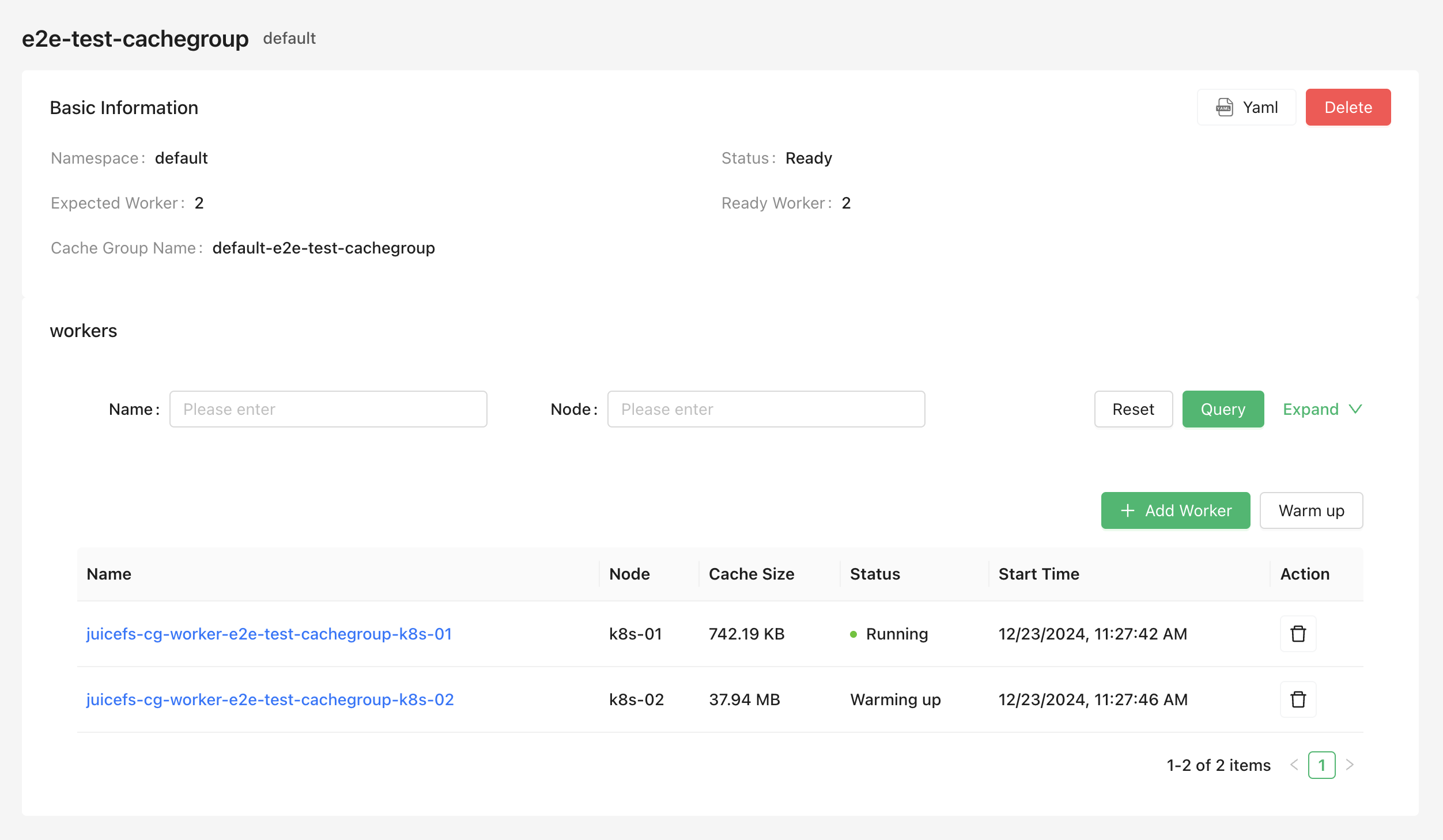
Cache group
Enterprise users can use the Cache Group Operator to create and manage distributed cache clusters. Compared to other deployment methods, the Cache Group Operator is more convenient to use (supporting both GUI and CLI) and also supports advanced features such as different node configurations, smooth scaling, and automatic cache cleaning.
Create a cache group
Refer to the following example to save the cache group configuration as a YAML file (for example, juicefs-cache-group.yaml). This example deploys a distributed cache on all nodes with the juicefs.io/cg-worker: "true" label (you can set any label you like). For more configuration options, refer to the Cache group configurations section.
apiVersion: v1
kind: Secret
metadata:
  name: juicefs-secret
  namespace: juicefs-cache-group
type: Opaque
stringData:
  name: juicefs-xx
  token: xx
  access-key: xx
  secret-key: xx
  # envs: '{"BASE_URL": "http://<IP or HOST>/static"}'
---
apiVersion: juicefs.io/v1
kind: CacheGroup
metadata:
  name: cachegroup-sample
  namespace: juicefs-cache-group
spec:
  secretRef:
    name: juicefs-secret
  cacheGroup: juicefs-cache-group-cachegroup-sample # Custom cache group name, default is `${NAMESPACE}-${NAME}`
  worker:
    template:
      nodeSelector:
        juicefs.io/cg-worker: "true"
      image: juicedata/mount:ee-5.1.1-1faf43b
      opts:
        - cache-size=204800
        - free-space-ratio=0.01
        - group-weight=100
      cacheDirs:
        - type: HostPath
          path: /mnt/cache
      resources:
        requests:
          cpu: 100m
          memory: 128Mi
        limits:
          cpu: 1
          memory: 1Gi
Then create the cache group using the kubectl apply command:
kubectl apply -f juicefs-cache-group.yaml
If the Kubernetes nodes do not have the juicefs.io/cg-worker: "true" label, add this label:
kubectl label node node1 juicefs.io/cg-worker=true
Check cache group status
Use the following command to check the cache group status and confirm that the cache group is in the "Ready" state:
kubectl get cachegroups -n juicefs-cache-group
NAME                CACHE GROUP                              PHASE   BACK UP   WAITING DELETED   READY   AGE
cachegroup-sample   juicefs-cache-group-cachegroup-sample   Ready   <none>    <none>            1/1     10s
Use the cache group
After completing the above steps, a JuiceFS distributed cache cluster has been started in Kubernetes, with the cache group name juicefs-cache-group-cachegroup-sample. To allow the JuiceFS client of the application to use this cache cluster, the JuiceFS client needs to join this cache group and add the --no-sharing mount option. This way, the JuiceFS client of the application joins the cache group but does not participate in cache data construction, avoiding cache data instability caused by frequent client creation and destruction.
For dynamic configuration, modify the mount options as shown below. For more information on how to adjust mount configurations, see Mount options.
apiVersion: storage.k8s.io/v1
kind: StorageClass
metadata:
  name: juicefs-sc
mountOptions:
  - cache-group=juicefs-cache-group-cachegroup-sample
  - no-sharing
Add and delete cache nodes
The Cache Group Operator supports smooth scaling of cache nodes, ensuring that adjustments do not significantly impact cache hit rates.
In the Create a cache group example, Kubernetes nodes must have the juicefs.io/cg-worker: "true" label. Therefore, adding or deleting cache nodes involves adding or removing this label from Kubernetes nodes. For example, use the kubectl command to add or delete nodes:
# Add nodes
kubectl label node node1 juicefs.io/cg-worker=true
kubectl label node node2 juicefs.io/cg-worker=true

# Delete nodes
kubectl label node node1 juicefs.io/cg-worker-
When nodes change, the Cache Group Operator will smoothly add or delete nodes. The specific logic is as follows:
-
When adding nodes, the Cache Group Operator automatically creates new Worker Pods and adds the
group-backupmount option. If the new Worker Pod receives an application request and finds a cache miss, it forwards the request to other cache nodes to ensure cache hits. By default, thegroup-backupmount option will be removed after 10 minutes, which can be controlled by thespec.backupDurationfield:apiVersion: juicefs.io/v1
kind: CacheGroup
metadata:
name: cachegroup-sample
namespace: juicefs-cache-group
spec:
backupDuration: 10m -
When removing nodes, the Cache Group Operator first attempts to migrate the cache data on the node to other nodes before deleting the node. The maximum waiting time is 1 hour by default, which can be controlled by the
spec.waitingDeletedMaxDurationfield:apiVersion: juicefs.io/v1
kind: CacheGroup
metadata:
name: cachegroup-sample
namespace: juicefs-cache-group
spec:
waitingDeletedMaxDuration: 1h
Cache group configurations
All supported cache group configurations can be found in the complete example.
Specify Worker Replicas Added in v0.6.0
You can specify the number of worker replicas in the cache group by setting the spec.replicas field:
- The worker management mode cannot be changed:
replicasmust be set when aCacheGroupis created. It cannot be added later to an existingCacheGroupthat does not have this field, nor can it be removed once set. However, you can change its value to scale the number of Workers. - When using this method, ensure that Pod IPs are fixed and the cache disk can follow Pod migration to other nodes, otherwise it may lead to cache penetration.
- The
worker.overwritefield will not be applicable in this mode, meaning different nodes cannot have different configurations.
apiVersion: juicefs.io/v1
kind: CacheGroup
metadata:
  name: cachegroup-sample
  namespace: juicefs-cache-group
spec:
  replicas: 3    # Specify to create 3 worker replicas
  worker:
    template:
      nodeSelector:
        juicefs.io/cg-worker: "true"
      image: juicedata/mount:ee-5.1.1-1faf43b
      opts:
        - cache-size=204800
        - free-space-ratio=0.01
        - group-weight=100
      cacheDirs:
        - type: VolumeClaimTemplates
          volumeClaimTemplate:
            metadata:
              name: jfs-cache
            spec:
              accessModes:
              - ReadWriteOnce
              resources:
                requests:
                  storage: 20Gi
              storageClassName: <your-storage-class-name>
This way, you can precisely control the number of workers in the cache group instead of relying on the number of node labels.
Affinity and anti-affinity Added in v0.7.2
By default, the Cache Group Operator deploys workers on all nodes that match the nodeSelector without following Node and Pod affinity and anti-affinity rules.
Starting from version v0.7.2, the Cache Group Operator supports enabling scheduling functionality through the spec.enableScheduling field.
For example, to deploy cache groups in different zones.
Only process the requiredDuringSchedulingIgnoredDuringExecution rule.
apiVersion: juicefs.io/v1
kind: CacheGroup
metadata:
  name: cachegroup-sample
  namespace: juicefs-cache-group
spec:
  secretRef:
    name: cachegroup-sample-secret
  enableScheduling: true
  worker:
    template:
      affinity:
        podAntiAffinity:
          requiredDuringSchedulingIgnoredDuringExecution:
            - labelSelector:
                matchExpressions:
                  - key: juicefs.io/cache-group
                    operator: In
                    values:
                      - cachegroup-sample
              topologyKey: "topology.kubernetes.io/zone"
Update strategy
When updating the cache group configuration, you can specify the update strategy for the worker nodes under the cache group using the spec.updateStrategy field.
Currently supported strategies are:
RollingUpdate(default): This is the default update strategy. When using theRollingUpdatestrategy, after updating the cache group template, the old Worker Pods will be terminated, and new Worker Pods will be automatically created. The number of updates at a time follows thespec.updateStrategy.rollingUpdate.maxUnavailableconfiguration, which defaults to 1.OnDelete: When using theOnDeletestrategy, after updating the cache group template, new Worker Pods will only be created when you manually delete the old Worker Pods.
apiVersion: juicefs.io/v1
kind: CacheGroup
metadata:
  name: cachegroup-sample
  namespace: juicefs-cache-group
spec:
  updateStrategy:
    type: RollingUpdate
    rollingUpdate:
      maxUnavailable: 1
Cache directory
The cache directory can be set using the spec.worker.template.cacheDirs field. Supported types are HostPath, PVC and VolumeClaimTemplates Added in v0.6.0.
apiVersion: juicefs.io/v1
kind: CacheGroup
metadata:
  name: cachegroup-sample
  namespace: juicefs-cache-group
spec:
  worker:
    template:
      nodeSelector:
        juicefs.io/cg-worker: "true"
      image: juicedata/mount:ee-5.1.1-1faf43b
      cacheDirs:
        - type: HostPath
          path: /var/jfsCache-0
        - type: PVC
          name: juicefs-cache-pvc
        # v0.6.0 and above support VolumeClaimTemplates
        - type: VolumeClaimTemplates
          volumeClaimTemplate:
            metadata:
              name: jfs-cache
            spec:
              accessModes:
              - ReadWriteOnce
              resources:
                requests:
                  storage: 20Gi
              storageClassName: <your-storage-class-name>
Use a block device as a cache disk Added in v0.9.0
Cache directories of the PVC and VolumeClaimTemplates types can use Kubernetes raw block volumes. The StorageClass and its CSI Driver must support raw block volumes. HostPath only supports directories and cannot be used in this mode.
When referencing an existing PVC, both spec.volumeMode in the PVC and cacheDirs[].volumeMode must be set to Block.
spec:
  worker:
    template:
      cacheDirs:
        - type: PVC
          name: block-cache-pvc
          volumeMode: Block
          format: true
When using VolumeClaimTemplates to dynamically create a block volume, set volumeMode: Block in the PVC template:
spec:
  worker:
    template:
      cacheDirs:
        - type: VolumeClaimTemplates
          format: true
          volumeClaimTemplate:
            metadata:
              name: block-cache
            spec:
              volumeMode: Block
              accessModes:
                - ReadWriteOnce
              resources:
                requests:
                  storage: 20Gi
              storageClassName: <your-storage-class-name>
For multiple workers, use VolumeClaimTemplates to create a separate PVC for each worker, or use worker.overwrite to assign a different PVC to each node.
format is only valid for block volumes and defaults to false. If the block device does not contain a recognizable file system, the worker exits without modifying the device by default. When set to true, if the Operator does not detect a recognizable file system or other signatures, it formats the device as ext4. Signature detection cannot prove that a device is empty, so unrecognized data may still be erased. Enable this option only for a dedicated cache disk that you have confirmed can be erased.
Specify different configurations for different nodes
Cache nodes may have heterogeneous configurations (for example, different cache disk sizes). In this case, you can specify different configurations for different nodes using the spec.worker.overwrite field:
apiVersion: juicefs.io/v1
kind: CacheGroup
metadata:
  name: cachegroup-sample
  namespace: juicefs-cache-group
spec:
  worker:
    template:
      nodeSelector:
        juicefs.io/cg-worker: "true"
      image: juicedata/mount:ee-5.1.1-1faf43b
      hostNetwork: true
      cacheDirs:
        - path: /var/jfsCache-0
          type: HostPath
      opts:
        - group-weight=100
    overwrite:
      - nodes:
          - k8s-03
        # You can also use nodeSelector
        # nodeSelector:
        #   kubernetes.io/hostname: k8s-02
        opts:
          - group-weight=50
        cacheDirs:
        - path: /var/jfsCache-1
          type: HostPath
        - path: /var/jfsCache-2
          type: HostPath
Mount options
Mount options can be set using the spec.worker.template.opts field. Refer to the documentation for all mount options.
apiVersion: juicefs.io/v1
kind: CacheGroup
metadata:
  name: cachegroup-sample
  namespace: juicefs-cache-group
spec:
  worker:
    template:
      nodeSelector:
        juicefs.io/cg-worker: "true"
      image: juicedata/mount:ee-5.1.1-1faf43b
      opts:
        - group-weight=100
Cache group name
The Cache Group Operator generates default cache group names in the
${NAMESPACE}-${NAME} format. If you want to customize the cache group name, you can set it using the spec.cacheGroup field:
apiVersion: juicefs.io/v1
kind: CacheGroup
metadata:
  name: cachegroup-sample
  namespace: juicefs-cache-group
spec:
  cacheGroup: jfscachegroup
Clean cache when deleting a node
When deleting a node, you can specify whether to clean the cache using the spec.cleanCache field:
apiVersion: juicefs.io/v1
kind: CacheGroup
metadata:
  name: cachegroup-sample
  namespace: juicefs-cache-group
spec:
  cleanCache: true
Delete a cache group
Use the following command to delete the cache group. All worker nodes under the cache cluster will be deleted:
kubectl delete cachegroup cachegroup-sample -n juicefs-cache-group
Warmup Cache Group
Operator supports creating a WarmUp CR to warmup the cache group.
apiVersion: juicefs.io/v1
kind: WarmUp
metadata:
  name: warmup-sample
  namespace: juicefs-cache-group
spec:
  cacheGroupName: cachegroup-sample
  # If targetsFrom is not configured, the entire file system is warmed up by default
  targetsFrom:
    files:
      - /a
      - /b
      - /c
  # Options for the juicefs warmup command; do not include the leading "--"
  # See https://juicefs.com/docs/cloud/reference/command_reference/#warmup
  options:
    - threads=50
spec.targetsFrom supports the following three ways of providing a file list. Only one is used at a time:
files: List paths directly in theWarmUpresource.configMap: Specify thenameandkeyof the ConfigMap entry that contains the file list.filePath: Specify the path to an existing file list in the JuiceFS file system.
The legacy spec.targets field is deprecated. Use spec.targetsFrom.files instead.
To run cache warmup periodically, set the policy to Cron:
spec:
  policy:
    type: Cron
    cron:
      schedule: "*/5 * * * *"
      suspend: false
Warm up an external cache group Added in v0.8.1
If the distributed cache group is not managed by a CacheGroup resource, specify the JuiceFS authentication Secret through spec.secretRef and explicitly set spec.image. The WarmUp resource and Secret must be in the same namespace. In this case, set cacheGroupName directly to the name of the distributed cache group to join.
apiVersion: juicefs.io/v1
kind: WarmUp
metadata:
  name: warmup-external
  namespace: juicefs-cache-group
spec:
  cacheGroupName: existing-cache-group
  secretRef:
    name: juicefs-secret
  image: juicedata/mount:ee-5.3.6-c8ec652
  mountOptions:
    - no-update
  options:
    - threads=50
  targetsFrom:
    files:
      - /dataset
If the image is hosted in a private registry, configure pull credentials through spec.imagePullSecrets. Any additional Secrets declared through configs in the authentication Secret are also mounted into the WarmUp job.
Sync
Operator supports quickly creating a distributed Sync task.
For example, to sync data from OSS to JuiceFS, you can refer to the following example:
apiVersion: juicefs.io/v1
kind: Sync
metadata:
  name: sync-test
  namespace: default
spec:
  # Expected number of workers, default is 1
  # meaning single-node synchronization
  replicas: 3
  options:
    - debug
    - threads=10
  image: registry.cn-hangzhou.aliyuncs.com/juicedata/mount:ee-5.1.9-d809773
  from:
    external:
      uri: oss://sync-test.oss-cn-hangzhou.aliyuncs.com/sync-src-test/
      # Two ways to provide the credentials, choose either value or valueFrom
      accessKey:
        value: accessKey
      secretKey:
        valueFrom:
          secretKeyRef:
            name: sync-test-secret
            key: secretKey
  to:
    juicefs:
      path: /sync-test/demo2/
      token:
        valueFrom:
          secretKeyRef:
            name: sync-test-secret
            key: token
      volumeName: sync-test
For each of from and to, choose one endpoint type from external, juicefs, or juicefsCE. The source and destination URIs must either both end with / or both omit the trailing /.
Starting from version v0.5.0, data synchronization for community edition JuiceFS is supported:
Currently, synchronization between community edition and enterprise edition is not supported.
apiVersion: juicefs.io/v1
kind: Sync
metadata:
  name: sync-ce-test
  namespace: default
spec:
  replicas: 3
  image: juicedata/mount:ce-v1.4.0
  from:
    external:
      uri: oss://sync-test.oss-cn-hangzhou.aliyuncs.com/sync-src-test/
      # Two ways to provide the credentials, choose either value or valueFrom
      accessKey:
        value: accessKey
      secretKey:
        valueFrom:
          secretKeyRef:
            name: sync-test-secret
            key: secretKey
  to:
    juicefsCE:
      metaURL: redis://127.0.0.1/1
      path: /sync_test/
Specify source files and mount additional volumes
Set filesFrom on the source endpoint to synchronize only the specified paths. As with WarmUp, this field supports files, configMap, and filePath as file-list sources, but it cannot be configured on the destination endpoint. When JuiceFS Enterprise Edition is used as the source endpoint, filesFrom requires client image version 5.1.10 or later. When JuiceFS Community Edition is used as the source endpoint, it requires version 1.3.0 or later.
spec:
  from:
    external:
      uri: oss://sync-test.oss-cn-hangzhou.aliyuncs.com/sync-src-test/
      filesFrom:
        files:
          - images/
          - videos/example.mp4
Each endpoint also supports mounting a ConfigMap, Secret, HostPath, or PVC into the sync Pods through extraVolumes. This can be used to provide configuration files or access a local file:// endpoint.
Configure sync Pods
Use resources to configure resources for both manager and worker Pods. Starting from v0.8.0, you can use managerResources and workerResources to configure the two types of Pods separately. If these fields are set together with resources, managerResources and workerResources override the corresponding resource configuration for their respective Pods.
Use env to inject environment variables into both manager and worker containers. Added in v0.8.3
spec:
  managerResources:
    requests:
      cpu: 1
      memory: 1Gi
  workerResources:
    requests:
      cpu: 2
      memory: 2Gi
  env:
    - name: HTTP_PROXY
      value: http://proxy.example.com:8080
For more supported options, refer to the example.
Use Kerberos to access HDFS Added in v0.8.0
When an external endpoint URI uses the hdfs:// scheme, you can set krb5Principal and provide a keytab using either krb5Keytab or krb5KeytabBase64. Each field supports either value or valueFrom. The two keytab fields cannot be used together. The Operator also does not support HDFS-to-HDFS synchronization.
spec:
  from:
    external:
      uri: hdfs://namenode.example.com:8020/source/
      krb5Principal:
        value: [email protected]
      krb5KeytabBase64:
        valueFrom:
          secretKeyRef:
            name: hdfs-credentials
            key: keytab-base64
Sync Progress
You can view the sync progress using the following command:
➜  kubectl get sync -w
NAME         PHASE         REPLICAS   PROGRESS   AGE
sync-test    Preparing     3                    12s
sync-test    Progressing   3                    19s
sync-test    Progressing   3          7.40%     26s
sync-test    Progressing   3          45.50%    38s
sync-test    Completed     3          100%      50s
Sync Cleanup
Delete the corresponding CRD to clean up all resources, or set automatic cleanup after the task is completed by setting spec.ttlSecondsAfterFinished.
Scheduled Data Synchronization
Operator supports creating a CronSync resource for scheduled data synchronization.
apiVersion: juicefs.io/v1
kind: CronSync
metadata:
  name: cron-sync-test
  namespace: default
spec:
  # Suspend jobs
  # Will not affect jobs that have already started
  suspend: false
  # The number of successful jobs to keep, default is 3
  successfulJobsHistoryLimit: 3
  # The number of failed jobs to keep, default is 1
  failedJobsHistoryLimit: 1
  # Concurrency policy, default is Allow
  # - Allow: Allow concurrent runs of jobs
  # - Forbid: Forbid concurrent runs, skip the new job if previous is still running
  # - Replace: Replace the currently running job with a new one
  concurrencyPolicy: Allow
  # ref https://wikipedia.org/wiki/Cron
  schedule: "*/5 * * * *"
  syncTemplate:
    spec:
      replicas: 2
      from:
        ...
      to:
        ...