Distributed Cache RDMA Acceleration
JuiceFS Enterprise Edition 5.3 introduces support for Remote Direct Memory Access (RDMA). It is applied specifically to the data transfer path within the distributed cache — that is, between clients and cache nodes.
What is JuiceFS RDMA?
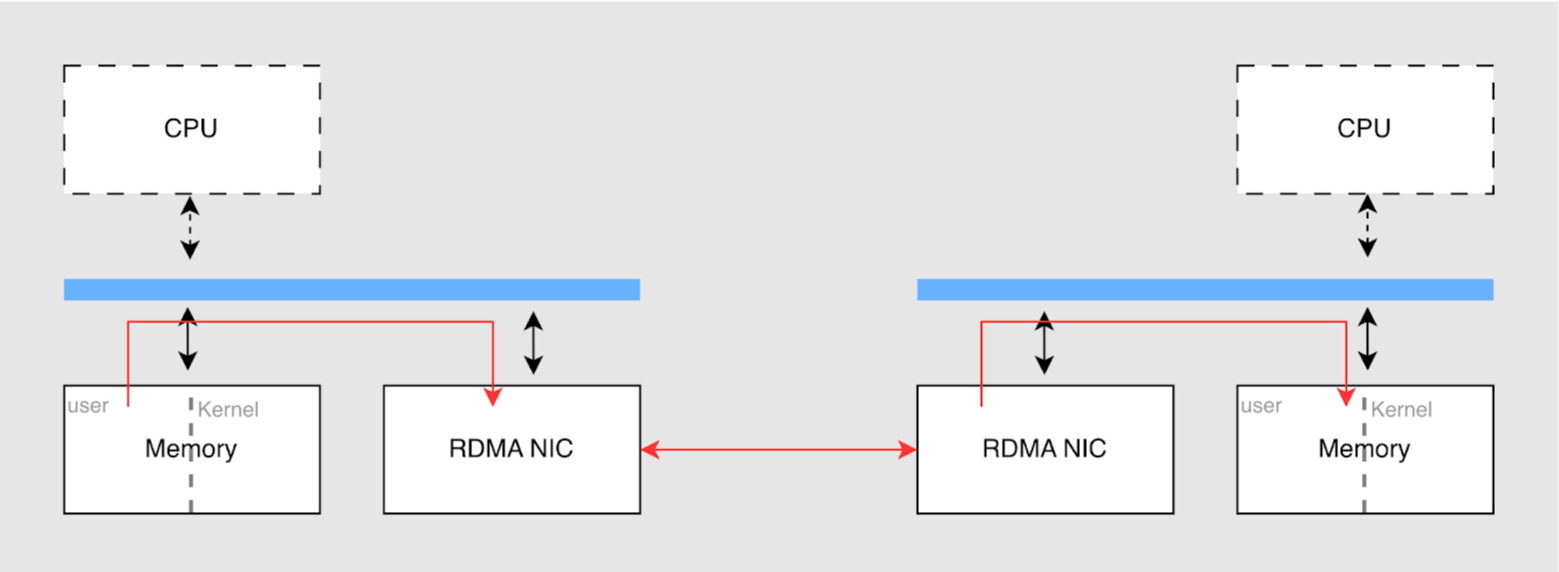
Traditional TCP networking routes data through the operating system's network protocol stack, incurring multiple CPU interrupts, context switches, and memory copies between user-space and kernel-space buffers. RDMA allows two nodes on a network to directly read and write each other's memory, with the entire process handled by the NIC hardware. The NIC reads and writes user-space buffers directly (achieving "zero-copy"), almost entirely bypassing the operating system kernel and CPU intervention. This effectively creates a "hardware-level dedicated expressway" for cache data retrieval.
Communication between clients and the metadata service primarily involves control messages. These messages have small data volumes, and existing TCP networking is fully sufficient for them. Therefore, RDMA optimization focuses specifically on the distributed cache layer, where large file data is transferred.
Core advantages and performance improvements
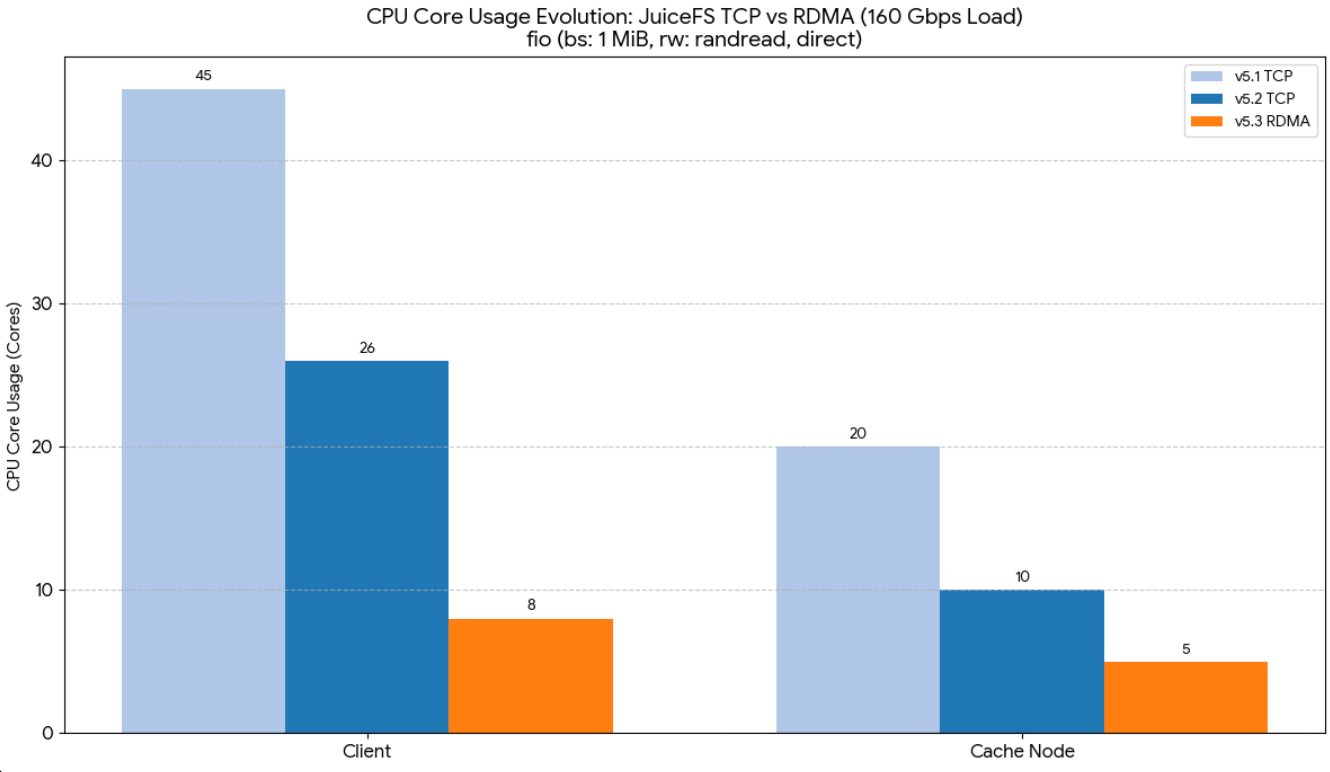
Based on the latest benchmark data, RDMA brings significant performance and resource utilization improvements to JuiceFS:
- Breaking bandwidth bottlenecks (higher throughput): At extremely high bandwidth levels, traditional TCP often struggles to fully utilize hardware capabilities (for example, typically only 85%–90% bandwidth utilization with 200 Gbps NICs). RDMA more fully harnesses the bandwidth ceiling of 100 Gbps, 200 Gbps, or even 400 Gbps high-performance NICs.
- Freeing up compute resources (reduced CPU usage): Because the NIC handles data copying independently, CPU load is dramatically reduced. In a 1 MB random read test on a 160 Gbps network, where network transfer bandwidth reached 20 GiB/s (approaching the 160 Gbps physical limit), RDMA reduced overall CPU utilization from nearly 50% to about one-third (client CPU down to 8 cores, cache node down to 5 cores).
- Ultra-fast response times (lower latency): By bypassing kernel protocol stack processing, data transfer time between nodes is substantially reduced.
Recommended use cases
This feature is currently in beta. It is highly recommended to try enabling it if the following conditions are met:
- Extremely high bandwidth requirements: Your network environment exceeds 100 Gbps, and traditional TCP has become a transfer bottleneck.
- Tight compute resources: You want to significantly reduce the CPU consumption of storage I/O on host machines, freeing up compute power for core application workloads (such as AI training and large model inference).
Environment and hardware requirements
To successfully enable this feature, the underlying network and hardware environment must meet the following conditions:
- Homogeneous hardware network: To use RDMA, both the client (JuiceFS mount point) and the server (distributed cache node) hosts must have RDMA-capable NICs. Both communication endpoints must be in a homogeneous hardware network environment (for example, both using RoCE, InfiniBand, or eRDMA NICs). If the hardware protocols are inconsistent (for example, one end uses RoCE and the other uses InfiniBand), the physical NICs cannot directly interpret each other's data format. This prevents an RDMA communication channel from being established.
- IP protocol configuration: RDMA itself does not require IP, but the cache group and metadata services still rely on IP to identify and manage nodes. Therefore, RDMA-capable NICs must still be configured with IPv4 addresses (for example, IPoIB for InfiniBand NICs).
- Network connectivity: The distributed cache client and server NICs must be able to communicate with each other.
Multi-NIC concurrent architecture and communication mechanism
If a host is equipped with multiple RDMA NICs and you want to use them simultaneously to aggregate bandwidth, you must pay special attention to the underlying network architecture and the application-layer distribution mechanism:
- Routing isolation and NIC bonding (network layer prerequisites): Due to the operating system's default routing mechanism (where only one of multiple NICs in the same subnet is typically used to send data), the system uses only one NIC to establish connections by default. To enable true parallel transmission across multiple NICs, you must use
one of the following network architectures:
- Subnet isolation: Configure each pair of NICs in different IP subnets. This forces independent parallel data flows across different physical links at the operating system level, without interference.
- NIC bonding (recommended): Bond multiple NICs at the system level. This exposes only a single logical NIC to the operating system, while traffic distribution, parallel transmission, and high-availability failover are handled automatically by the NIC hardware and switch (for example, via LACP), simplifying operations.
- Multi-connection parallelism and pseudo-random distribution (application-layer mechanism): When the network layer is properly configured, and multiple independent NICs are explicitly specified at the software level, JuiceFS' underlying communication mechanism uses a multi-connection parallelism with pseudo-random distribution strategy rather than strict round-robin.
- The client establishes a dedicated connection channel for each specified NIC address.
- When the application layer initiates multiple concurrent requests, the system randomly assigns requests to idle channels that are waiting.
- This mechanism effectively balances overall load across multiple physical NICs. However, note that a single request is always assigned to only one connection (that is, one NIC). The system never splits a single request across multiple NICs for simultaneous transmission.
Core parameter configuration guide
- Enable RDMA transport (
--rdma-network): To use RDMA, specify--rdma-networkon every node (for example,--rdma-network eth1:eth2). This parameter tells JuiceFS which NICs to use for RDMA communication. It is required for both cache server nodes and pure client nodes (--no-sharing) to establish RDMA connections. If not set, the node falls back to TCP. RDMA ports are randomly assigned and cannot be explicitly configured. - IORPC cache access mode (
--iorpc-mode=dio): Controls how the IORPC server reads cache data from disk. Supported values:dio(Direct I/O, default),pagecache(buffered read),splice(zero-copy. Uses the kernel pipe to transfer data directly between disk and network, without user-space copying. Requires a system pipe max size of at least 8 MiB. Automatically falls back todiowhen RDMA is enabled. Check the current value withsysctl fs.pipe-max-size),disable(disable the IORPC server on this node). - Differentiating TCP and RDMA networks (
--group-network):--group-networkcontrols traditional TCP network communication.--rdma-networkcontrols RDMA data transmission. The two can point to the same NIC or be completely separated. For example, you can let control commands use a Gigabit management network, while massive cache data goes through a dedicated 100+ Gbps high-speed RDMA network.
RDMA vs. TCP comparison
| Feature | RDMA mode | TCP mode |
|---|---|---|
| How to enable | --rdma-network eth1 | Default (no additional parameters) |
| Direct I/O for cache reads | Enabled by default (--iorpc-mode=dio) | Requires --cache-try-dio |
| IORPC protocol | Automatically enabled | Requires --use-iorpc |
| NIC specification | --rdma-network (data) + --group-network (control) | --group-network or --group-ip |
| Hardware requirement | RDMA-capable NICs | None |
| Port assignment | RDMA ports auto-assigned (random) | Use --group-port (random by default) |
IORPC is the underlying communication protocol for distributed cache. When you set --rdma-network, IORPC is automatically enabled and uses RDMA transport. You do not need to set --use-iorpc separately. The --use-iorpc flag is only useful when you want IORPC over TCP without RDMA hardware.
Deployment and usage notes
- Use dedicated components: RDMA depends on a specific underlying environment, so you must use a specially packaged binary (for example,
mount.rdma) to start the service. - Mixed RDMA and TCP network support: When you set
--rdma-network, the distributed cache server automatically listens on both RDMA and TCP ports. This means the server fully supports a mixed architecture: clients with RDMA hardware can connect via RDMA, while other clients continue to connect over TCP. They do not interfere with each other. - Network anomaly degradation and automatic failover Added in v5.3.9
- At startup: If
--rdma-networkis not specified, the system automatically falls back to TCP. However, if--rdma-networkis specified but initialization fails (for example, the NIC does not exist or memory allocation fails), the client terminates immediately without falling back to TCP. Verify that the specified NICs are correct and the RDMA driver is installed. - At runtime: RDMA connections now support automatic failover to TCP and failback to RDMA. If an RDMA connection fails during operation, the system automatically falls back to TCP for subsequent data transfers and retries RDMA after a configurable interval. The retry interval is controlled by the
IORPC_RDMA_RETRY_DURATIONenvironment variable (5mby default, which means 5 minutes). Common values include30s,10m, and1h. This means transient RDMA network issues no longer require manual remounting to restore RDMA communication.
- At startup: If
- Pre-connectivity verification: Before deploying to production, verify the RDMA NIC status and connectivity:
-
Check NIC status:
rdma link(expected output:state ACTIVE physical_state LINK_UP) -
Test RDMA connectivity:
# Server
rping -s -a <Server_IP> -C 10

# Client
rping -c -a <Server_IP> -C 10
Success indicators:
- Server:
rdma_bind_addr successful / rdma_listen successful - Client:
rdma_resolve_addr successful / rdma_resolve_route successful
- Server:
-
Complete mount examples
# Cache server node
juicefs mount $VOLUME_NAME /jfs-cache --cache-group=cg --rdma-network=ib0:ib2 \
  --cache-dir=/data/cache* --cache-size=-1 --buffer-size=8192 --max-downloads=800

# Pure client node
juicefs mount $VOLUME_NAME /jfs --cache-group=cg --no-sharing \
  --rdma-network=ib0:ib1 --max-write=1M --cache-size=0 --max-downloads=600 --buffer-size=8192
Reference test method
Mount parameters
The following mount parameter is recommended for the client (the end handling FUSE requests):
--max-write=1M: This increases the I/O size of a single FUSE request. The default I/O size is 128 KiB. Increasing the I/O size reduces the number and overhead of system calls.
Test command
fio --name=rdma_read_test --directory=/jfs --rw=read --ioengine=libaio --bs=1M --size=1G --direct --thread --group_report --time_based --runtime=300 --numjobs=128 --iodepth=1
```Expand commentComment on line R134Resolved

- `--direct`: Bypasses the kernel page cache, ensuring results reflect RDMA network throughput rather than cache performance.
- `--ioengine=libaio`: Linux native async I/O engine — required with `--direct` to fully utilize RDMA's high bandwidth.
- `--bs=1M`: Uses a large block size to reduce FUSE call overhead, making RDMA transport the bottleneck.
- `--numjobs`: Controls concurrency and should be calibrated to your CPU core count and RDMA bandwidth. Start from the number of CPU cores and increase gradually — once throughput stops growing, the optimal concurrency is reached. Too many jobs shifts the bottleneck to the CPU.
- `--iodepth`: Defaults to 1, meaning each job keeps at most one in-flight I/O request. With RDMA, low `iodepth` is sufficient to achieve high throughput; with TCP, a higher `iodepth` is typically needed to saturate the bandwidth. Adjust to compare throughput differences between the two modes.

### Performance reference \{#performance-reference}

In a test environment with 2×400 Gbps InfiniBand, 128 CPU cores, and local NVMe cache disks, RDMA mode achieved about 60 GB/s throughput per client. That is more than double the 25 GB/s throughput of TCP mode. In a cluster of 3 cache nodes (which can theoretically provide about 300 GB/s total throughput), a stress test with 6 clients reached 288 GB/s aggregate throughput. That is 96% utilization. Actual performance depends on hardware configuration, such as NIC bandwidth, CPU core count, and cache disk speed.

### Monitoring RDMA metrics <VersionAdd>5.3.9</VersionAdd> \{#monitoring-rdma-metrics}

:::note
From 5.3.9 onward, both the mount processes that use RDMA and the client that runs `juicefs stats` must be at version 5.3.9 or later to be available. The mount processes produce the metric data, while the `stats` command parses and displays it. Neither works alone.
:::

Use `juicefs stats` with the `e` schema character to monitor RDMA-specific metrics in real time:

```shell
juicefs stats -l 1 --schema=ufmcreo /jfs
The rdma section in the output measures only RDMA traffic. You can compare it with the remotecache section (which includes both TCP and RDMA) to assess the RDMA coverage ratio:
write: Bytes sent to the requesting peer (bytes/sec). This is for a server sending cache data.read: Bytes pulled from the requesting peer (bytes/sec). This is request metadata and is typically small.w_ops/lat: Number of RDMA write operations per second and average latency in milliseconds.recv: Bytes received from the serving peer (bytes/sec). This is for a client receiving cache data.
write and recv measure the same data flow from opposite sides. The data one node sends as write is what the other node receives as recv.
See juicefs stats for all available schema characters and metrics.
Troubleshooting
| Symptom | Check |
|---|---|
Client log shows iorpc client started but no transport:RDMA. | The server is not using RDMA. Verify rdma link and confirm the mount.rdma binary is being used. |
Client shows get iorpc address from <ip> failed: rpc disabled. | Server version is older than 5.3 and does not support RDMA. |
Client loops with Cannot establish rpc connection. | Physical RDMA connectivity failed. Use rping to verify, or check --rdma-network configuration. |
| I/O latency spikes above 100 seconds. | The cache network may be misconfigured. Verify --group-network and --rdma-network settings. |