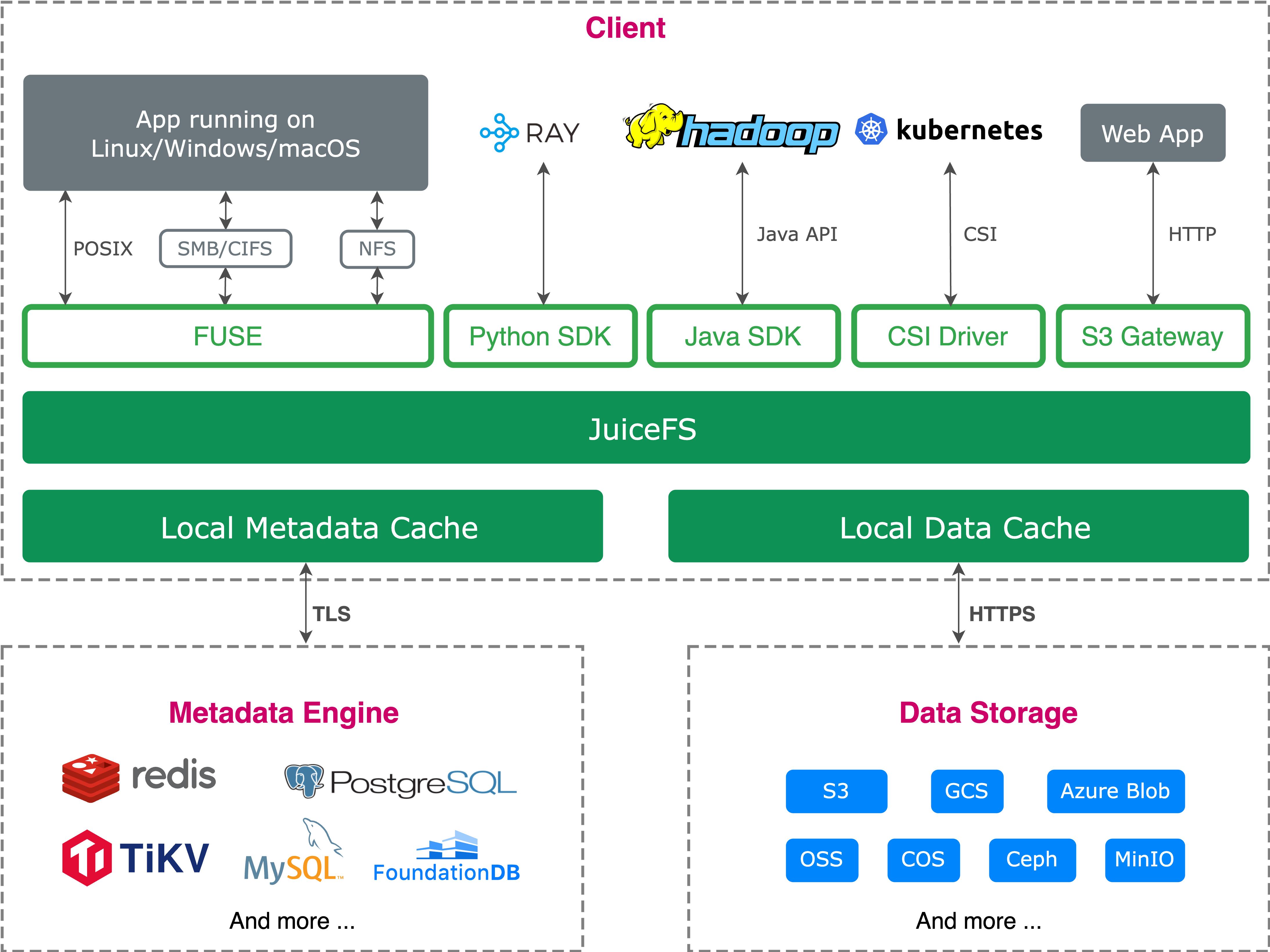
Different applications access data in different ways: some rely on POSIX file interfaces, some are built on the S3 API, and some users want to browse and edit remote files through a file manager. JuiceFS' multi-protocol access capability is designed precisely to let these tools access the same file system.
In this article, we'll explain the shared initialization path of S3 Gateway and WebDAV, describe their applicable scenarios and common mappings, and dive into their implementation principles and boundaries.
A shared initialization path
JuiceFS consists of a metadata engine and object storage:
- The metadata engine manages directories, attributes, locks, and sessions.
- Object storage stores the actual file data blocks.
From an implementation perspective, S3 Gateway and WebDAV first go through the same service initialization path. The service process creates a JuiceFS client based on the metadata address, listen address, and common parameters such as subdir, read-only, cache, limits, access-log, and metrics. Then, it initializes the metadata client, object storage, data block cache, and VFS configuration in sequence, ultimately obtaining an fs.FileSystem.
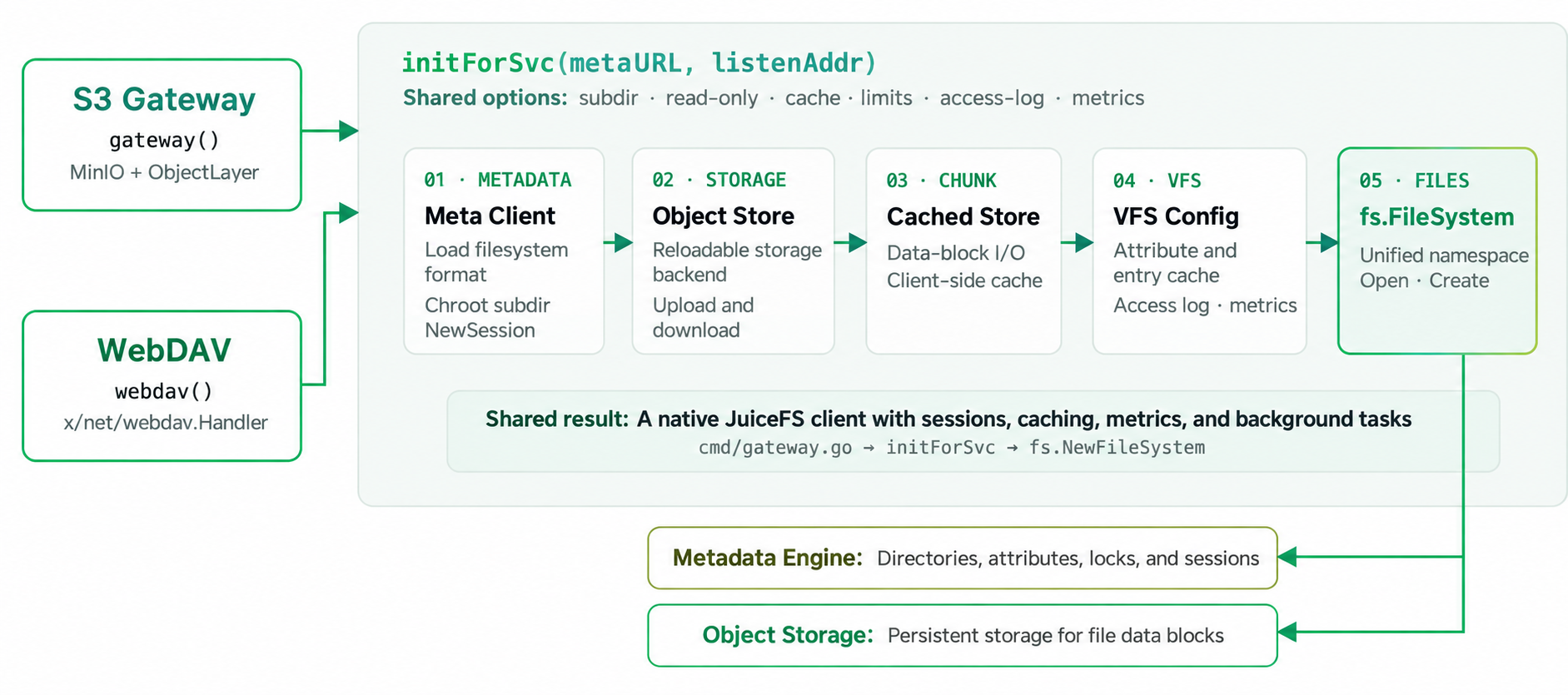
In other words, the common foundation of the two is not a FUSE mount point, but a native JuiceFS client with sessions, caching, metrics, and background tasks. Before S3 requests and WebDAV requests enter their respective protocol adaptation layers, they already share the same JuiceFS file system and the same file system namespace.
Applicable scenarios and common mappings
The shared initialization path explains how the two connect to the same file system. In actual use, what matters more is choosing the access method: which scenarios are suitable for S3 Gateway, which are suitable for WebDAV, and how common requests map to JuiceFS operations.
- Linux applications, training jobs, or workloads requiring full file system semantics should prefer FUSE/CSI.
- Applications already built on the S3 SDK, AWS CLI, MinIO Client, or object storage toolchains should prefer S3 Gateway.
- Desktop file manager access, DAV/rclone synchronization, Office/apps collaboration, and simple sharing should prefer WebDAV.
Mapping of common S3 Gateway APIs to JuiceFS file system operations:
| S3 API | Purpose | Equivalent file system operation |
|---|---|---|
| GetObject | Download an object | open/read |
| PutObject | Upload or overwrite an object | create/write/rename |
| HeadObject | Query object metadata | stat/getxattr |
| DeleteObject(s) | Delete one or more objects | unlink/remove |
| ListObjects V1/V2 | List objects by prefix | readdir+filter |
| CopyObject | Copy an object server-side | copy/read+write |
| MakeBucket | Create a bucket | mkdir |
| DeleteBucket | Delete an empty bucket | rmdir |
| NewMultipartUpload | Create a multipart upload session | create |
| PutObjectPart | Write a part | write |
| CompleteMultipart | Merge and commit the object | copy + atomic rename |
| Tags/Metadata | Read/write tags and metadata | get/setxattr |
Mapping of common WebDAV methods to JuiceFS file system operations:
| HTTP method | Purpose | Equivalent file system operation |
|---|---|---|
| GET | Download a file | read |
| PUT | Upload or overwrite a file | write/create |
| DELETE | Delete a file or directory | remove |
| MKCOL | Create a directory | mkdir |
| PROPFIND | Query properties or list a directory | stat/readdir |
| PROPPATCH | Modify custom properties | setxattr |
| COPY | Copy a file or directory | cp |
| MOVE | Move or rename | mv/rename |
| LOCK | Lock resources | File lock |
| UNLOCK | Unlock resources | Release a file lock |
| OPTIONS | Query server capabilities | Capability negotiation |
| HEAD | Query HTTP metadata only | Lightweight stat |
S3 Gateway principles: from object semantics to file system operations
S3 Gateway converts S3 protocol requests into JuiceFS file system operations. This section covers four aspects:
- The request path
- Internal state
- Key semantic conversions
- Permission coordination
Request path: from the MinIO S3 server to jfsObjects
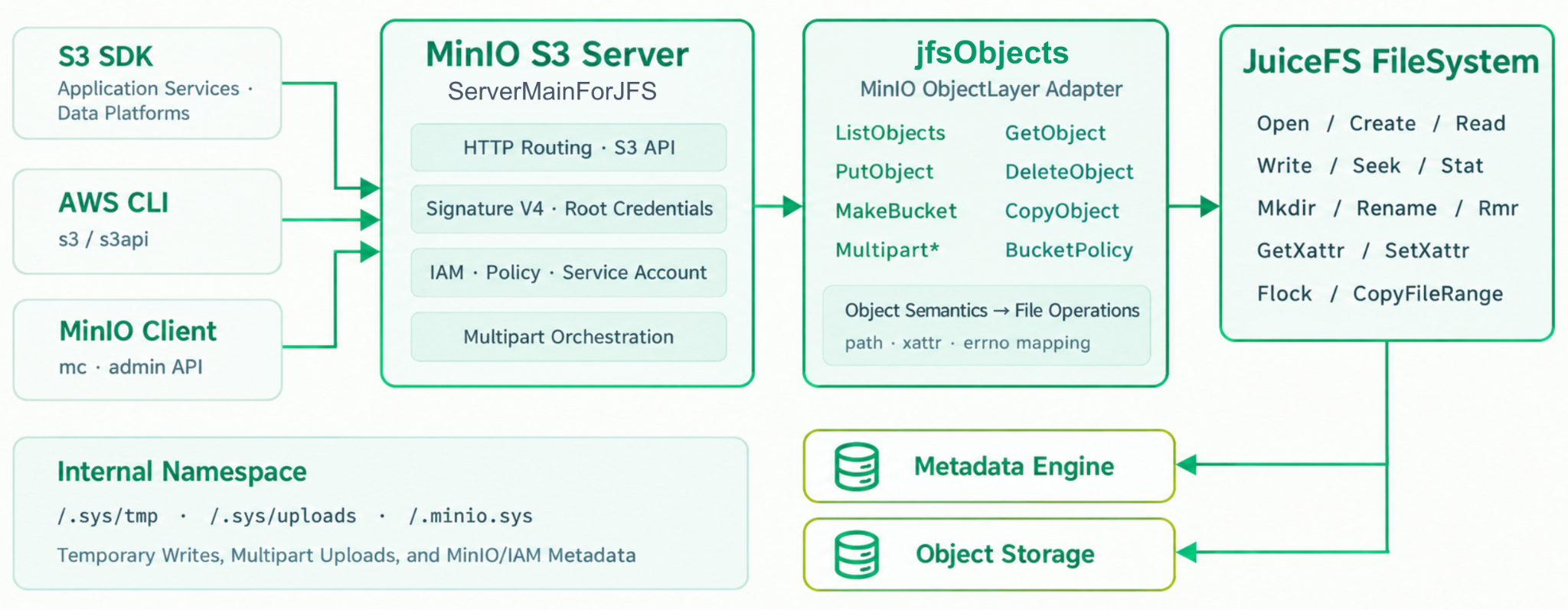
The MinIO S3 server handles the S3 protocol layer, including request routing, signature verification, authentication and authorization, and multipart upload orchestration. After requests pass through the protocol layer, they enter the ObjectLayer implemented by JuiceFS, namely jfsObjects. jfsObjects converts object-level reads, writes, listings, deletions, and attribute access into JuiceFS file system calls.
State storage: how the internal namespace carries the Gateway state
During request conversion, the Gateway does not only access user-visible object paths; it also uses an internal namespace to store state needed by the service itself. For example, .sys/tmp is used for temporary writes, .sys/uploads is used for multipart upload state, and .minio.sys is used to store MinIO/IAM-related metadata.
These internal paths are not application data in the ordinary user's understanding, but they are the foundation the Gateway needs to maintain upload processes, part states, and permission configurations.
Semantic conversion: PutObject, Multipart, Bucket, and Metadata
The S3 object model and the file system model are not completely the same, so the Gateway needs to perform semantic conversions at several key points.
PutObject must ensure that an object is visible only after the upload is complete. To prevent clients from reading incomplete objects, JuiceFS S3 Gateway writes to a temporary file and saves object attributes such as metadata and tag, commits to the target path via rename after completion. Leveraging the atomicity of file system rename, the Gateway can switch an object write from “uncommitted” to “committed.”

Multipart upload needs to merge multiple parts into the final object. JuiceFS S3 Gateway can use file system capabilities such as CopyFileRange to combine already written parts and commit the final file via rename. This mainly adjusts file system metadata relationships rather than moving all data again.

Bucket mapping handles the relationship between the object namespace and file paths. In single-bucket mode, the file system name corresponds to the bucket; in multi-bucket mode, top-level directories map to buckets. Object attributes such as metadata, tag, and ETag are stored through file extended attributes (xattr).
Permission coordination: IAM and multiple instances
S3 Gateway also needs to handle identity and permission information, including root users, regular users, policies, service accounts, and more. These configurations are stored in the JuiceFS file system through internal paths, allowing them to be reused across multiple Gateway instances.
Therefore, multiple Gateway instances can share the same set of IAM configurations; however, each instance caches IAM information, so permission changes are not synchronized instantaneously. In actual deployments, we need to consider the refresh cycle.
WebDAV principles: from file protocol to JuiceFS operations
WebDAV starts from a different point than S3 Gateway. It targets file access scenarios, with common clients including macOS Finder, DAV/rclone, and some Office/apps clients. Since the WebDAV protocol includes concepts such as files, directories, and attributes, it does not need to first handle the model conversion between buckets, objects, and keys on the one hand and paths and files on the other, unlike S3 Gateway.
Request path: from HTTP entry to webdavFS
After a WebDAV request enters JuiceFS:
1.It passes through net/http and indexHandler. This layer mainly handles HTTP entry-related capabilities, such as authentication, transport, and conversion of directory access requests.
2.The request enters x/net/webdav.Handler, which handles the WebDAV protocol layer and converts protocol methods into file access requests that webdavFS can process.
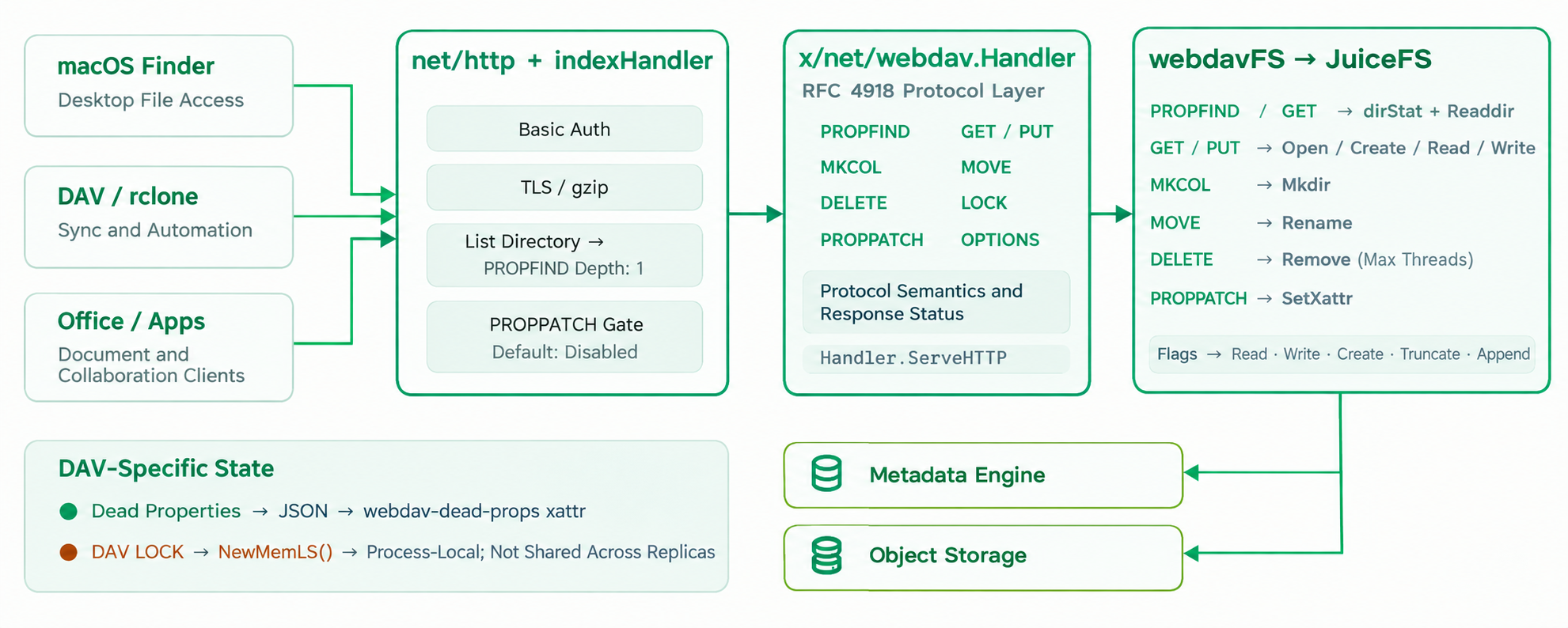
3.After entering webdavFS, the file access requests passed in by the Handler are converted into JuiceFS file system calls such as open, create, read/write, rename, delete, and attribute setting. Since the WebDAV protocol is close to file system semantics, the focus here is not to rebuild an object model, but to handle how request methods, file open flags, and attribute states map onto JuiceFS operations.
State boundaries: dead properties and LOCK
WebDAV adaptation involves not only data reads and writes but also the protocol's own state. Dead properties can be saved as JSON in xattr, thus landing in JuiceFS' file attribute system; however, LOCK state is different—it's currently kept in the service process memory. Single-instance deployments usually have no problem; in multi-instance deployments, different instances cannot automatically synchronize lock state.
These limitations usually do not affect Finder browsing, simple sharing, or DAV/rclone synchronization. However, if an application strongly relies on WebDAV file lock semantics, deployment mode and client behavior need to be verified separately.
S3 Gateway and WebDAV share the same JuiceFS client initialization path and access the same file system namespace. The difference is that S3 Gateway needs to convert object semantics into file system operations, while WebDAV is closer to file access semantics.
Therefore, the choice of access method should ultimately depend on the application itself: whether it organizes data as objects or operates on data as files and directories.
If you have any feedback on this article or ideas to share, we invite you to participate in the discussions on GitHub and join our community on Discord.