


In large-scale file access scenarios such as AI training and dataset management, metadata often becomes the first performance bottleneck as file counts and concurrency grow. Whether you're deleting millions of small files, cloning large datasets, or traversing directories under heavy concurrency, metadata performance directly impacts application efficiency.
JuiceFS Community Edition 1.4 introduces three major metadata optimizations:
- Batch unlink for large-scale file deletion
- Batch clone for metadata cloning
- Redis client-side caching for hot metadata reads
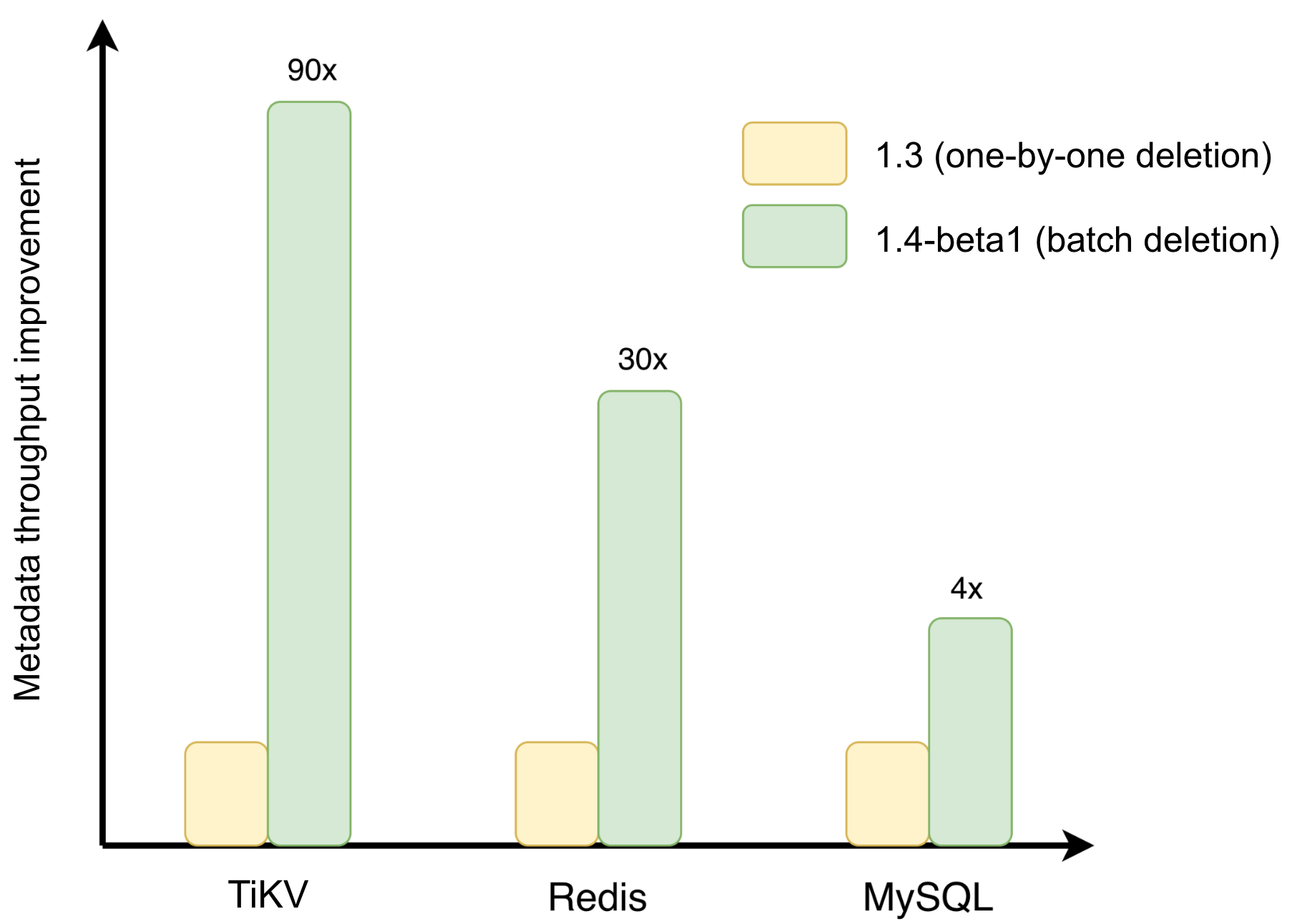
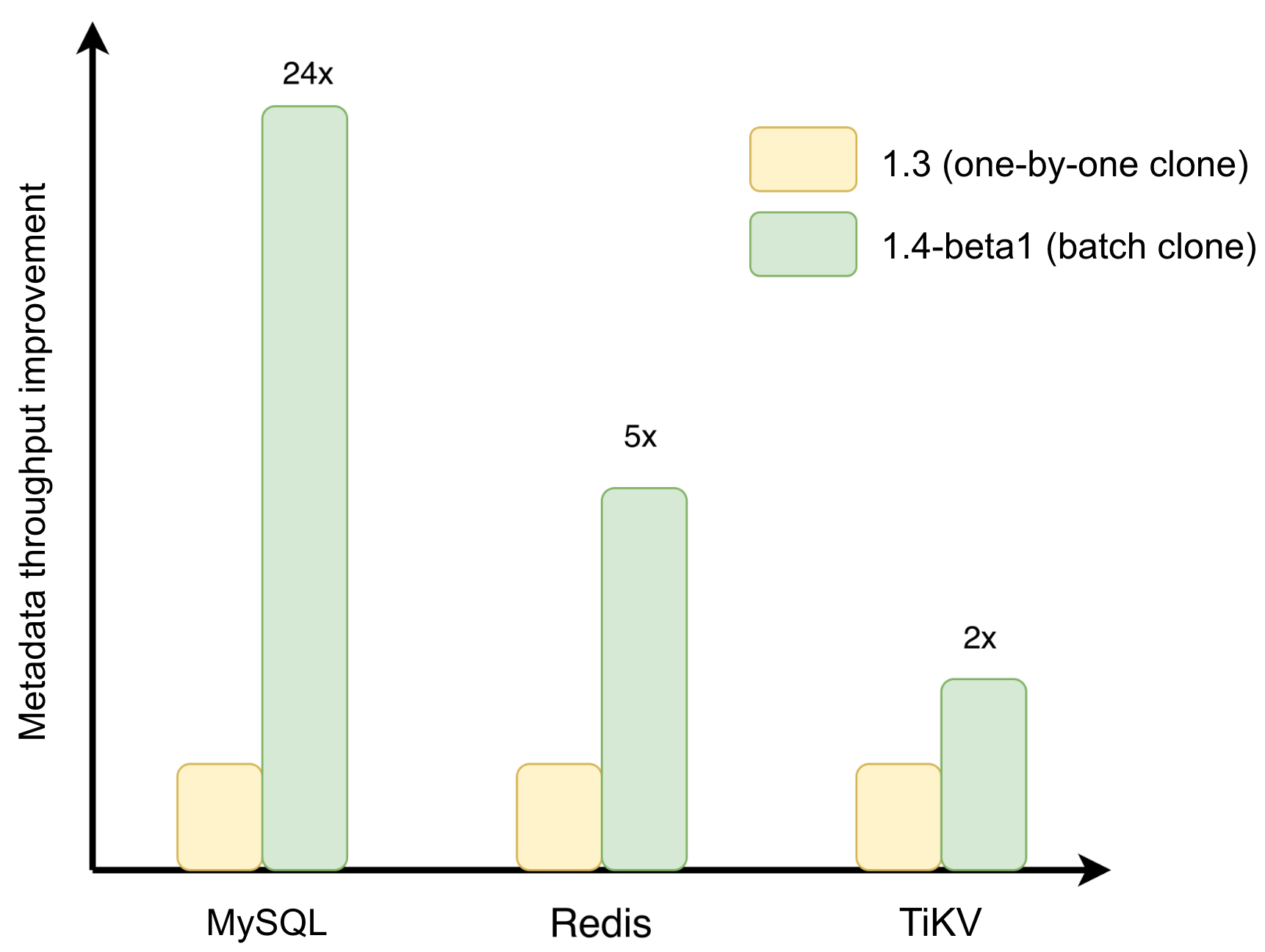
These improvements reduce transaction commits, network round trips, and redundant metadata lookups. In tests on a flat directory containing 100,000 files, batch unlink improved performance by up to 93×, while batch clone achieved up to 24× speedup.
In this article, we’ll explain the motivation, design, and performance benefits behind these optimizations.
Deletion: From one‑by‑one to batched transactions
Under JuiceFS' metadata-data separation architecture, deleting a file involves much more than removing a directory entry. The system must also:
- Update inode reference counts
- Reclaim inode and space resources
- Process trash entries
- Update quota statistics
These operations must typically be completed within the same transaction.
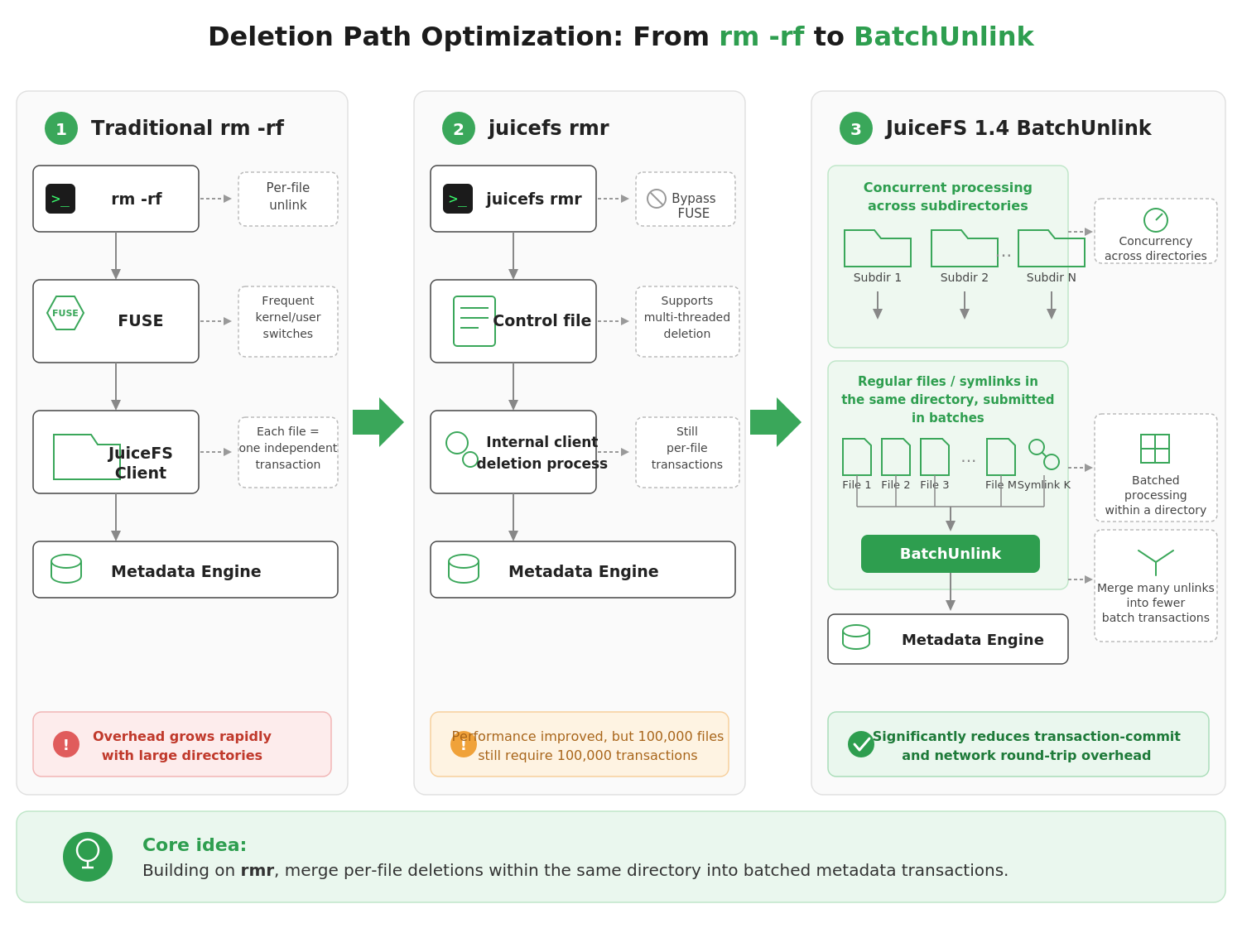
When a directory contains hundreds of thousands or even millions of files, the traditional file-by-file deletion approach used by rm -rf quickly becomes a bottleneck. Each unlink request goes through the FUSE protocol, switches between kernel and user space, and triggers a separate metadata transaction.
As the number of files grows, the overhead from system calls, context switches, network round trips, and transaction commits accumulates rapidly.
To mitigate this issue, JuiceFS previously introduced the juicefs rmr command. Unlike rm -rf, rmr bypasses the FUSE layer and sends deletion requests directly to the client. It also supports multi-threaded deletion (50 threads by default), significantly improving throughput.
However, each file deletion still requires its own metadata transaction. Deleting 100,000 files still means executing 100,000 transactions.
Batch unlink takes optimization one step further by merging many independent deletion operations within the same directory into a single batch transaction, further removing network overhead.
Core design
The key is to turn many small transactions into fewer large ones. JuiceFS adds a batch unlink interface at the metadata engine layer. It allows the client to delete multiple non‑directory files under the same directory in one call.
When recursively clearing a directory, JuiceFS reduces deletion overhead in two ways:
- Different subdirectories are handled concurrently with multi‑threaded deletion.
- Inside each directory, normal files and symlinks are grouped into batches and sent to
BatchUnlink.
This merges many unlink operations into fewer batch transactions at the metadata level.
It's important to note that BatchUnlink does not directly delete directories. Directory removal still follows the standard recursive workflow: empty the subdirectory first, and then delete the subdirectory itself. Therefore, BatchUnlink only applies to regular files and symbolic links within the same directory.
This restriction preserves correct recursive deletion semantics while avoiding consistency risks to the directory tree structure.
Implementation across metadata engines
JuiceFS uses different batching strategies depending on the metadata backend to minimize transaction commits and network round trips.
SQL backends (MySQL, PostgreSQL, etc.): Previously, each file deletion required its own sequence of INSERT, DELETE, and UPDATE statements. With BatchUnlink, the system:
- Fetches all edge records for the target entries in a single batch query.
- Retrieves the relevant inode attributes in a single locked batch query.
- Executes edge deletions, inode state updates (decrementing nlink or marking for cleanup), and delfile entry insertions — all within one transaction.
Instead of executing one transaction per file, the entire batch can now be completed in a single transaction.
Redis backend: The optimization uses Redis pipelines and transactions. Where individual deletions previously required separate command round trips, BatchUnlink collects all HDEL (dentry removal), ZADD (enqueue for cleanup), SET (inode attribute update), and INCRBY (counter update) commands for multiple files into a single pipeline, executed atomically within one MULTI/EXEC transaction. To avoid blocking Redis' single-threaded event loop for too long, batch size is capped at 250 entries.
TiKV backend: BatchUnlink consolidates multiple deletions into a single transaction, using TiKV's batch write capability to reduce network round trips and transaction overhead. For distributed key-value backends, this kind of batching allows the backend's concurrent write capacity to be more fully utilized.
The figure below shows benchmark results on a flat directory of 100,000 files using juicefs rmr --threads 16. BatchUnlink delivers meaningful improvements across all metadata backends, with TiKV and Redis showing the largest gains.
Clone: From one‑by‑one copy to batched references
juicefs clone creates fast copies of files or directories for training dataset version management, experiment snapshots, and large-scale directory duplication. Its efficiency comes from the fact that cloning doesn't immediately copy the underlying data blocks. Instead, it creates new file records at the metadata layer and reuses the source file's existing block references. New data blocks are only allocated when the clone is actually written to. This avoids the time and storage overhead of a full copy.
For large directory clones, the same problem as deletion arises: processing files one by one generates a large number of short transactions and network round trips. The core idea behind batch clone is to merge the clone operations for multiple files in the same directory into a single batch transaction. When recursively cloning a directory, the system reads directory entries in batches as a stream. For each batch, all non-directory entries are collected and cloned together in one operation.
One key implementation detail is inode pre-allocation: before entering the transaction, the system uses nextInode to pre-allocate target inodes for all entries to be cloned. This avoids lock contention from repeatedly requesting inodes inside the transaction. Once inside the transaction, the system batch-queries all source file attributes (with row locks), builds all the insertion data for target nodes, edges, chunks, symlinks, and xattrs, and then inserts everything in a single batch.
Batch clone uses each backend's native batch write capabilities in a similar way to batch unlink. The per-backend implementation details won't be repeated here.
The performance gains vary across backends depending on:
- Transaction models
- Network communication overhead
- Batch insertion efficiency for metadata records such as nodes, edges, and chunk references
Results on a flat directory of 100,000 files are shown below. MySQL sees the largest improvement at approximately 24x; Redis at approximately 5x; TiKV at approximately 2x.
Redis client-side caching: Keeping hot metadata local
In high-concurrency metadata workloads such as AI training dataset access and large-scale container startup, network round trips between JuiceFS clients and Redis often become a major performance bottleneck.
Consider the following operation:
open("/mnt/jfs/dataset/images/cat.jpg")
Before the file can be opened, the Linux Virtual File System (VFS) must resolve every component in the path:
- Look up
dataset. - Look up
images. - Look up
cat.jpg.
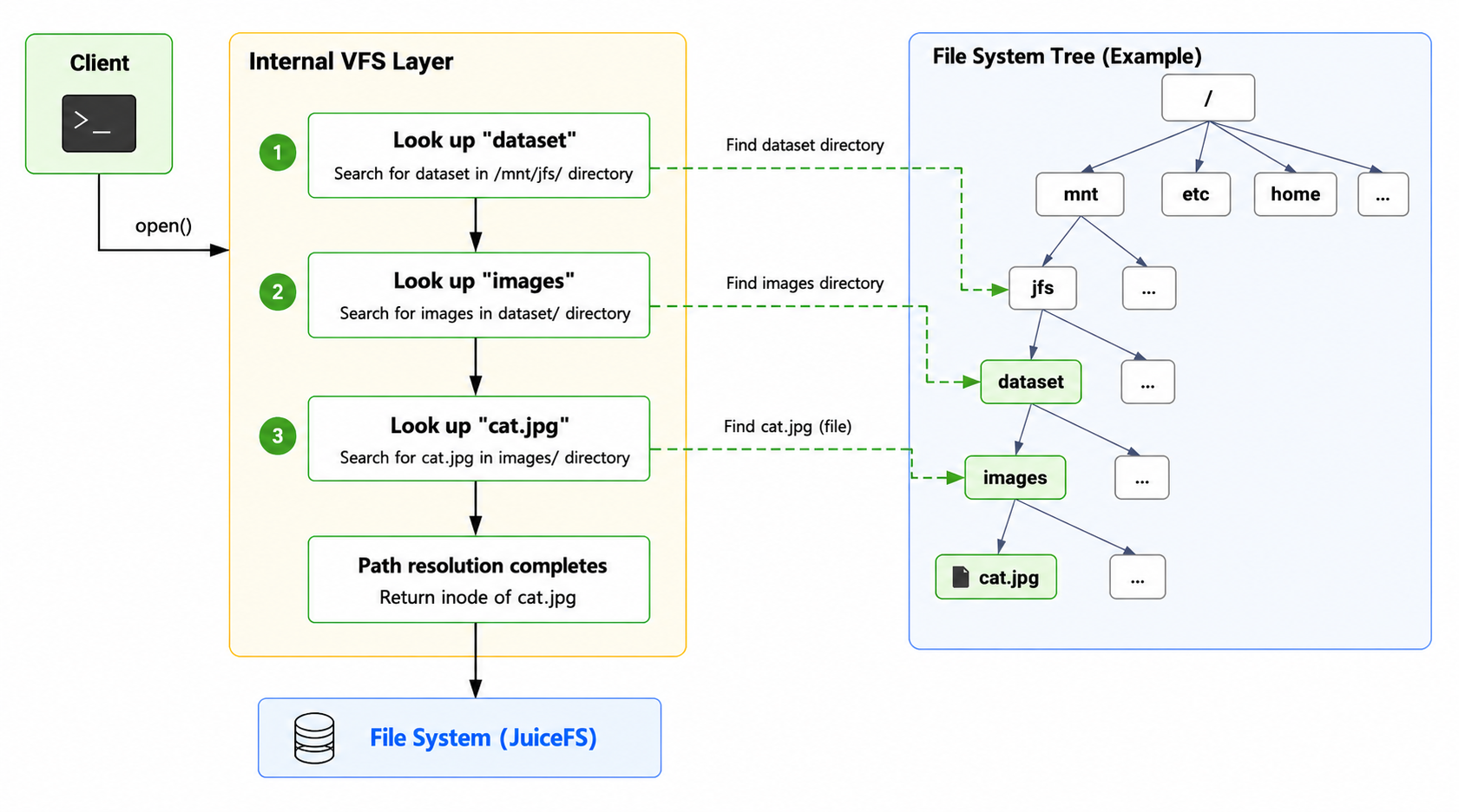
If the images directory contains hundreds of thousands of files and training jobs perform random access across the dataset, each lookup requires a GET request to Redis.
Under heavy concurrency, this results in large numbers of network round trips and increased Redis CPU utilization. Even though a single Redis query takes only a few dozen microseconds, network latency pushes each lookup to hundreds of microseconds or even milliseconds. When thousands of training processes are accessing files simultaneously, this overhead becomes significant.
How it works: Redis 6.0 client-side caching
Redis 6.0 introduced client-side caching, which allows clients to cache hot keys locally and receive invalidation notifications whenever those keys are modified.
Based on this capability, JuiceFS caches two categories of metadata in client memory:
- Inode attribute cache. Keyed by inode number, this stores the complete attribute data for a file, such as type, size, permissions, and timestamps. The caching is implemented transparently through hook mechanisms in the Redis driver layer. On query, it first checks the local cache; on hit, it returns immediately without any network request. On modification, it automatically invalidates the corresponding cache. Application logic requires no awareness of the cache.
- Directory entry cache. Keyed by "parent inode + path separator + filename," this caches the results of directory lookups. Unlike the inode attribute cache, the lookup logic for entry cache is embedded directly in the directory lookup path rather than being intercepted transparently at the driver layer. When entries for a directory are invalidated, all related cache entries under that directory are cleared using prefix matching. This allows path resolution and repeated access to hot entries in the same directory to be served from local memory.
Introducing client-side caching creates a consistency challenge in multi-mount scenarios. When multiple clients share the same JuiceFS file system, an operation on one client — creating, deleting, renaming, or updating attributes of a file or directory — can invalidate cached inode attributes or directory entries on other clients. Without an effective invalidation mechanism, subsequent reads could hit stale metadata, causing the directory entries or file attributes seen by one client to diverge from the actual state in the backend.
To address this, JuiceFS introduces a Tracking and Broadcast Invalidation (BCAST) model on top of Redis' client-side caching mechanism. After connecting to Redis, each client declares the metadata key prefixes it wants to track. When those keys are modified, Redis sends invalidation notifications to the relevant clients. On receiving a notification, the client clears the corresponding inode attribute cache or entry cache entries, so that subsequent accesses fetch fresh data from the metadata engine.
In addition, at client initialization, JuiceFS warms up metadata for the root directory of the mount point. Since these files are typically the most frequently accessed, benchmarks show this warm-up significantly improves overall access performance.
Through this mechanism, hot metadata can be reused locally. When the metadata changes, the related caches are evicted in time, reducing the risk of stale metadata.
When to use it
Redis client‑side caching works best in read‑heavy, write‑light scenarios with repeated access to hot metadata. AI training dataset loading is a good example: the dataset is usually read‑only during training, and tasks repeatedly access the same directories and files, so inode attribute cache and entry cache hit often, reducing redundant lookups and remote metadata queries.
The benefit is even more obvious when there is higher network latency between the client and the Redis metadata engine, such as in cross-availability-zone deployments.
Redis 6.0 or later is required to use this feature. The default cache expiration time is 1 minute, which provides a safety net in case of network interruptions or connection anomalies where invalidation notifications may not arrive, preventing stale entries from persisting indefinitely. For workloads with stricter consistency requirements, the expiration time can be shortened or client-side caching can be disabled entirely to reduce the risk of reading stale metadata.
Summary
These three optimizations each target a different path through the metadata layer:
- Batch unlink merges multiple independent unlink operations within the same directory into a single batch transaction.
- Batch clone merges multiple independent clone operations within the same directory into a single batch transaction.
- Redis client-side caching keeps hot metadata in client memory, bringing read latency from network-level down to memory-level, with broadcast invalidation to maintain consistency across multiple clients.
BatchUnlink and BatchClone are internal interfaces. Users do not call them directly. Just use the right commands: juicefs rmr for deleting large directories, juicefs clone for copying directories. The optimization will be applied automatically.
One thing worth noting: both batch operations work by merging regular files within the same directory into a single batch transaction. Subdirectories are handled recursively by concurrent goroutines. The larger the directory, the greater the benefit.
Batch operations mainly merge ordinary files under the same directory into one batch transaction. Subdirectories are handled recursively by concurrent goroutines. The larger the directory, the bigger the benefit.
All optimizations above are available in JuiceFS Community Edition 1.4. Upgrade the client to get the performance gains.
If you have any questions for this article, feel free to join JuiceFS discussions on GitHub and community on Discord.
