JuiceFS Community Edition 1.4 is released. It’s the fifth major release since the open source edition was introduced in 2021 and is now the new Long-Term Support (LTS) version. We’ll continue to maintain both v1.4 and v1.3, while v1.2 has reached end of maintenance.
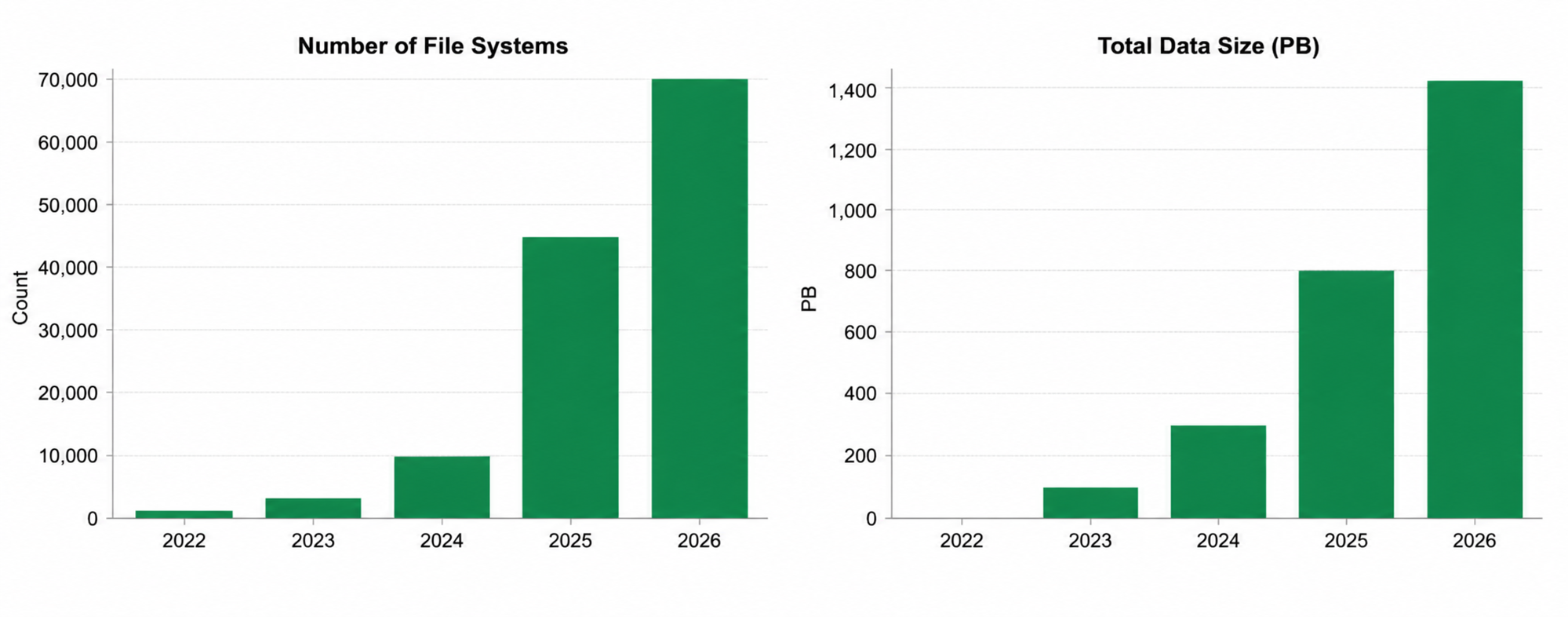
JuiceFS has now surpassed 14.2k GitHub stars. According to anonymous usage statistics reported by users, the total amount of data managed by JuiceFS Community Edition has exceeded 1.4 EB, representing more than 700× growth since 2022.
As JuiceFS is increasingly adopted for large-scale data management, high-concurrency workloads, and multi-user shared environments, long-standing challenges such as storage cost optimization, metadata performance, and resource governance have become more prominent. These are the primary focus areas of the 1.4 release.
In this post, we'll walk through the key improvements in JuiceFS 1.4, including tiered storage, faster metadata operations, enhanced resource management, more reliable data synchronization, metadata change tracking, and broader platform compatibility.
Lower storage costs with file- and directory-level tiered storage
As file systems continue to grow, different datasets naturally diverge in access frequency, performance requirements, and retention periods. Using a single storage type uniformly makes it difficult to simultaneously meet the performance needs of frequently accessed data and the cost-control requirements of infrequently accessed data. Object storage typically offers different storage classes based on access patterns, including hot data, warm (infrequent access) data, and cold (archival) data storage.
JuiceFS has supported setting object storage types via --storage-class since v1.1, but the configuration granularity was mainly at the file system default or mount point level. JuiceFS 1.4 integrates storage class into the file system semantics, supporting storage tier settings on a per-file or per-directory basis. Directory-level configurations can be inherited by subsequently created files and subdirectories. This facilitates tiered management by project, dataset, or application directory.
The storage tiers can be configured flexibly according to the object storage vendor being used. When writing new data, JuiceFS writes it to the corresponding object storage type based on the configuration of the file or its parent directory. For existing data, you can also adjust the metadata configuration and leverage the data migration capabilities on the object storage side to move it to a new storage tier. This capability is suitable for scenarios such as AI training datasets, log archiving, backup data, historical experiment data, and offline analysis results. For archive storage, it’s still necessary to evaluate retrieval latency and fees. For more implementation details, usage methods, and future evolution, see A Deep Dive into JuiceFS 1.4 Tiered Storage.
Faster metadata operations: batch delete, batch clone, and hotspot read optimization
In workloads involving massive numbers of small files, large directories, or high-concurrency access, metadata operations often become the primary performance bottleneck.
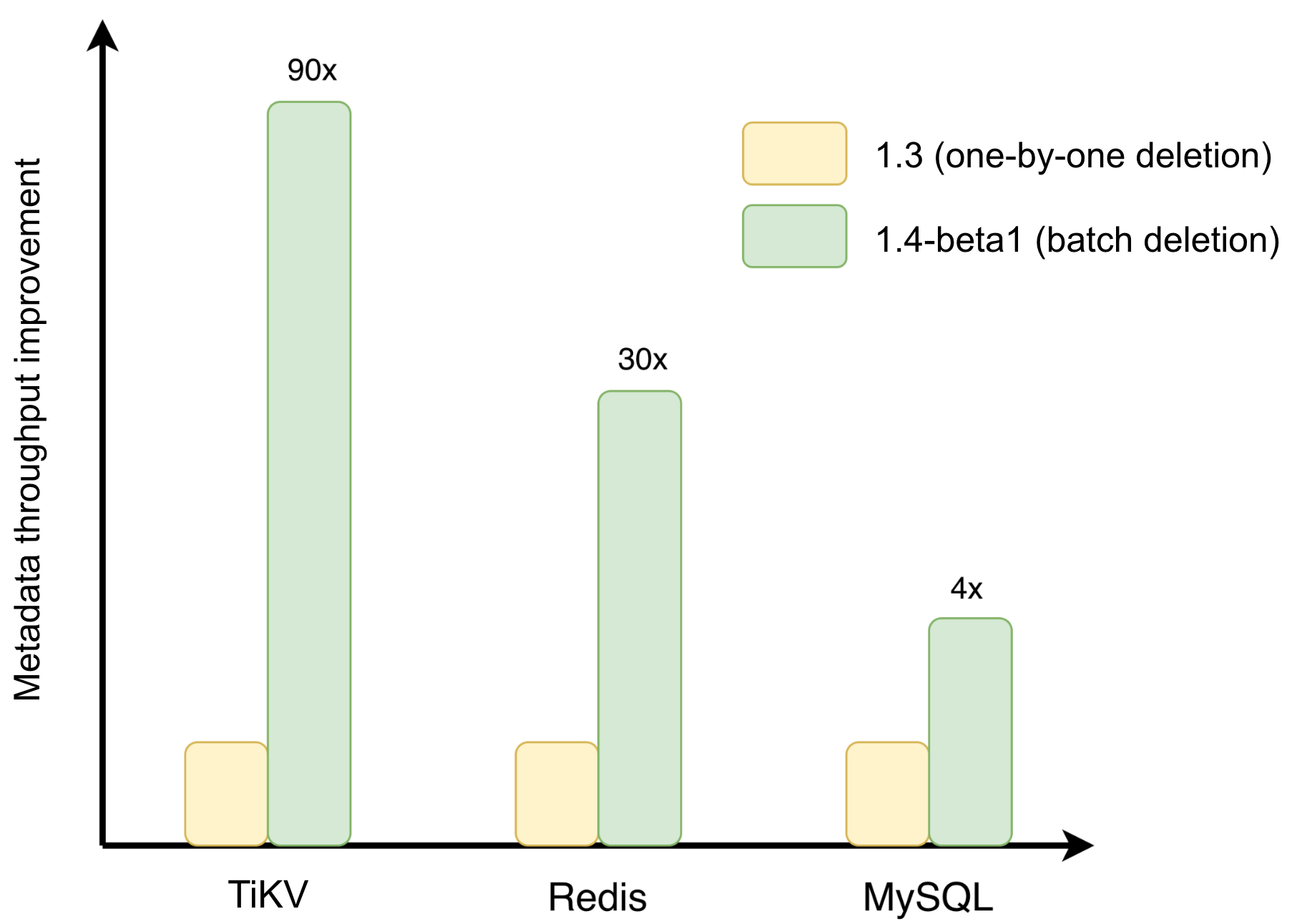
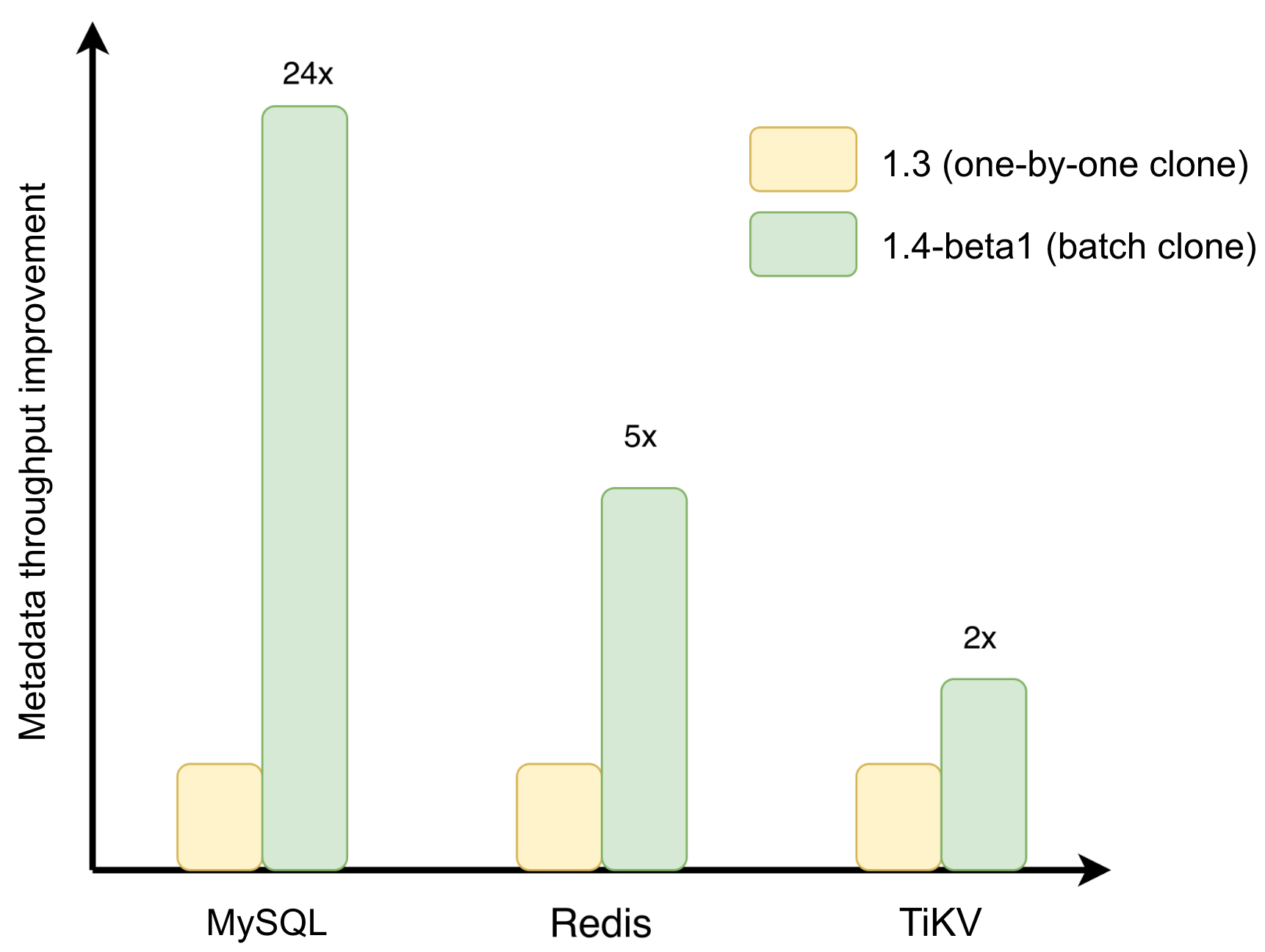
JuiceFS 1.4 addresses write transaction overhead and hotspot read overhead in metadata operations with optimizations including batch delete, batch clone, and Redis client-side caching.
Batch delete and clone: reducing transaction overhead
Previously, deleting a large number of files required the system to process them one by one, sequentially updating directory entries, inodes, space statistics, trash, and quota metadata. JuiceFS 1.4 consolidates the deletion of multiple non-directory files within the same directory into a batch transaction, reducing the repetitive overhead of per-file operations. This is applicable to scenarios like large directory cleanup, temporary data reclamation, training sample cleanup, and log directory deletion.
Batch cloning targets directory replication and snapshot scenarios. juicefs clone does not copy the underlying data blocks but creates new file records at the metadata layer and reuses the source file's data block references. JuiceFS 1.4 further reduces the metadata transactions generated by per-file cloning by processing clones of multiple files within the same directory in batch. This is ideal for AI dataset version management, experiment environment preparation, and large-scale directory snapshots.
Redis client-side caching: reducing hotspot metadata read overhead
In high-concurrency reads, path resolution, directory entry lookups, and file attribute queries generate a large number of repeated requests. When Redis is used as the metadata engine, these requests require round trips between the client and Redis. This may impact access latency and increase Redis load.
JuiceFS 1.4 caches hot inode attributes and directory entries locally on the client side. When cached, it can reduce repeated queries to Redis. When related metadata changes, the local state is updated through a cache invalidation mechanism. It's important to note that this capability caches metadata, not file content.
It’s particularly beneficial for read-heavy workloads with stable hot paths, such as AI training data loading, large-scale container startup, and multi-task concurrent reading. For more implementation details, see Faster Metadata Operations with Batch Unlink, Batch Clone, and Redis Client-Side Caching.
Improved resource management: user quotas and trash usage statistics
In distributed storage environments, storage resources are often shared among multiple users, teams, and projects.
Without effective governance, accidental writes or abnormal workloads from a single user can quickly consume large amounts of storage space or inodes. This affects both system stability and operating costs. Quota management is a critical means of establishing predictable resource boundaries in shared environments.
JuiceFS Community Edition 1.4 introduces user and group quotas, allowing administrators to monitor, configure, and enforce resource limits based on identities.
Resource governance is now extended beyond file system and directory quotas to include user- and group-level quotas, making it especially suitable for shared clusters and AI training platforms.
To reduce metadata overhead in multi-client environments, JuiceFS uses asynchronous accounting so that usage statistics converge gradually over time. For details, see Quota Design in Distributed Architectures: Implementation and Use Cases in JuiceFS.
Supported quota types include:
| Quota type | Scope | Design goal | Typical use case |
|---|---|---|---|
| Total file system quota | Entire file system | Prevents overall resource runaway | Cost budget control, capacity limit |
| Subdirectory quota | Directory subtree | Blocks abnormal write behavior | Prevents misoperations, small‑file storms |
| User quota | Per user | Isolates impact between different applications | Multi‑tenant data management |
| User group quota | Project or department | Cost allocation and team limits | Shared environment for AI projects |
JuiceFS 1.4 also improves trash space visibility.
Deleted files may remain in the trash for a retention period, making it difficult to understand why storage space has not yet been reclaimed. The enhanced summary tool now reports trash usage, helping administrators identify storage consumption and make informed cleanup, retention, or expansion decisions.
Expanded capabilities: sync, backup, and change tracking
More reliable large-scale sync
Large-scale migration, cross-cloud sync, backup, and archival workloads often face interruptions, security requirements, and bandwidth contention.
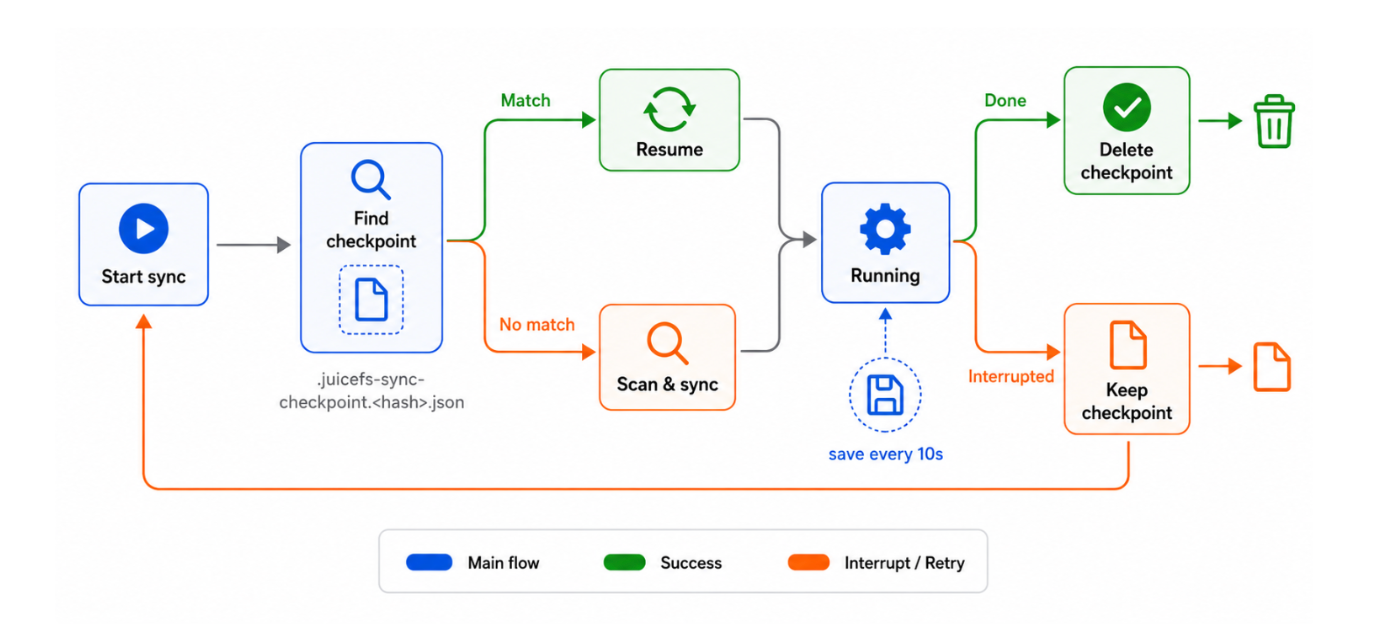
JuiceFS 1.4 significantly enhances juicefs sync with three major capabilities:
- Resumable sync: It reduces recovery costs after task interruptions. During synchronization, JuiceFS records the task progress. If the task exits abnormally or is manually interrupted, it can resume from the saved state, reducing repeated scanning and processing. This capability is suitable for migration and backup scenarios with a large number of objects, long task durations, or unstable cross-cloud links.
- Data encryption and decryption: In cross-cloud backup and archiving scenarios, client-side encryption is a common compliance requirement. JuiceFS 1.4 supports completing encrypted writes, decryption recovery, or re-encryption within the sync pipeline, reducing reliance on external encryption tools. This capability is suitable for off-site backup, sensitive data migration, key rotation, and compliance auditing. However, it requires careful management of key storage and recovery processes.
- Global traffic control: It provides bandwidth constraints for concurrent multiple sync tasks. Compared to per-process rate limiting, version 1.4 can centrally manage the overall bandwidth usage of multiple sync tasks, reducing the impact of sync tasks on online application and other network activities. This is suitable for cross-cloud transfers, multi-task concurrent backups, data center migrations, and shared outbound link scenarios. For implementation details, see JuiceFS Sync for PB-Scale Data Transfers: Resumable Sync, Encryption, and Bandwidth Control.
Changelog: metadata changes become traceable
JuiceFS Community Edition 1.4 introduces a metadata changelog capability, which records metadata change events across the file system.
Previously, troubleshooting relied primarily on client-side access logs, which only reflected operations performed through individual mount points. In multi-client deployments, reconstructing a complete sequence of events was often difficult.
A changelog records metadata operations—including file creation, deletion, attribute updates, and renames—directly at the metadata layer, providing a unified source for troubleshooting, auditing, and incremental processing.
Administrators can now quickly identify accidental deletions, unexpected renames, permission changes, and metadata modifications without collecting logs from every client.
When issues like accidental deletion, abnormal renaming, or unexpected permission or attribute changes occur, administrators can review the relevant change records based on the changelog. This reduces dependence on single-client logs and shortens the troubleshooting path. It also provides a more unified source of metadata changes for operational auditing.
In backup, migration, and recovery scenarios, the changelog can serve as a reference for incremental processing. For large-scale file systems, numerous changes may occur between two full backups or migration tasks. By recording the metadata changes during this period, the changelog can provide input for subsequent incremental backups, migrations, or recovery processes, reducing reliance on full scans.
Better support across different environments
JuiceFS Community Edition 1.4 further improves compatibility across diverse deployment environments.
On Windows clients, the release improves cross-platform consistency and stability, including user mapping, permission mapping, and file access behavior, reducing compatibility issues when Linux and Windows clients access the same file system.
For the Java SDK and the Hadoop ecosystem, JuiceFS 1.4 adds Kerberos authentication, completing support for Hadoop secure mode.
JuiceFS 1.3 already introduced Apache Ranger integration for authorization and access control. Together, Kerberos authenticates who the user is, while Ranger determines what the user can access, providing a more complete security model for enterprise big data platforms.
On the storage backend side, JuiceFS 1.4 also adds support for SMB/CIFS-based storage. This makes it easier to integrate with existing NAS or file-sharing infrastructure.
Continued growth in scale and AI adoption
According to anonymous usage statistics, JuiceFS Community Edition now powers nearly 70,000 file systems managing over 1.4 EB of data, with deployment scale continuing to grow.
Over the past year, AI applications have continued to expand from model training to inference services, agents, and multi-cloud scheduling, placing higher demands on data storage. These changes are also reflected in the use cases shared by community users, covering areas such as large language models, autonomous driving, quantitative investment, and computing platforms. We thank these users for sharing their real-world practices, providing valuable references for more teams building AI data infrastructure.
New user stories:
AI training and large language models
- INTSIG Built Unified Storage Based on JuiceFS to Support Petabyte-Scale AI Training
- StepFun Built an Efficient and Cost-Effective LLM Storage Platform with JuiceFS
- JuiceFS at Xiaomi: Unified Storage for AI, Big Data, and Cloud‑Native Workloads
AIGC
- Why Gaoding Technology Chose JuiceFS for AI Storage in a Multi-Cloud Architecture
- From GlusterFS to JuiceFS: Lightillusions Achieved 2.5x Faster 3D AIGC Data Processing
Autonomous driving and robotics
- Zelos Tech Manages Hundreds of Millions of Files for Autonomous Driving with JuiceFS
- How D-Robotics Manages Massive Small Files in a Multi-Cloud Environment with JuiceFS
Inference and AI agents
- How Gongjiyun Keeps Model Distribution Fast Enough for Cross-Cloud Elastic Inference
- 42x Faster Writes & 85% Throughput Gain: JuiceFS for Multi-Cloud AI Agents
Quant investment
Big data
Development of JuiceFS 1.4 spanned nearly a year. During the release cycle, the community reported 366 issues, merged 515 pull requests, and welcomed contributions from 59 contributors. We sincerely thank everyone who reported issues, contributed code, improved documentation, and helped evolve JuiceFS for increasingly demanding production environments. Your participation drives the rapid growth of JuiceFS.
Download and try JuiceFS 1.4 here.