In scenarios such as data migration, cross-cloud synchronization, and object storage backup, juicefs sync is commonly used to transfer large volumes of data. When datasets grow to the TB- or PB-scale, with millions or even billions of objects, a single synchronization task may run for hours or even days.
As these long-running jobs progress, several common challenges tend to emerge:
- After network interruptions, process crashes, or node restarts, tasks often struggle to resume from a consistent state and may need to rescan or reprocess data.
- Backup workflows may expose plaintext data and face compliance or security requirements.
- When multiple sync jobs run concurrently, bandwidth contention becomes significant, while the overall transfer process lacks effective global control.
To address these challenges, JuiceFS 1.4 introduces three major enhancements to sync: resumable sync, data encryption/decryption, and global traffic control.
In this article, we’ll explain the use cases, implementation details, and configuration methods for each feature.
Resumable sync
In earlier versions, if a synchronization task failed or was interrupted, rerunning juicefs sync required rescanning both the source and destination before determining which objects had already been synchronized and which still needed to be copied.
For workloads involving hundreds of millions of objects or large files, the scan itself could incur substantial time and object-storage request costs.
To address this issue, JuiceFS 1.4 introduces a resumable sync mechanism for sync. When enabled, synchronization progress is periodically saved to the destination. If the task is interrupted, rerunning the same command automatically locates and loads the matching checkpoint and resumes from the last unfinished position, avoiding a full restart.
How it works
When resumable sync is enabled, sync stores a JSON state file on the destination side:
.juicefs-sync-checkpoint.<hash>.json
The <hash> value is derived from the source, destination, and key synchronization parameters. This ensures that a task only loads checkpoints created for itself, preventing accidental reuse across different jobs.
The workflow is shown below:
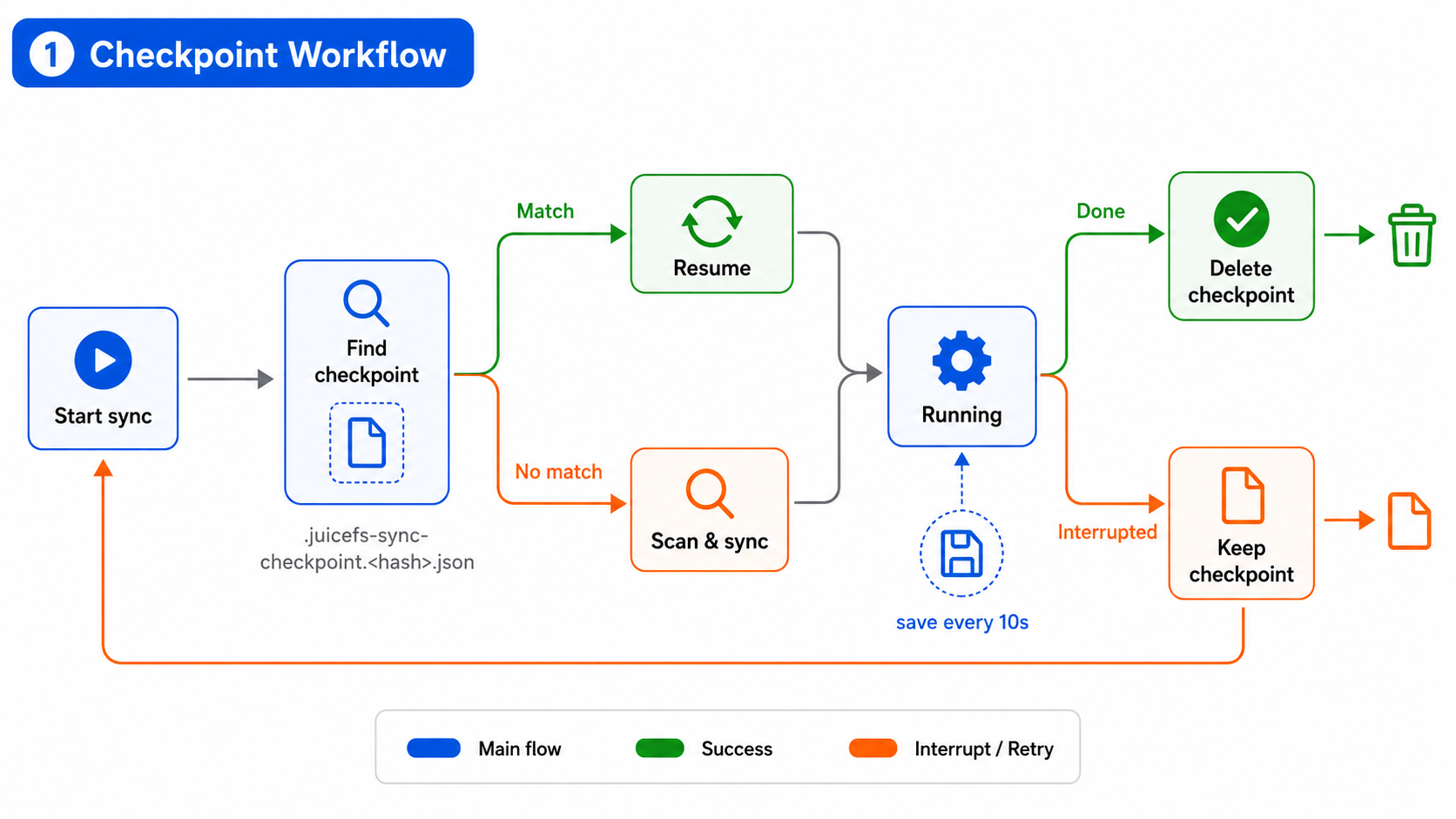
Checkpoint save, restore, and cleanup workflow in juicefs sync:
- When
syncstarts, it first looks for a checkpoint matching the current task. -
If a matching checkpoint is found, execution resumes from the saved state. Otherwise, synchronization starts normally with a fresh scan.
synctraverses multiple prefixes concurrently, maintaining independent state for each prefix, including:- Whether traversal is complete
- The last scanned position
- Pending objects to synchronize
- Failed objects
-
When restoring from a checkpoint:
- Pending and failed objects recorded in the checkpoint are re-added to the task queue.
- Prefixes that were not fully traversed resume scanning from their saved positions.
- Fully traversed prefixes only continue processing unfinished objects recorded in the checkpoint.
-
During execution, progress is saved asynchronously at a configurable interval, which defaults to every 10 seconds.
-
After successful completion, the checkpoint file is automatically removed. If the task fails or is interrupted, the checkpoint is retained for resumption on the next execution of the same command.
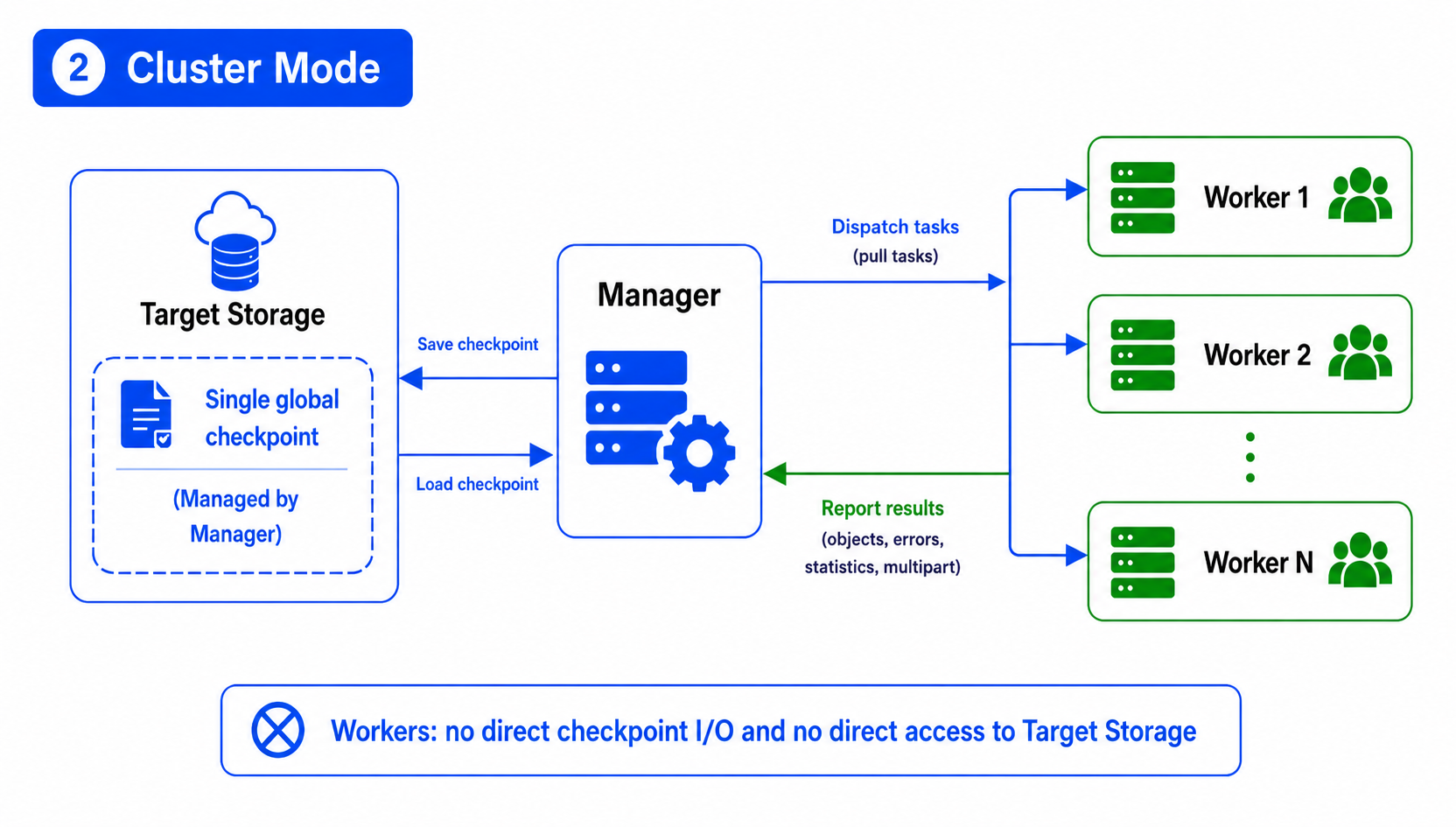
In cluster mode, only a single checkpoint exists and is maintained centrally by Manager.
Workers do not directly read or write checkpoint files on the destination. Instead, they:
- Pull tasks from Manager
- Execute synchronization
- Report results back to Manager
Manager aggregates completed objects, failed objects, statistics, and multipart-upload state into the global checkpoint.
Usage
# Enable resumable sync.
juicefs sync --enable-checkpoint SRC DST

# Customize checkpoint save interval (default: 10s).
juicefs sync --enable-checkpoint --checkpoint-interval 30s SRC DST

# Ignore existing checkpoints and restart from scratch.
juicefs sync --enable-checkpoint --checkpoint-force-reset SRC DST
Data encryption and decryption
For cross-cloud backup and archival workflows, client-side encryption is often required to satisfy compliance requirements such as data sovereignty, encryption at rest, and secure migration of sensitive data.
Previously, juicefs sync did not provide built-in encryption capabilities. Users who wanted to write encrypted data to the destination typically had to use external tools for additional processing.
In JuiceFS 1.4, streaming encryption and decryption are integrated directly into the synchronization pipeline, enabling three common workflows:
- Encrypt-on-write: Encrypt plaintext data before writing it to the destination, suitable for encrypted backup and archiving.
- Decrypt-on-read: Read encrypted data from the source and write decrypted data to the destination, suitable for data recovery or plaintext migration.
- Re-encryption: Decrypts source data with an old key and re-encrypts it with a new key before writing to the destination, suitable for key rotation or cryptographic algorithm migration.
Chunk-based streaming encryption
To support object storage Range GET operations while avoiding excessive memory usage for large files all at once, sync uses a fixed-size 1 MiB chunk-based streaming encryption scheme.
A file is first divided into plaintext chunks:
[chunk 1: 1 MiB][chunk 2: 1 MiB] ... [chunk N: ≤1 MiB]
Each plaintext chunk is encrypted independently.
Each encrypted chunk consists of a 4-byte header and the ciphertext data, where the 4-byte header stores the actual ciphertext length (ct_len):
Each encrypted block: [4B ct_len][ciphertext + padding]
Encrypted file: [encrypted chunk 1][encrypted chunk 2] ... [encrypted chunk N]
The encrypted block size is determined by the plaintext chunk size plus encryption overhead: plainChunkSize + overhead. The plainChunkSize is fixed at 1 MiB, and the overhead depends on the encryption algorithm and key type used.
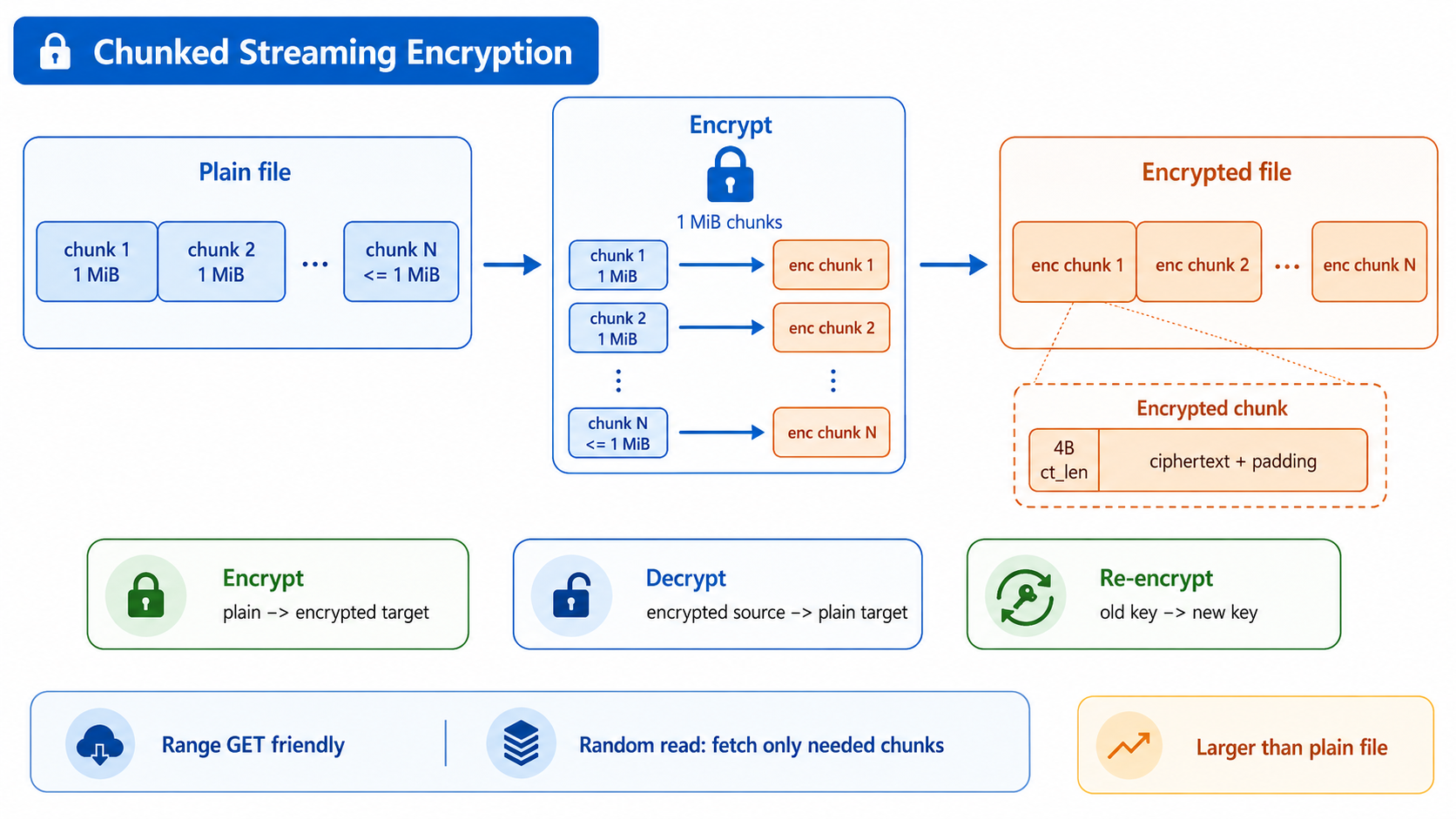
This design allows random reads to retrieve only the required encrypted chunk rather than downloading the entire file. Because encrypted objects contain additional headers, padding, and encryption metadata, the destination object is typically larger than the original plaintext file.
Supported algorithms
The table below shows the supported algorithms:
| Option | Symmetric cipher | Key encapsulation | Typical use case |
|---|---|---|---|
| aes256gcm-rsa (default) | AES-256-GCM | RSA | General-purpose workloads |
| chacha20-rsa | ChaCha20-Poly1305 | RSA | Environments without efficient AES hardware acceleration |
| sm4gcm | SM4-GCM | SM2 | Scenarios requiring Chinese commercial cryptography standards |
Usage
The following examples use RSA keys.
Generate a key pair:
# Generate an RSA private key (the public key is derived automatically).
openssl genrsa -out private.pem 2048

# Generate a password-protected private key.
openssl genrsa -aes256 -out private.pem 2048
Scenario 1: Encrypt and write to destination
juicefs sync /local/data s3://mybucket/backup
    --encrypt-rsa-key /path/to/private.pem
Scenario 2: Decrypt and read from source for data recovery or plaintext migration
juicefs sync s3://mybucket/backup /local/data
    --decrypt-rsa-key /path/to/private.pem
Scenario 3: Re-encrypt for key rotation or algorithm migration
# Decrypt data encrypted with the old key and re-encrypt with the new key to new storage.
juicefs sync s3://old-bucket/encrypted s3://new-bucket/re-encrypted
    --decrypt-rsa-key /path/to/old-private.pem
    --encrypt-rsa-key /path/to/new-private.pem
If the private key is password-protected, the password can be provided via environment variables:
# For encryption scenarios, use JFS_ENCRYPT_RSA_PASSPHRASE.
export JFS_ENCRYPT_RSA_PASSPHRASE="your-passphrase"
juicefs sync /local/data s3://mybucket/backup --encrypt-rsa-key private.pem

# For decryption scenarios, use JFS_DECRYPT_RSA_PASSPHRASE.
export JFS_DECRYPT_RSA_PASSPHRASE="your-passphrase"
juicefs sync s3://mybucket/backup /local/data --decrypt-rsa-key private.pem
Notes:
- Encrypted data is stored using a JuiceFS-specific format and can only be decrypted through
juicefs syncwith the corresponding key. - Back up encryption keys carefully. Once a private key is lost, encrypted data cannot be recovered.
Global traffic control
In earlier versions, juicefs sync already supported per-process rate limiting via --bwlimit. However, when multiple sync processes run concurrently—such as multiple Workers in a distributed sync, or multiple independent sync tasks sharing the same egress link—per-process limiting cannot constrain total bandwidth usage. The egress link may still be saturated, affecting other application traffic.
JuiceFS 1.4 introduces the --traffic-control-url parameter. Multiple sync processes can connect to the same external traffic control service, which allocates bandwidth quotas uniformly, enabling cross-process, cross-task global rate limiting.
How it works
Global traffic control uses a token bucket model. Before transmitting data, each sync process requests byte credits from the same traffic-control service.
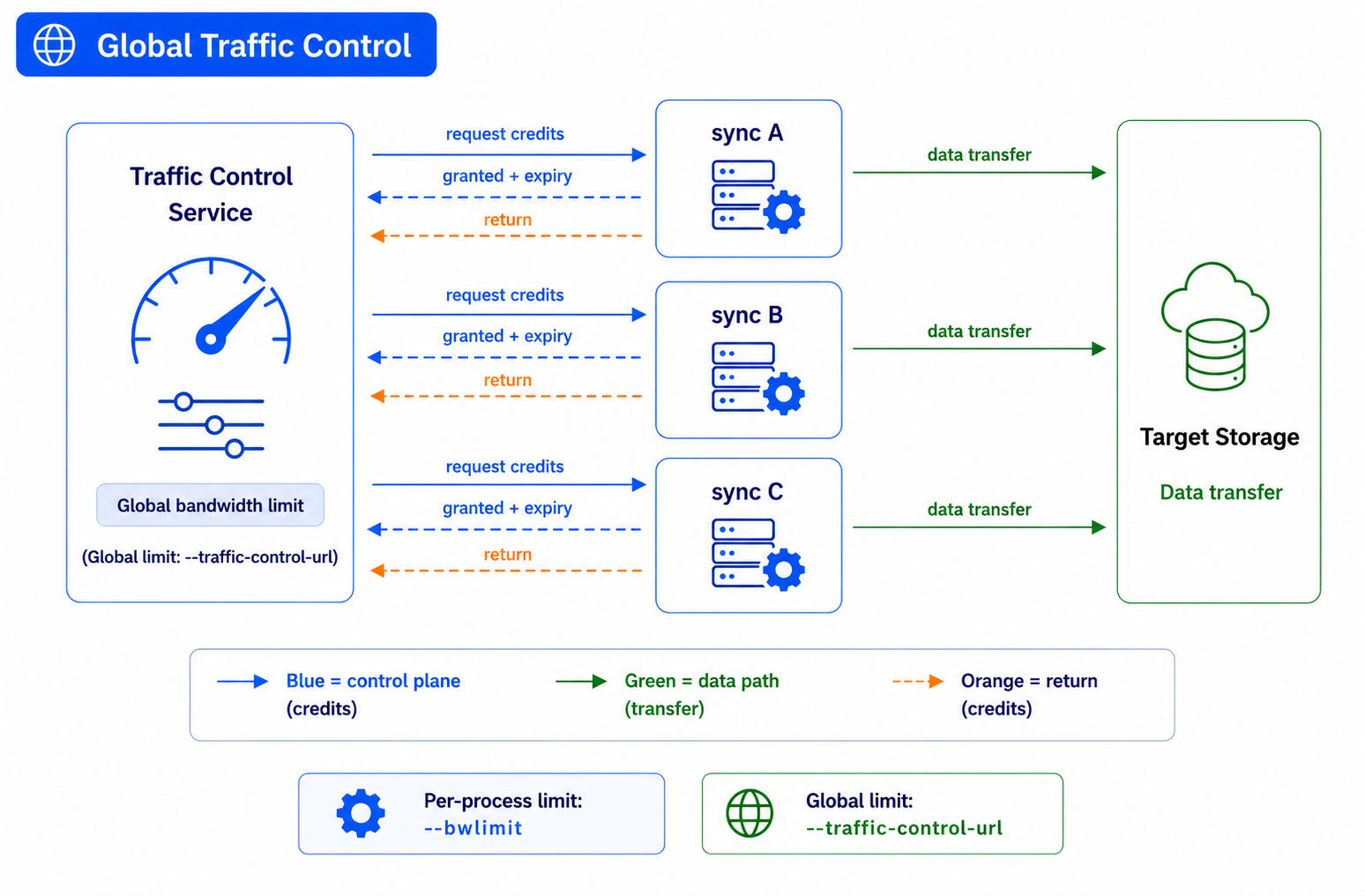
Each process periodically requests a certain number of bytes (credit) before data transfer.
The traffic-control service determines:
- How many bytes to grant
- How long the granted quota remains valid
When credits are exhausted, the process requests additional credits.
If a quota is about to expire before being fully consumed, the unused portion is returned to the service in advance.
The service exposes a simple HTTP API for granting and reclaiming quotas. This must be implemented by the user or integrated with an existing service:
POST /traffic-control
Content-Type: application/json

Request:
{"bytes": 1048576}
  bytes > 0: Request byte credits.
  bytes < 0: Return unused credits.


Response:
{"granted": 524288, "expired": 1000}
  granted: Number of bytes granted this time.
  expired: Credit validity period (milliseconds).
During synchronization, sync requests quotas from the traffic control service before transmitting data. If no credits are available, transmission blocks until new credits are obtained. In this way, multiple sync tasks can share a single global bandwidth limit, preventing the total traffic from becoming uncontrolled even when individual tasks have their own limits.
Usage
# Deploy a traffic-control service first.
# (Example: listen on port 8080 and cap total bandwidth at 100 Mbps)
# (Service implementation is user-defined; JuiceFS only calls the API)

# Multiple sync processes share the same control service.
juicefs sync SRC1 DST1 --traffic-control-url http://127.0.0.1:8080/traffic-control &
juicefs sync SRC2 DST2 --traffic-control-url http://127.0.0.1:8080/traffic-control &
--traffic-control-url can be combined with --bwlimit.
The two mechanisms are independent:
--bwlimitlimits the bandwidth of a single sync process.--traffic-control-urllimits aggregate bandwidth across multiple processes.
# Per-process limit: 50 Mbps. All processes combined respect the service-side cap.
juicefs sync SRC DST
    --bwlimit 50
    --traffic-control-url http://controller:8080/traffic-control
Summary
JuiceFS 1.4 enhancements to sync include:
- Resumable sync reduces recovery costs after task interruptions.
- Encryption and decryption improve the security of backups and archival data.
- Global traffic control enables multiple synchronization tasks to share bandwidth in a coordinated manner.
For scenarios such as data migration, cross-cloud sync, object storage backup, and encrypted archiving, users can combine these capabilities flexibly based on task scale, network environment, and security requirements.
If you have any questions for this article, feel free to join JuiceFS discussions on GitHub and community on Discord.