


Murphy's law: Anything that can go wrong will go wrong
Let me paint you a picture.
It's a Thursday morning. You're the head of infrastructure for a massive financial institution, let's say, a pension fund managing over $100 billion in assets for more than 600,000 members. Your team spent months migrating everything to a private Google Cloud deployment. You have redundancy in two geographic regions. You have backups. You followed every best practice in the book.
Then you wake up to this: everything is gone. Not just a server. Not just a database. The entire private cloud account is deleted, like it never existed.
If you're unfamiliar with this story, allow me to introduce you to UniSuper, an Australian pension fund that experienced every sysadmin's worst nightmare. On May 1, 2024, UniSuper lost complete access to its private cloud infrastructure. No member portals. No transaction processing. No account balances. For two full weeks, customers couldn't access their retirement savings. Eventually, and thankfully, the incident was resolved, and the data was recovered. Shoutout to the engineers who didn't just back things up—they also made backups offsite and then backed those up too!
But how did the incident happen exactly? The answer is almost too absurd to believe.
When provisioning the infrastructure, a parameter was left blank. That blank field triggered an automatic default: the private cloud environment was set to a fixed one-year term, with automatic deletion at the end. Fast forward to that point in time, the system did exactly what it was told: delete everything. Both geographic regions, all the data, and yes, even the backups stored in those regions. There was no warning, no confirmation dialog asking, "Are you absolutely certain you wish to delete everything?"
Human errors and automation failures are inevitable, so what do we do about it? We can't prevent every mistake, but we can build systems that survive them, just like what UniSuper engineers did. This is where your choices of core data infrastructure (i.e., databases, storage, and file systems) matter more than you think. JuiceFS offers multiple layers of defense specifically designed for scenarios like these. Let me walk you through all of them today.
Your first line of defense: protecting the brain
In JuiceFS' architecture, there's a clear separation of duties. The actual file content (the data) lives in object storage services of your choice, such as S3, GCS, and MinIO. In the meantime, the map (the metadata) that tells which data blocks belong to which file is stored in the metadata engine supported by JuiceFS, such as Redis, MySQL, or the JuiceFS Enterprise metadata store.
Here's the "a little bit scary" part: The metadata is the brain. Lose your Redis backend, and you have petabytes of random data objects with no way to assemble them back into files. It's like having a million puzzle pieces without knowing what the original painting looks like.
But flip that around. If the metadata is the brain, then backing it up alone means you've backed up the entire file system. This assumes that the object storage is always intact, and we will question this assumption later.
Metadata backup
JuiceFS has a brilliant feature that doesn't rely on you to remember: automatic metadata backup. The JuiceFS client can be configured to automatically dump metadata to your object storage. By default, it does this operation every hour. Under the hood, the JuiceFS client uses the juicefs dump command, serializing the entire directory tree into a snapshot, which can be either human-readable JSON or a compact binary format. And don't worry about performance: with optimizations in the JuiceFS Community Edition v1.3, backing up 100 million files takes just minutes with controlled memory usage.
# Back up metadata every 8 hours.
juicefs mount -d --backup-meta 8h redis://127.0.0.1:6379/1 /mnt
The backup frequency is configurable with JuiceFS, along with some reasonable defaults taking the number of files and cleanup policies into account. It's worth mentioning that JuiceFS supports various databases as metadata engines. A database often comes with its own backup/snapshot mechanism as well, which can be utilized as an additional layer of backup. However, the backup file generated by juicefs dump can be used across different engines as a uniform format specifically for JuiceFS metadata management.
Once it's set, you don't think about it again. Until the day you need it, and when that day comes, the juicefs load command restores everything from that snapshot. Of course, this all relies on one critical assumption: that your object storage is perfectly safe, which should often be the case. But for the sake of being extra skeptical, let's dig into that next.
Do I really need to back up object storage?
So now you have hourly metadata backups. That's a solid first step. Still, a common objection arises: "Amazon S3 provides 99.999999999% durability." Isn't that sufficient?
Recall how this post began. Mainstream databases and object stores are extremely reliable. However, it didn't help with accidents, like when a higher-level control logic failed. Other scenarios also exist beyond vendor errors: lightning strikes (acts of God), accidental bucket deletions, misconfigured IAM policies, or cyber attacks compromising your access keys.
Here is the essential truth: Your metadata backup is a map. If the actual data chunks in object storage are corrupted or deleted, that map serves no purpose. For critical data, backing up your object storage can be a sensible addition, because complex systems have many failure modes.
Beyond metadata backup: enterprise-grade resilience
Metadata backups are essential, and backing up object storage is pragmatic. But for organizations running critical workloads, especially across multiple regions or even cloud providers, sometimes a "cold" backup is not enough and can be wasteful as well. There are several additional JuiceFS features that go beyond traditional backup, which we will cover in this section.
Data synchronization
For straightforward data copying between storage systems, JuiceFS provides the data synchronization feature via the juicefs sync command, available in both the JuiceFS Community and Enterprise Editions. This tool can copy data between object storage, JuiceFS volumes, local file systems, and even remote servers via SSH or HDFS. It supports incremental synchronization and pattern matching (similar to rsync), making it suitable for one-time data migrations or periodic copying of specific datasets.
Here is a basic example of syncing from an S3 bucket to a JuiceFS volume, excluding any files with the .log suffix:
juicefs sync s3://mybucket.s3.us-east-2.amazonaws.com/ jfs://VOL_NAME/ --exclude '*.log'
The juicefs sync tool is incredibly versatile, and it's not even only for JuiceFS usages. The flexibility is substantial: you can sync from MinIO to Azure Blob, from a local directory to JuiceFS, or between two entirely different cloud providers. The --include and --exclude patterns allow fine-grained control over exactly which files are copied.
Data replication
For continuous, asynchronous replication across clouds or regions, JuiceFS Enterprise Edition offers data replication. Once enabled, every write to the primary object storage bucket is automatically copied to a target bucket in another region or cloud provider. This feature serves multiple purposes: cross-region data sharing, seamless object storage migration, and disaster recovery. If the primary object store fails, clients can be manually switched to the target bucket to restore service with minimal downtime.
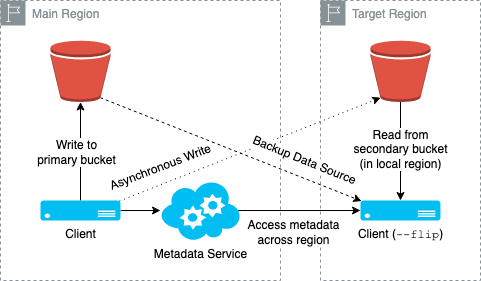
As shown in the diagram above, taking the primary region (main) writes and the replicated region (target) reads as an example, the data copy logic is straightforward: writes go to the primary region's object storage first and then are asynchronously replicated to the target region. Reads prefer the local region's bucket and fall back to the remote bucket if data hasn't yet arrived.
It's notable that replication runs continuously and asynchronously within the client process itself. The client writes to both buckets directly, rather than relying on a background job mechanism. Because both regions share the same JuiceFS Enterprise metadata engine, metadata remains fully consistent between them. However, the target region inherently operates with higher latency and may experience reduced performance.
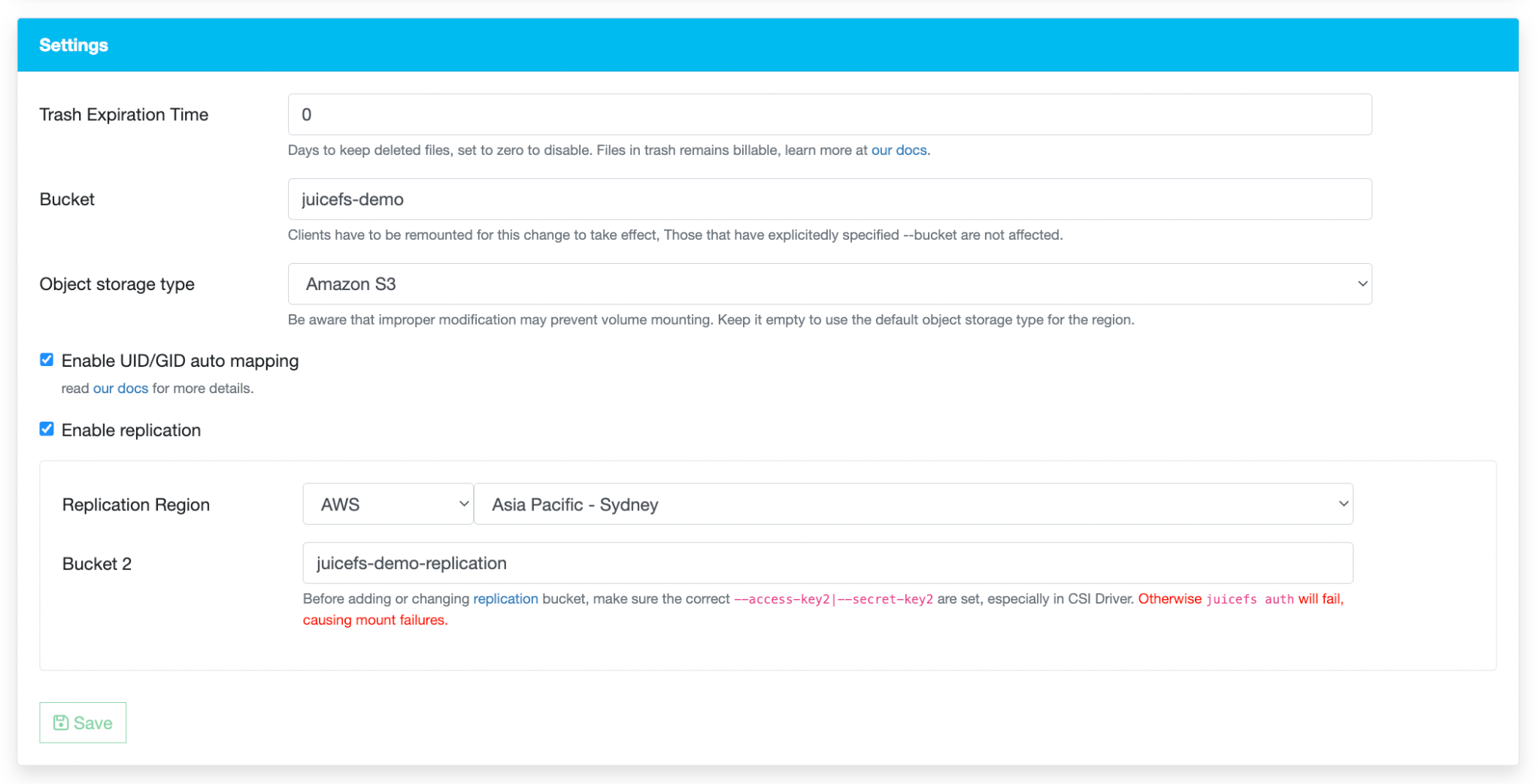
From a cost perspective, replication is free to enable, as JuiceFS does not charge for this feature, nor does it generate additional metadata that would affect billing. However, you remain responsible for your object storage provider's standard usage fees, as now you have more than one copy of data.
In short, data replication is designed to keep the underlying object storage in sync across regions using a shared metadata engine, with the additional benefits described above.
Mirror file system
The most sophisticated option is the mirror file system—a complete, writable replica of your entire JuiceFS deployment. Here's how it works and why it matters.
A mirror file system creates one or more full copies (both the metadata engine and the object storage) of an existing file system in different regions. Metadata is automatically synchronized from the source, allowing clients in the mirrored region to access the file system locally with dramatically lower latency. It is noteworthy that you can still choose not to replicate the object storage and rely on the caching layers to accelerate data access and reduce storage costs. But for simplicity, we will skip that setup here, as the mirror file system itself deserves a full long blog post.
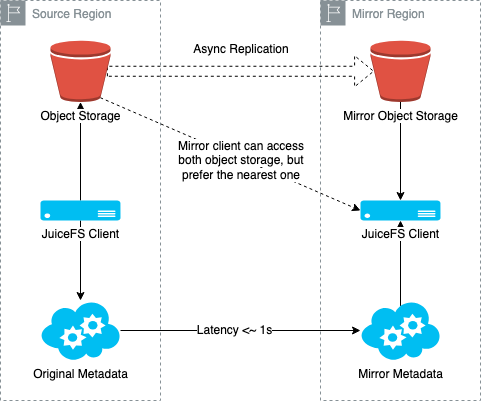
Prior to JuiceFS Enterprise version 5.1, mirrors were read-only, and write operations had to go back to the source region. Starting with version 5.1, mirrors support writes as well. In a write-enabled mirror, clients connect to both the source and mirror metadata services simultaneously. Read requests go to the local mirror for low latency. Write requests go directly to the source. After the source responds, the client waits briefly for the change to sync back to the mirror before returning to the application.
Consider an AI training scenario: your GPUs are in Region B, but your primary storage is in Region A. Without a mirror, every metadata operation crosses the network, potentially hundreds of milliseconds per request. With a mirror, reads are local, and the performance difference can be dramatic.
With that said, a mirror file system is not merely a backup. It is also a cross-cloud, low-latency disaster recovery solution. It is not likely that a JuiceFS Enterprise setup fails, as everything has high availability and resilience built-in: the JuiceFS Enterprise metadata engine is at least a 3-node topology using Raft as the consensus algorithm, and the object store service is generally robust. On top of that, the mirror file system feature enables consistent replication across regions and clouds. In the unlikely event of a primary region failure (again, maybe the entire data center is gone), you still have one or more copies of the entire file system with all committed writes available, each with its metadata engine and object storage highly available.
Final thoughts
Stop trusting anything as a magic shield. The UniSuper incident proves that even some of the most trusted systems can lose everything due to human errors. Assume your entire cloud console could be deleted at any second. Thus, test your backups! It is just a file until you load it, and that's exactly why you should consider running juicefs load regularly in a test environment to rehearse the recovery process.
Follow the 3-2-1 rule: Keep at least three copies of your data, stored on two different media types, with one copy kept offsite. Your downtime matters, so prepare accordingly. And here is how JuiceFS features covered in this blog post can help make your infrastructure resilient:
| Feature | JuiceFS edition | What it does | Best for |
|---|---|---|---|
| Metadata Backup | Community & Enterprise | Metadata backups saved to object storage with configurable frequency | Protecting against metadata engine loss |
| Data Synchronization | Community & Enterprise | One-time or periodic syncing between storage systems | Migrations and scheduled data syncing |
| Data Replication | Enterprise | Continuous async copy of object storage to another region with shared metadata | Active-passive disaster recovery and data sharing |
| Mirror File System | Enterprise | Writable mirror with local metadata service and local object storage | Cross-cloud, cross-region active-active deployments |
No single feature fits every use case. Assess your recovery needs, complexity tolerance, and budget. Let's recall Murphy's Law: anything that can go wrong will go wrong. The question now is just whether you will be ready for it.
If you have any questions for this article, feel free to join JuiceFS discussions on GitHub and community on Discord.
