


JuiceFS Enterprise Edition 5.3 has recently been released, achieving a milestone breakthrough by supporting over 500 billion files in a single file system. This upgrade includes several key optimizations to the metadata multi-zone architecture and introduces remote direct memory access (RDMA) technology for the first time to enhance distributed caching efficiency. In addition, version 5.3 enhances write support for mirrors and provides data caching for objects imported across buckets. It aims to support high-performance requirements and multi-cloud application scenarios.
JuiceFS Enterprise Edition is designed for high-performance scenarios. Since 2019, it has been applied in machine learning and has become one of the core infrastructures in the AI industry. Its customers include large language model (LLM) companies such as MiniMax and StepFun; AI infrastructure and applications like fal and HeyGen; autonomous driving companies like Momenta and Horizon Robotics; and numerous leading technology enterprises across various industries leveraging AI.
Single file system supports 500 billion+ files
The multi-zone architecture is one of JuiceFS' key technologies for handling hundreds of billions of files, ensuring high scalability and concurrent processing capabilities. To meet the growing demands of scenarios like autonomous driving, version 5.3 introduces in-depth optimizations to the multi-zone architecture, increasing the zone limit to 1,024 and enabling a single file system to store and access at least 500 billion files (each zone can store 500 million files, with a maximum of 2 billion).
The figure below shows JuiceFS Enterprise Edition architecture, with a single zone in the lower left corner:
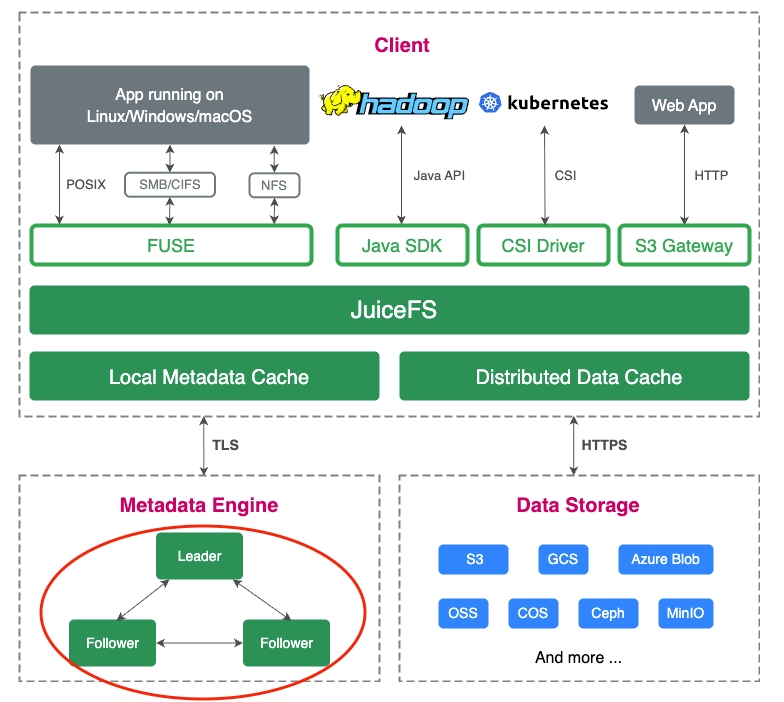
This breakthrough presents exponentially increasing challenges in system performance, data consistency, and stability, backed by a series of complex underlying optimizations and R&D efforts.
Cross-zone hotspot balancing: automated monitoring and hotspot migration, with manual ops tools
In distributed systems, hotspots are a common challenge. Especially when data is distributed across multiple zones, some zones may experience higher loads than others. This leads to imbalance that impacts system performance.
When the number of zones reaches hundreds, hotspot issues become more prevalent. Particularly with smaller datasets and larger numbers of files, read/write hotspots exacerbate latency fluctuations.
We introduced an automated hotspot migration mechanism to move frequently accessed files to other zones, distributing the load and reducing pressure on specific zones. However, in practice, relying solely on automated migration cannot fully resolve all issues. In certain special or extreme scenarios, automated tools may not respond promptly. Therefore, alongside automated monitoring and migration, we added manual operational tools, allowing administrators to intervene in complex scenarios, perform manual analysis, and implement optimization solutions.
Large-scale migration: improved migration speed, small-batch concurrent migration
Facing zones with excessive hotspots, early migration operations were simple. However, as the system scale expanded, migration efficiency gradually decreased. To address this, we introduced a small-batch concurrent migration strategy, breaking down high-access directories into smaller chunks and migrating them in parallel to multiple lower-load zones. This quickly scatters hotspots and restores normal application access.
Enhanced reliability self-checks: automatic repair and cleanup of intermediate migration states
In large-scale clusters, the probability of distributed transaction failures increases significantly, especially during extensive migration processes. To address this, we enhanced reliability detection mechanisms, adding periodic background checks to scan cross-zone file states, particularly focusing on intermediate state issues, and automatically performing repairs and cleanup.
Previously, the system encountered issues with residual intermediate state data. While these did not affect operations in the short term, over time they could lead to errors. Through enhanced self-check mechanisms, we ensure the background periodically scans and promptly handles intermediate state issues, improving system stability and reliability.
Beyond the three key optimizations above, we also made multiple improvements to the console to better adapt to managing more zones. We optimized concurrent processing, operational tasks, and query displays, enhancing overall performance and user experience. Specifically, we refined UI design to better showcase system states in large-scale zone environments.
Performance stress test for hundreds of billions of files
We conducted large-scale tests using a custom mdtest tool on Google Cloud, deploying 60 nodes, each with over 1 TB of memory. In terms of software configuration, we increased the number of zones to 1,024. The deployment method was similar to previous setups, but to reduce memory consumption, we deployed only one service process, with two others as cold backups.
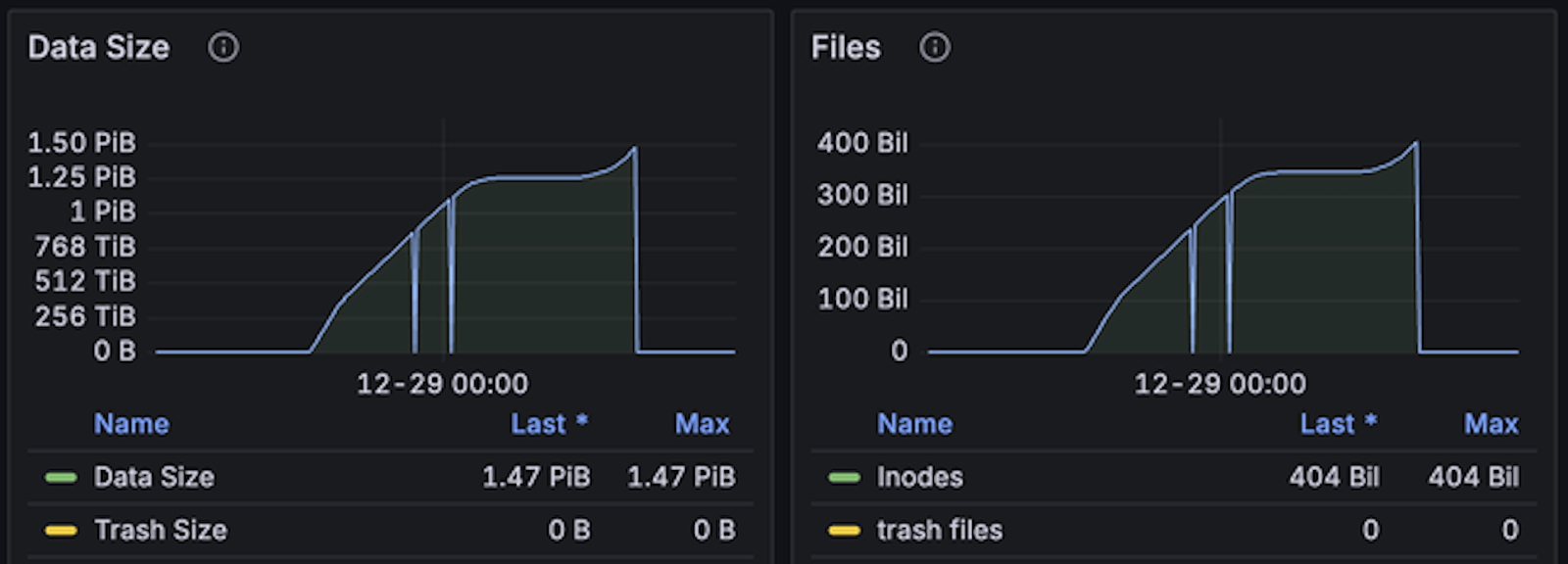
JuiceFS Enterprise Edition 5.3 test:
- Test duration: Approximately 20 hours
- Total files written: About 400 billion files
- Write speed: 5 million files per second
- Memory usage: About 35% to 40%
- Disk usage: 40% to 50%, primarily for metadata persistence, with good utilization
Based on our experience, if using a configuration with one service process, one hot backup, and one cold backup, memory usage increases by 20% to 30%.
Due to limited cloud resources, this test only wrote up to 400 billion files. During stress testing, the system performed stably, with hardware resources still remaining. We’ll continue to attempt larger-scale tests in the future.
Support for RDMA: increased bandwidth cap, reduced CPU usage
This new version introduces support for RDMA technology for the first time. Its basic architecture is shown in the diagram below. RDMA allows direct access to remote node memory, bypassing the operating system's network protocol stack. This significantly improves data transfer efficiency.
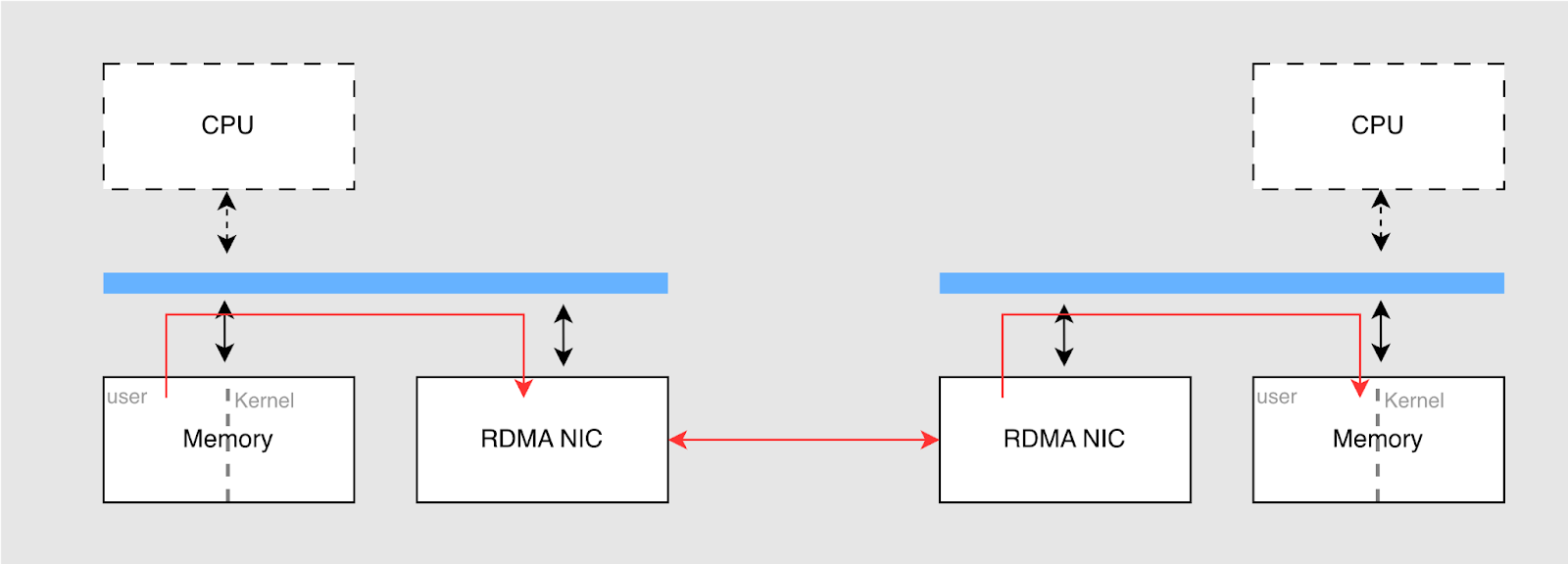
The main advantages of RDMA include:
- Low latency: By enabling direct memory-to-memory transfers and bypassing the OS network protocol layers, it reduces CPU interrupts and context switches. This lowers latency.
- High throughput: RDMA uses hardware for direct data transfer, better utilizing the bandwidth of network interface cards (NICs).
- Reduced CPU usage: In RDMA, data copying is almost entirely handled by the NIC, with the CPU only processing control messages. This allows the NIC to handle hardware transfers, freeing up CPU resources.
In JuiceFS, network request messages between clients and metadata services are small, and existing TCP configurations already meet the needs. However, in distributed caching, file data is transferred between clients and cache nodes. Using RDMA can effectively improve transfer efficiency and reduce CPU consumption.
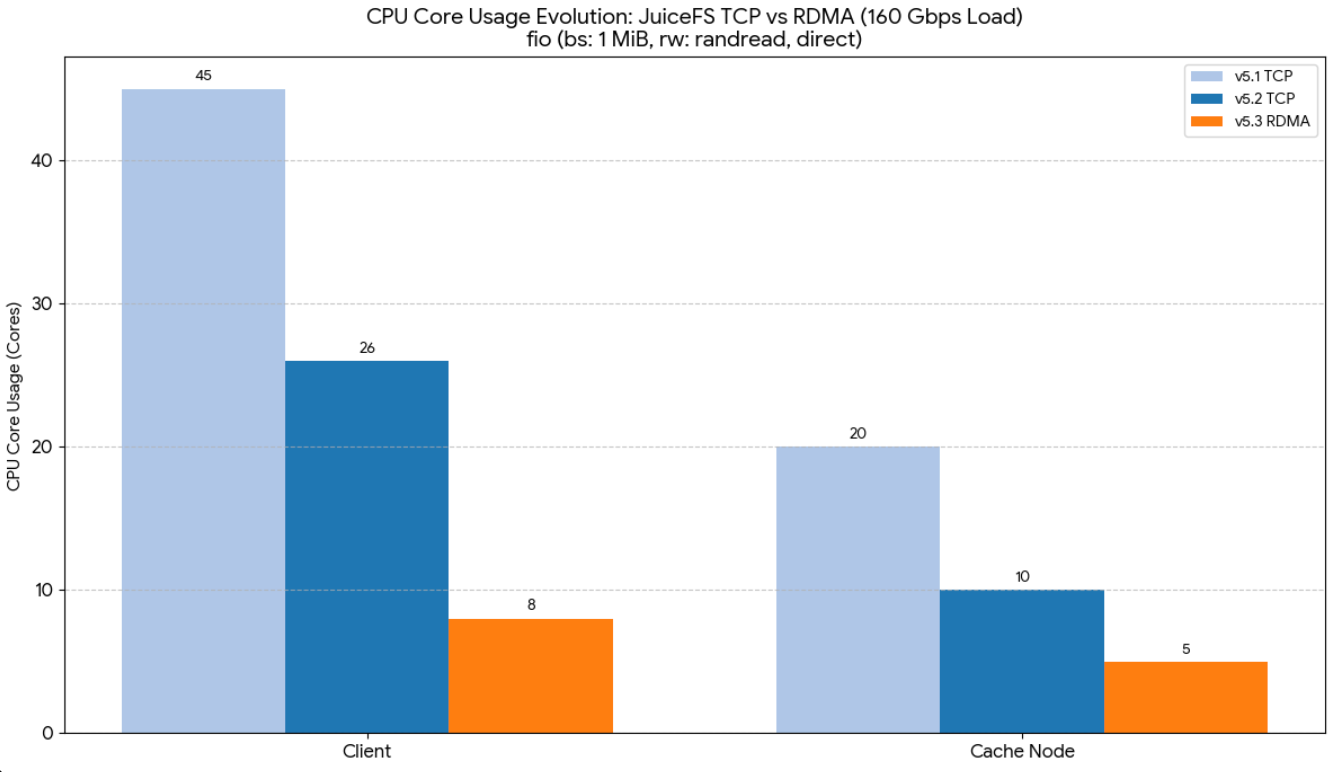
We conducted 1 MB random read tests using 160 Gbps NICs, comparing versions 5.1, 5.2 (using TCP networking) with version 5.3 (RDMA), and observed CPU usage.
Tests showed that RDMA effectively reduces CPU usage:
- In version 5.2, CPU usage was nearly 50%.
- In version 5.3, with RDMA optimization, CPU usage dropped to about one-third. Client and cache node CPU usage decreased to 8 cores and 5 cores respectively, with bandwidth reaching 20 GiB/s.
In previous tests, we found that while TCP ran stably on 200G NICs, fully saturating bandwidth was challenging, typically achieving only 85%-90% utilization. For customers requiring higher bandwidth (such as 400G NICs), TCP could not meet demands. However, RDMA can more easily reach hardware bandwidth limits, providing better transfer efficiency.
If customers have RDMA-capable hardware and high bandwidth requirements (for example, NICs greater than 100G) and wish to reduce CPU usage, RDMA is a technology worth trying. Currently, our RDMA feature is in public testing and has not yet been widely deployed in production environments.
Enhanced write support for mirrors
Initially, mirror clusters were primarily used for read-only mirroring in enterprise products. As users requested capabilities like writing temporary files (such as training data) in mirrors, we provided write support for mirrors.
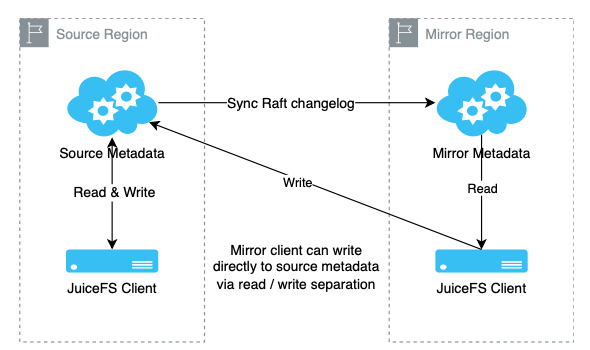
The mirror client implements a read-write separation mechanism. When reading data, the client prioritizes fetching from the mirror cluster to reduce latency. When writing data, it still writes to the source cluster to ensure data consistency. By recording and comparing metadata version numbers, we ensure strong consistency between the mirror client and source cluster client views of the data.
To improve availability, version 5.3 introduces a fallback mechanism. When the mirror becomes unavailable, client read requests automatically fall back to the source cluster. This ensures application continuity and avoids interruptions caused by mirror cluster failures. We also optimized deployments in multi-mirror environments. Previously, the mirror end required two hot backup nodes to ensure high availability. Now, with the improved fallback feature, deploying a single mirror node can achieve similar effects. This ensures application continuity and reduces costs, especially beneficial for users requiring multiple mirrors.
Through this improvement, we not only reduced hardware costs but also found a balance between high availability and low cost. For users deploying mirrors in multiple locations, reducing metadata replicas further lowers overall costs.
Simplified operations & increased flexibility: providing cross-bucket data cache for imported objects
In JuiceFS, users can use the import command to bring existing files from object storage under unified management. This is convenient for users already storing large amounts of data (for example, tens of petabytes). However, in previous versions, this feature only supported caching for objects within the same data bucket. This meant imported objects had to reside in the same bucket as the existing file system data. This limitation had certain practical constraints.
In version 5.3, we improved this feature. Users can now provide caching capability for any imported objects, regardless of whether they come from the same data bucket. This allows users more flexibility in managing objects across different data buckets, avoiding strict bucket restrictions and enhancing data management freedom.
In addition, previously, if users had data distributed across multiple buckets and wanted to provide caching for that data, they needed to create a new file system for each bucket. In version 5.3, users only need to create one file system (volume) to uniformly manage data from multiple buckets and provide caching for all buckets.
Other important optimizations
Trace feature
We added the trace feature, a feature provided by the Go language itself. Through this, advanced users can perform tracing and performance analysis, gaining more information to help quickly locate issues.
Trash recovery
In previous versions, especially with multiple zones, sometimes the paths recorded in the trash were incomplete. This led to anomalies during recovery, where files were not restored to the expected locations. To address this, in version 5.3, when deleting files, we record the original file path, ensuring more reliable recovery capabilities.
Python SDK improvements
In earlier versions, we released the Python SDK, providing basic read/write functionalities for Python users to interface with our system. In version 5.3, we not only strengthened basic read/write functions but also added support for operational subcommands. For example, users can directly call commands like juicefs info or warmup via the SDK without relying on external system commands. This simplifies coding efforts and avoids potential performance bottlenecks from frequently calling external commands.
The Windows client
We previously launched a beta version of the Windows client and have received some user feedback. After improvements, the current version shows significant enhancements in mount reliability, performance, and compatibility with Linux systems. In the future, we plan to further refine the Windows client, providing an experience closer to Linux for users reliant on Windows.
Summary
Compared to expensive dedicated hardware, JuiceFS helps users balance performance and cost when addressing data growth by flexibly utilizing cloud or existing customer storage resources. In version 5.3, by optimizing the metadata zone architecture, a single file system can support over 500 billion files. The first-time introduction of RDMA technology significantly improves distributed caching bandwidth and data access efficiency, reduces CPU usage, and further optimizes system performance. In addition, we enhanced features like write support for mirrors and caching, improving the performance and operational efficiency of large-scale clusters and optimizing user experience.
Cloud service users can now directly experience JuiceFS Enterprise Edition 5.3 online, while on-premises deployment users can obtain upgrade support through official channels. We’ll continue to focus on high-performance storage solutions, partnering with enterprises to tackle challenges brought by continuous data growth.
If you have any questions for this article, feel free to join JuiceFS discussions on GitHub and community on Slack.
