


JuiceFS Community Edition 1.4 introduces enhanced tiered storage capabilities, allowing users to set object storage classes at the file or directory level. This makes it possible to manage different storage tiers for data under a unified file system interface. In this article, we’ll discuss this feature’s application background, evolution, usage model, implementation, and future plans.
Application background
In real‑world scenarios, different files have different access patterns and performance requirements. Some data is read or written frequently and demands low latency and high throughput. Other data is rarely accessed after being written, and the main concern is long‑term storage cost. Tiered storage addresses this by placing data in the appropriate storage layer based on access patterns, balancing performance and cost.
Typically, data can be classified into three categories:
- Hot data: Frequently accessed, requires low latency and high throughput.
- Warm (infrequent access) data: Accessed occasionally, but still requires fast retrieval when needed.
- Cold (archival) data: Primarily for long‑term retention, very low access frequency, can tolerate some restoration delay in exchange for lower cost.
Object storage already offers tiering capabilities. For example, Amazon S3 provides S3 Standard for frequently accessed data, S3 Standard‑IA for infrequent but still millisecond‑accessible data, and Glacier / Deep Archive for long‑term archiving. These storage classes differ in access latency, minimum storage duration, and pricing.
The table below compares main S3 storage classes:
| Storage class | Use case | First byte latency | Minimum storage duration fee |
|---|---|---|---|
| S3 Standard | General-purpose storage for frequently accessed data | Milliseconds | N/A |
| S3 Standard-IA | Infrequently accessed data requiring millisecond access | Milliseconds | 30 days |
| S3 Glacier Deep Archive | Archiving very rarely accessed data with very low cost | Hours | 180 days |
For JuiceFS, which is built on top of object storage, the key is to translate these capabilities into file‑system‑level tiering: users set storage tiers for files, directories, or datasets, and JuiceFS maps them to the underlying object storage while handling writes, migrations, and restore operations.
Evolution of JuiceFS tiering capabilities
The evolution of JuiceFS tiering has moved from being “passively unaware of object storage classes” to “actively managing storage tiers at file and directory granularity.”
Before v1.1, JuiceFS did not provide a way to configure storage classes. While users could manually change the storage class of objects at the object storage side, these changes were not recognized or managed by JuiceFS at the file system level. For standard and infrequent‑access classes that support direct access, normal read/write operations usually continued to work. However, if objects were moved to archival storage, access would fail because those objects cannot be read directly.
Starting with v1.1, JuiceFS supports setting the object storage class via --storage-class. For example, you can specify the default storage class for the file system at format time or override the storage class used for data written to a specific mount point during mount. This gave JuiceFS a basic ability to leverage object storage tiering. However, the configuration granularity remained coarse – primarily at the file system default or mount‑point level – and did not allow fine‑grained management per directory, per file, or per dataset.
Version 1.4 further advances tiering capabilities to the file and directory level. You can assign a storage tier to individual files or directories based on data temperature. When a directory is assigned a tier, newly created files and subdirectories under it automatically inherit that configuration. Compared to the previous default or mount‑point level settings, v1.4 is better suited for tiered management by project, directory, dataset, or data temperature.
How to configure tiered storage
The key to tiered storage in JuiceFS 1.4 is translating object storage classes into file‑system‑manageable tiers. The usage model consists of two steps:
- Map tier IDs to object storage classes.
- Assign files or directories to those tier IDs.
This allows users to organise tiering policies by file, directory, or dataset without specifying the underlying storage class on every write.
The figure below shows mapping tier IDs to storage classes:
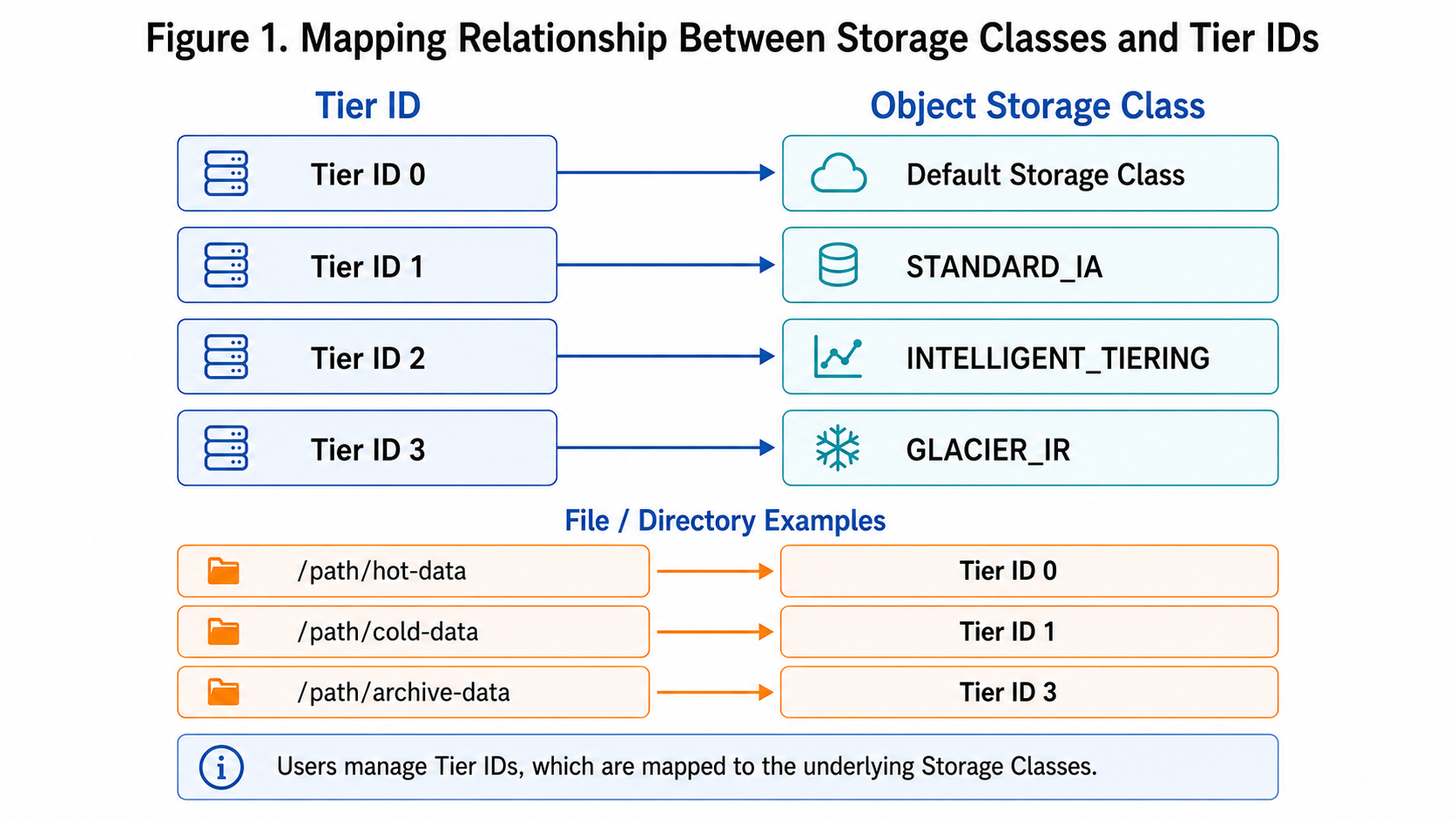
For example, map tier IDs 1–3 to different storage classes:
juicefs config redis://localhost --tier-id 1 --tier-sc STANDARD_IA -y
juicefs config redis://localhost --tier-id 2 --tier-sc INTELLIGENT_TIERING -y
juicefs config redis://localhost --tier-id 3 --tier-sc GLACIER_IR -y
After mapping, set the storage tier for a file or directory:
juicefs tier set redis://localhost --id 1 /path/to/file
juicefs tier set redis://localhost --id 2 /path/to/dir
Directory‑level settings have inheritance semantics. Once a directory is assigned a tier ID, newly created files and subdirectories will inherit that tier. To apply the tier to existing data under the directory, use -r to recursively set the tier:
juicefs tier set redis://localhost --id 2 /path/to/dir -r
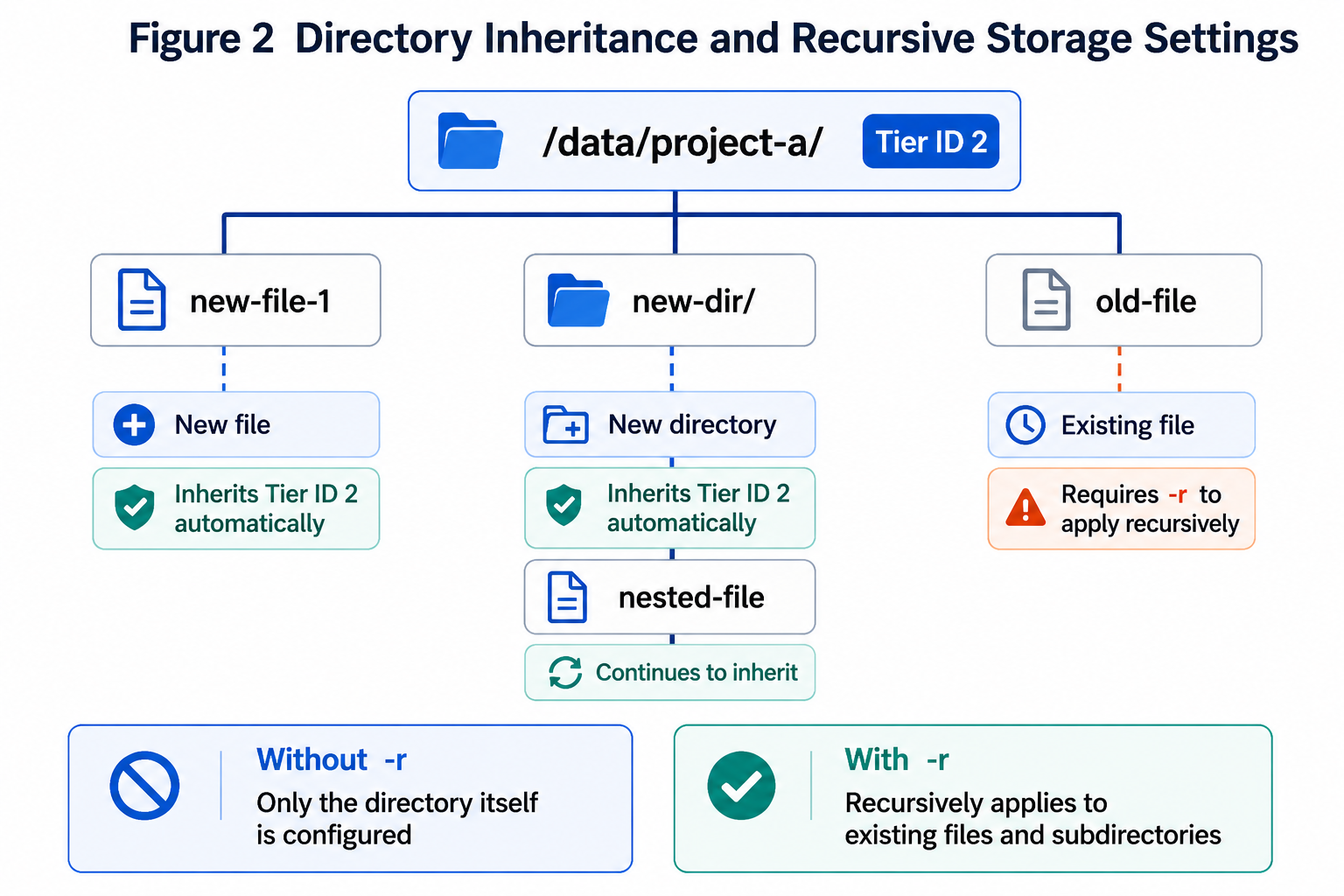
For archival storage classes such as Glacier, a restore request must be issued before reading:
juicefs tier restore redis://localhost /path/to/dir -r
Implementation
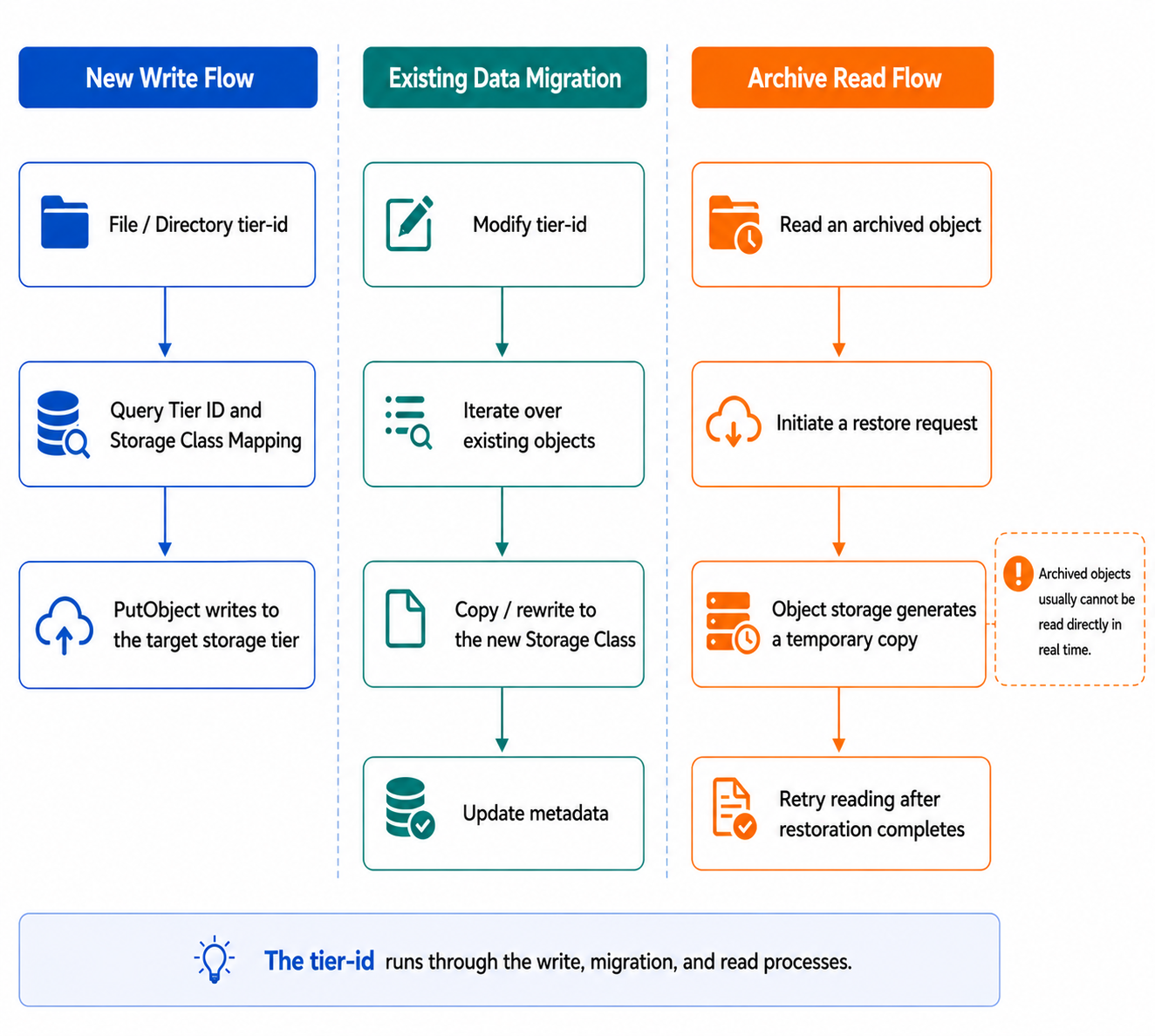
From an implementation perspective, the key to tiered storage in v1.4 is storing tier information in metadata and using the tier ID to decide the object storage behavior during writes, migrations, and reads.
Metadata design
JuiceFS uses tier-id on files and directories to indicate the storage tier. A value of 0 means the default storage tier; values 1 to 3 correspond to user‑configured object storage classes.
Thus, the storage tier is no longer just an external state at the object storage side, but becomes part of the file system metadata that JuiceFS can understand and manage. When writing new data, migrating existing data, or checking file status, JuiceFS can determine the intended storage class based on this metadata.
Migrating existing data
For existing data, changing the storage tier involves not only updating the metadata tier-id but also changing the actual storage class of the underlying objects. When a directory is set recursively, JuiceFS processes all files and subdirectories under it and uses the object storage’s copy capability to migrate existing objects to the new storage class.
If only the mapping from a tier ID to a storage class is changed, the actual storage class of existing objects is not automatically updated. In that case, you must use tier set --force to explicitly trigger the change. This will rewrite the objects with the new storage class.
Write path
When a new file is written, JuiceFS determines the target storage class based on the file’s own tier-id or, if not set, the inherited tier-id from its parent directory. For directories that already have a storage tier assigned, new data can be written directly to the corresponding storage tier. This avoids the overhead of first writing to the default tier and then migrating later.
Read path
For storage classes that support immediate access (for example, Standard and Standard‑IA), reads are transparent to the application, and JuiceFS simply reads the data from object storage as usual.
For archival classes such as Glacier and Deep Archive, objects cannot be read directly. You must first issue a restore request using juicefs tier restore. This sends a request to the object storage service. Whether and when the objects become readable depends on the cloud provider’s restore mechanism. After restoration completes, applications can retry the read.
Therefore, archival storage is suitable for data that is accessed very infrequently and can tolerate restoration delay. It’s not appropriate for workloads that require online access at any time. When using archival tiers, you must consider storage cost, restoration time, and restoration costs.
Future plans
Reducing operational costs of archival storage
Archival storage classes have low long‑term storage costs, but they often come with complex cost models for writes, restores, early deletion costs, and lifecycle transitions. Writing data directly to archival storage may incur extra costs in scenarios with frequent changes or bulk migrations.
In the future, JuiceFS could combine object storage lifecycle management. Data could first be written to standard storage with specific object tags. Users could then use cloud‑vendor lifecycle rules to automatically and cost‑effectively transition data to infrequent‑access or archival tiers based on those tags. This would preserve JuiceFS’ file‑system‑level tiering capabilities while leveraging native batch transition mechanisms to reduce overhead.
Extending tiering to multi‑bucket, multi‑cloud
Currently, tiered storage works on different storage classes within the same object storage backend. In the future, JuiceFS could extend “tier” to different buckets, different object storage services, or even different cloud providers. Tiering would no longer be limited to a single backend.
For example, hot data could be stored in a local high‑performance MinIO cluster backed by SSDs, while cold or archival data resides in low‑cost cloud archival buckets. Policies could then gradually move data from the hot tier to the cold tier. With such an architecture, JuiceFS could offer cross‑bucket, cross‑cloud, and cross‑media tiered data management under a unified file system namespace.
If you have any questions for this article, feel free to join JuiceFS discussions on GitHub and community on Discord.
