Hello is a Chinese mobility and technology company, offering car-pooling, car-hailing, battery swapping, shared bike, e-bike, and e-scooter rental services. We have 800 million+ registered users.
As our AI business continues to grow, we need to support multiple workloads simultaneously, including model training, data processing, and AI agents. To address issues such as data fragmentation, inconsistent access methods, and complex cross-cloud data flows caused by multiple storage systems, we introduced JuiceFS (an open-source, high-performance distributed file system) in production to build a unified file data foundation that connects Notebook, training, evaluation, and agent environments.
Among these workloads, agents have become an important application type and are already used in several real-world application scenarios. We’ve also deployed an internal personal agent for employees. Unlike training workloads, which primarily focus on high-performance I/O and access to massive numbers of files, agents place greater emphasis on data movement during task execution, state persistence, and the accumulation of results.
This article focuses on how we use JuiceFS to persist user profiles, conversations, memories, skills, execution traces, and application artifacts, and how a shared workspace decouples agent state from compute Pods.
Hello's AI infrastructure and storage landscape
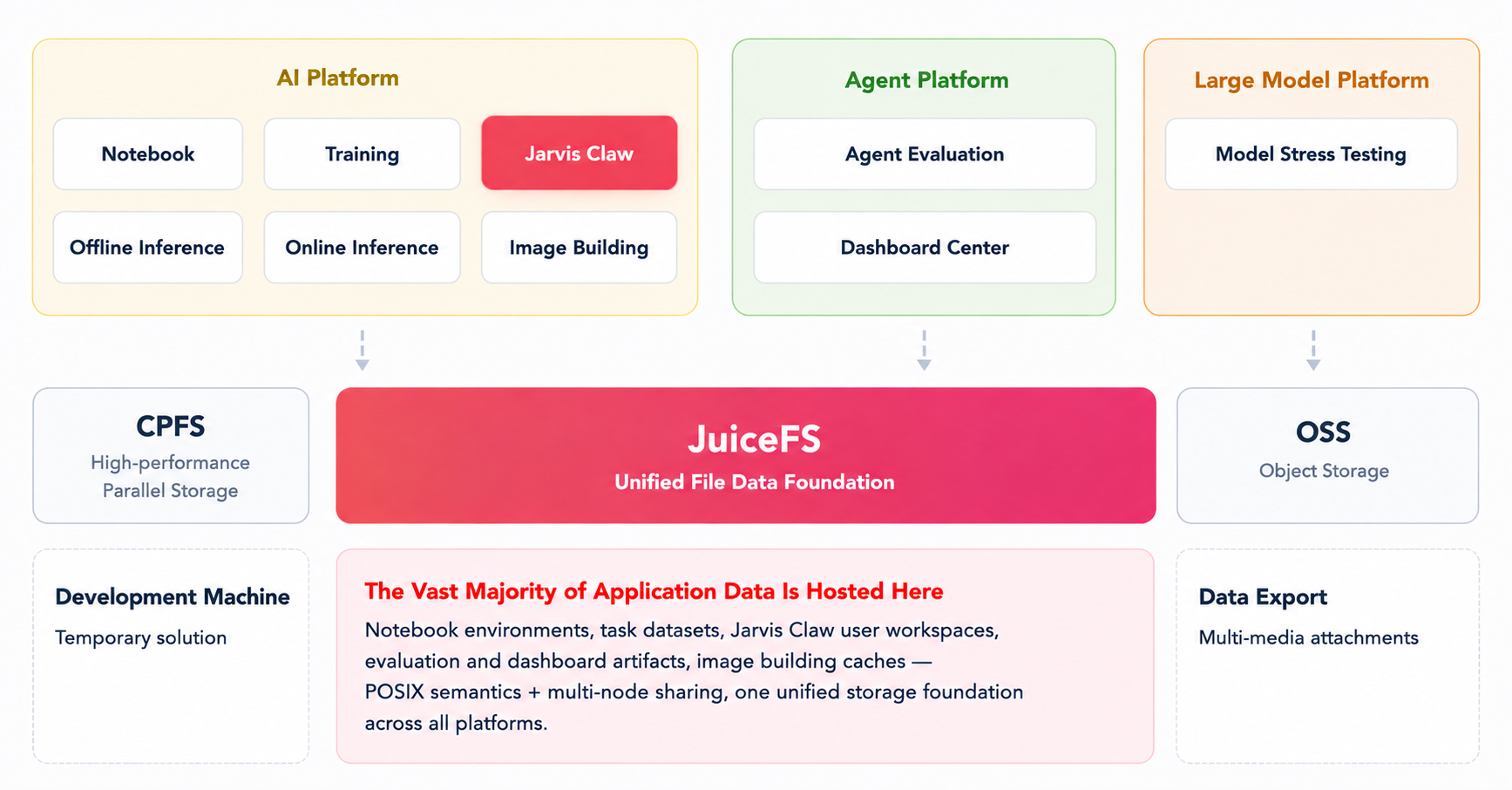
Our business scenarios are diverse, including customer service, review, scheduling, analytics, and broadcasting. To support AI applications across these businesses, we’ve progressively built an AI platform and a large language model (LLM) platform covering model development, training, inference, and serving.
The AI platform supports scenarios including Notebook, training, offline inference, online inference, and image building. Notebook environments need to mount user directories and datasets. Training and inference jobs need to access input data, models, and intermediate results. The image-building process also generates reusable caches.
The LLM platform aggregates different model services and provides model invocation and benchmarking capabilities. The data and reports generated during model benchmarking also need to be persistently stored.
For different types of data and workloads, we primarily use three types of storage:
- CPFS provides high-performance parallel storage.
- JuiceFS serves as the shared file storage foundation for the platform. It supports data requiring POSIX semantics, multi-node sharing, and a unified namespace, including Notebook environments, task datasets, model benchmarking reports, and image build caches.
- Object storage is mainly used for object data such as multimedia attachments.
A small number of directories on development machines are still used as a transitional solution and have not yet been migrated to the unified storage system.
Overall, this storage architecture already covers the data persistence and cross-environment sharing requirements of our AI platform.
New storage requirements introduced by agent workloads
As agents have gradually moved into production, our AI capabilities have expanded beyond model development, training, and inference to agents capable of invoking tools and completing application workflows.
Related applications include image review for two-wheeled vehicle operations and trip recording review for ride-sharing services. These applications have delivered practical results by expanding review coverage, reducing manual effort, and lowering service costs.
Building on the deployment of vertical agents, we further introduced Jarvis Claw, a personal agent for employees. Employees can interact with Jarvis Claw through DingTalk or the web. By combining capabilities such as long-term memory, skills, Model Context Protocol (MCP), and Cron, it can assist with tasks such as answering questions, generating reports, reviewing content, and performing analysis.
Unlike vertical agents designed for a single application workflow, a personal agent needs to preserve state across multiple rounds of interaction and continuous tasks.
For example:
- In an IT support scenario, Jarvis Claw needs to preserve user requests, attachments, conversations, knowledge retrieval results, and tool invocation results.
- In an operations reporting scenario, it needs to continuously access historical source tables and scripts while generating new data tables, charts, and reports.
- In an operations attribution scenario, it also needs to preserve data extraction scripts, intermediate data, and final analysis results for later inspection and re-execution.
A long-running agent needs to preserve five types of data:
- User profiles and behavioral configurations
- Conversation history and runtime state
- Long-term memory that can be reused across conversations
- Skills, MCP servers, channel configurations, and scheduled task configurations
- Application artifacts such as scripts, CSV files, Excel spreadsheets, charts, and reports
These states naturally take the form of files:
- Profiles are stored as Markdown files.
- Conversation history is stored in SQLite.
- Skills consist of directories and scripts.
- Task configurations use JSON.
- Application results exist as ordinary files such as data tables, charts, and code.
The complete state of an agent ultimately consists of a continuously evolving collection of files and directories that are created, modified, and related to one another.
A long-running agent therefore requires a unified shared storage layer that supports POSIX semantics, SQLite write-ahead logging (WAL), atomic rename operations, and access to large numbers of small files. It must also allow multiple Pods to share the same user state. Even if a compute Pod is destroyed, recreated, or rescheduled, the user's profile, conversations, memories, and task artifacts must remain available.
How JuiceFS stores the complete state of an agent
To meet these requirements, we extended our existing JuiceFS-based shared file storage foundation to agent workloads and use it to store a complete workspace for each user.
The platform assigns each employee an independent Jarvis Claw directory based on the employee account. The directory structure is similar to:
/userdata/aiplatform-jarvis-claw/user/<staff_id>/data/workspace
The user's profile, conversations, memories, skills, task configurations, and application artifacts are all stored in this directory. The Jarvis Claw Pod is responsible only for computation.
When a Pod is destroyed, recreated, or rescheduled, it only needs to remount the existing workspace to continue using the previous state. This makes the agent stateful while keeping the compute Pods stateless.
What agent state is stored in the workspace?
The workspace contains profile files such as:
AGENTS.mdSOUL.mdPROFILE.mdHEARTBEAT.mdMEMORY.md
These files describe the agent's identity, behavior, and user preferences and are combined into the system prompt.
Conversation and runtime state are primarily stored in files and directories such as:
sessions/transcripts/dialog/tool_results/history.dbchats.jsoninbox_events.json
history.db uses SQLite and also generates WAL and SHM files.
User messages are written to transcripts/ at the beginning of a task. Even if the task is interrupted later, the conversation content generated before the interruption is preserved.
Long-term memory is stored in directories such as:
memory/digest/mem_agent/mem_session/mem_metadata/resource/
Jarvis Claw manages memory using ReMe and a Memory-as-File approach.
Some memory is written directly by the agent during execution. Another part is generated by periodically reviewing historical conversations, extracting user preferences and information that remains useful over time, and writing the results to directories such as digest/. Internally, this process is referred to as Dream.
The workspace also stores task and capability configurations, including:
cron_jobs.jsoncron_runs/mcp.jsonchannels.jsondingtalk_webhooks.jsonskills/skill.json
Skill packages are stored as ZIP files in object storage. When a Pod starts, they are downloaded and extracted into the user's workspace.
Scripts, data tables, charts, and reports generated by the agent are stored in directories such as output/ and scripts/, as well as in files including Excel spreadsheets, CSV files, and SVG images.
The actual workspace also contains auxiliary content such as browser data, backups, and migration files.
Together, these files and directories form the complete state of an agent and are continuously created, modified, and accumulated as tasks are executed.
How a unified file system supports data movement and operations
Storing agent workspaces in JuiceFS not only provides state persistence and storage-compute separation, but also allows agents to share the same file system with environments such as Notebook, training, and evaluation.
When permissions allow it, Notebook can directly access an agent's workspace. Data prepared in Notebook can be directly provided to an agent. Likewise, data tables and scripts generated by an agent can be reused for analysis or evaluation without repeatedly uploading or copying data between different systems.
Operational tasks such as inspection, migration, backup, and per-user storage usage analysis can also be performed using standard tools such as ls, du, and rsync. Engineers can directly inspect conversations, memories, configurations, and task artifacts to troubleshoot issues during execution.
However, as the workspace evolves from an ordinary data directory into a working environment that an agent can actively read from, write to, and execute scripts within, the platform must provide not only file persistence and sharing, but also appropriate access controls and execution boundaries.
Security boundaries for shared workspaces
An agent may not only read and modify files in its workspace, but also execute commands or code through Shell, MCP, and REPL. Without effective constraints, its access could extend beyond the user's workspace to other users' data, service source code, and sensitive files inside the container.
Therefore, we established security boundaries across four layers:
- User data isolation
- Tool invocation governance
- File access control
- Subprocess management
How different users' data is isolated
We manage file system permissions through JuiceFS and OpenACL, assigning each user an independent workspace and controlling the directories that different users are allowed to mount and access.
With this mechanism, each agent can access only the workspace for which it has been authorized and cannot read other users' data.
File system permissions provide the basic data boundary between users, but they cannot cover all access behavior generated when an agent executes tools and code inside a container. Therefore, in addition to user-level permissions, the platform also needs to further restrict tool invocations and their execution environments.
How the system determines whether a tool invocation is allowed
When the model decides to invoke a tool, the operation is not executed immediately. Instead, the governance layer first evaluates the operation through assert_policy().
The result falls into one of four categories:
ALLOW: Allow the operation.DENY: Reject unknown tools and dangerous operations such assudo.ASK: Request manual approval.SANDBOX_FALLBACK: Execute the operation in a sandbox environment.
When manual approval is required, the system sends an approval request to the frontend through a side channel. After the user approves the request, a generalized version of the rule can be written to policy.yaml so that similar future invocations can reuse it.
For Shell operations, execute_shell_command() fixes the current working directory to the user's workspace rather than the service source directory. Then, it selects the appropriate sandbox configuration based on the governance result. The configuration prioritizes dynamically generated fine-grained rules from the governance layer, followed by globally configured default rules registered when the service starts. Bare-process execution is allowed only in local development environments. This layer determines whether a tool invocation is allowed to execute. For approved operations, the platform must further restrict the files that can actually be accessed based on the execution method.
How file access permissions are restricted for the main process and subprocesses
Agents access files mainly in two ways, which require different control mechanisms.
File tools such as read_file, write_file, edit, grep, glob, and view_image run directly inside the main service process and do not create subprocesses.
As a result, they cannot be intercepted by bubblewrap. The system uses application-level path checks, such as is_protected_path(), to constrain relative paths to the user's workspace while blocking access to protected locations such as /app, which contains service source code and installation files. Protected entries are also filtered during directory listing.
Shell commands, stdio MCP servers, and REPL environments used to execute model-generated code, on the other hand, create subprocesses.
For these operations, application-level path checks alone cannot establish a complete security boundary. Therefore, the system uses bubblewrap and Linux mount namespaces to construct an isolated file system view for subprocesses.
Within this restricted view:
- The user's workspace is mounted with read and write access.
- Other approved paths are exposed according to policy rules.
- Service source directories such as
/appare hidden or mounted as read-only. - Sensitive paths such as
~/.sshand~/.awsare blocked.
As a result, the agent can operate normally within the user's workspace without gaining access to all files in the container.
If the production environment is configured to use bubblewrap but the sandbox cannot actually be created, Shell and MCP use a fail-closed policy: execution is rejected rather than falling back to an unisolated bare process. The REPL follows the same rule when executing model-generated Python code. If the sandbox is unavailable, execution is denied.
How subprocess lifecycles and sandbox boundaries are managed
Each tool invocation that creates a subprocess uses an independent sandbox and process group with --die-with-parent enabled. When a user executes /stop, a task times out, or a new task within the same Scope replaces the current one, the system progressively cancels the current task and uses killpg to clean up the entire process group. This prevents Shell processes, MCP servers, or their child processes from continuing to run in the background.
Although stdio MCP servers are launched by the SDK itself, their execution commands are also prefixed with bubblewrap so that they use the same file system view as Shell commands. The REPL must likewise enter the sandbox when executing model-generated Python code, preventing execution methods other than Shell from becoming a path around the security boundary.
There are also several implementation details to consider:
- After
/appis overlaid with tmpfs, it must be remounted as read-only to prevent writes to the temporary/appfrom silently succeeding. - Before entering the sandbox,
VIRTUAL_ENVandPATHentries pointing to protected locations must also be cleaned up to avoid problems with the Python runtime environment. - When the service starts, it performs an actual
/bin/trueexecution inside the sandbox as a self-check rather than merely verifying that the bubblewrap binary exists.
The current solution primarily addresses file system and service source code isolation. Network isolation through --unshare-net has not yet been implemented. In addition, CPU and memory quotas have not yet been configured beyond execution timeouts.
Summary
Our production practice can be summarized in four points:
- Everything about an agent's state can be represented as files. Profiles are Markdown files. History is stored in SQLite. Skills are directories. Memory and configuration are stored as files. Application artifacts include Excel spreadsheets, CSV files, charts, and scripts.
- A shared file system provides state persistence and storage-compute separation. Agent Pods are responsible only for computation, while agent state and workspaces are stored in JuiceFS. Pods can be rebuilt at any time without causing user data to disappear with the compute instance.
- The same file system connects multiple AI environments. Notebook, training, evaluation, and Jarvis Claw can access the same set of files. Data no longer needs to be repeatedly copied between different systems, and operations can rely on standard file-based tools and workflows.
- Opening the workspace requires layered security boundaries. JuiceFS and OpenACL manage user-level file system permissions. Application-level path checks restrict the file access scope of tools running in the main process. Bubblewrap controls subprocesses created by Shell commands, MCP servers, and code execution.
Next, we plan to further explore agent self-evolution. Agent telemetry, memories, and evaluation data will continue to accumulate in the file system. Models will continue to improve, and this accumulated data will become part of the foundation for the agent's future evolution.
If you have any feedback on this article or ideas to share, we invite you to participate in the discussions on GitHub and join our community on Discord.