AWS announced Amazon S3 Files to let you mount an S3 bucket as a high‑performance shared file system on compute nodes without moving any data.
This isn't the industry's first attempt to make S3 accessible as a file system. From the early days of s3fs, to AWS' later release of Mountpoint for Amazon S3, and now S3 Files, the path to "using S3 like a file system" has been many years in the making. The key difference is that earlier solutions mostly operated at the access layer, while S3 Files finally wraps shared access, full file system semantics, and a managed high‑performance layer into a native offering.
This makes S3 Files a new option worth analyzing on its own. For workloads that need file‑style access to existing S3 data, it provides a native, lightweight solution. But in more complex scenarios such as AI model training or big data analytics, its actual performance still needs to be evaluated based on its underlying implementation and runtime behavior.
In this article, we’ll analyze S3 Files’ implementation, performance boundaries, and how it differs from JuiceFS.
S3 Files: an S3 native file system with EFS as the high‑performance layer
S3 Files uses Amazon Elastic File System (EFS) as a managed high‑performance storage layer to handle low‑latency data and metadata. On top of that, it provides full file system semantics for S3, including consistency, file locking, and POSIX permissions.
Think of it this way: AWS adds an EFS-based file system access layer on top of object storage, so that data previously accessible only through object APIs can be used directly by compute nodes as directories, files, and mount points. Changes between the file system and S3 are synchronized automatically by the service in the background.
With this architecture, S3 Files does not migrate the entire dataset. Instead, it only places a portion of the current working set into the high‑performance layer on demand, while the “source of truth” for the data remains in S3.
How S3 Files works: mount, import, and sync
For S3 Files, mounting is only the beginning. What really matters is the data path after mounting: how the scope is determined, what gets imported on first access, which requests go to the high‑performance layer, and how writes are synced back to S3. These mechanisms directly determine the performance boundaries and cost structure discussed later.
The figure below shows S3 Files mount architecture:
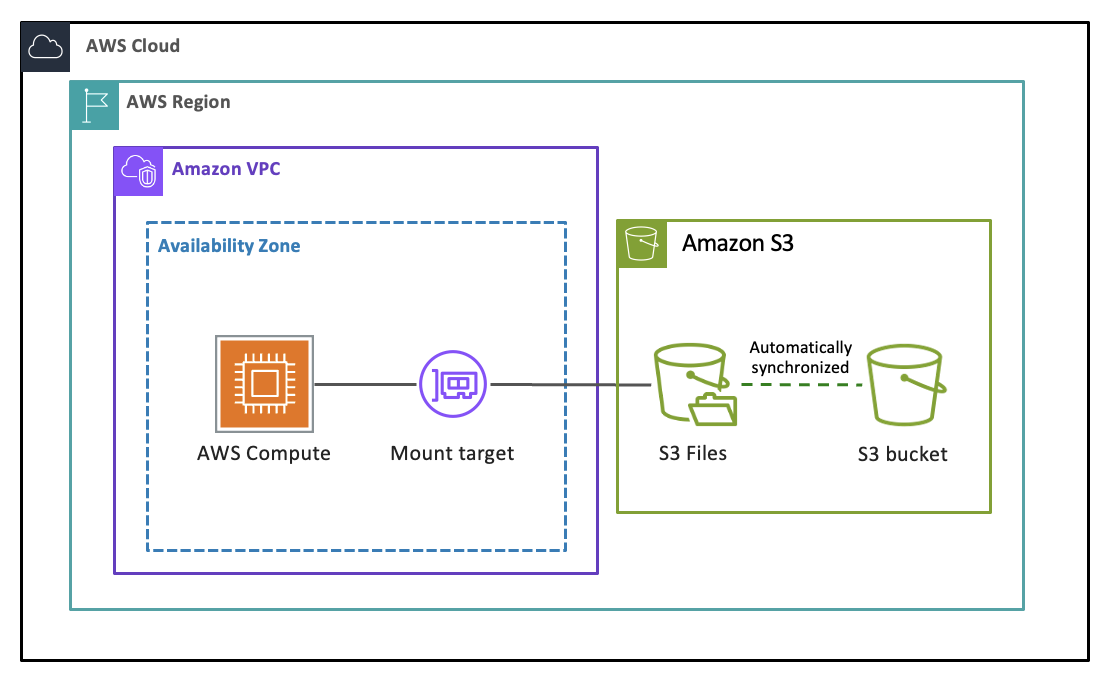
Taking an EC2 instance mounting an existing S3 bucket as an example, the real questions are not about the mount command itself, but about what happens after mounting: how data is imported, accessed, and synced. Here are the key technical details.
Scope: import the entire bucket or a specific prefix
In S3, files are organized using prefixes. You can think of them as similar to “subdirectories” or “sub-buckets” within a bucket, but they are not actual directories. S3 Files can mount an entire S3 bucket (i.e., s3://my-bucket/) or restrict the scope to a specific prefix (i.e., only s3://my-bucket/data/ml/). This is especially important for huge S3 buckets containing millions or even hundreds of millions of objects, because a broader scope adds more metadata sync overhead and potentially more operational complexity.
When using S3 Files on a compute node, AWS provides a custom mount client amazon-efs-utils. When mounting, you use the file system ID assigned by AWS for the S3 Files instance, not the bucket name.
You can create a local mount directory and mount it using the dedicated s3files file system type as shown below:
sudo yum -y install amazon-efs-utils
sudo mkdir /mnt/s3files
sudo mount -t s3files file-system-id:/ /mnt/s3files
When mounting, you can specify a subdirectory (or actually a prefix) in the mount path (for example, file-system-id:/data/ml/). However, this only affects the local mount point, as the underlying metadata sync still applies to the entire bucket, and other mount points could inadvertently access other subdirectories. Very often in practice, a better approach is to limit the scope to a specific prefix when creating the S3 Files instance, rather than using the entire bucket and trying to restrict access afterward.
First access: import triggers and size thresholds
S3 Files does not immediately move the entire dataset into the high‑performance layer after mounting. Data import is triggered by access events. The default mode is trigger=ON_DIRECTORY_FIRST_ACCESS: when you first access a directory, the system imports the metadata of files under that directory and asynchronously moves the data of small files that meet the criteria into the EFS high‑performance layer.
If configured as trigger=ON_FILE_ACCESS, the first directory traversal only imports metadata; data enters the high‑performance layer only when a file is actually read for the first time. This saves space and import cost, but first‑read latency is higher.
The most critical control parameter here is sizeLessThan, which takes a value in bytes. By default, only files smaller than 128 KiB (i.e., sizeLessThan=131072) are moved into the high‑performance layer during import. Larger files only have their metadata imported; their content is still retrieved mainly from S3. In other words, S3 Files optimizes primarily for small files and low‑latency access, not for warming up all data into the high‑performance layer. For AI training datasets that consist mainly of 10 MB‑level images or video files, this is crucial: even after a directory traversal, those large files may not actually enter the high‑performance layer under default settings.
Sync intervals and conflict resolution
S3 Files automatically maintains bidirectional sync between the file system and S3 in the background. When data in S3 changes, the file system view updates accordingly. Writes from compute nodes first land in the EFS high‑performance layer and then are batch‑synced back to S3 asynchronously. By default, the system aggregates modifications for a period before writing back.
The conflict resolution principle is clear: S3 is always the source of truth. If a file system modification hasn’t yet been synced back and the corresponding object has been updated by another application in S3, the system uses the latest version from S3 and moves the conflicting file to a .s3files-lost+found-* directory.
Performance boundaries and cost structure of S3 Files
The previous section explained how S3 Files works. This section discusses the resulting performance boundaries and cost structure. High‑performance layer occupancy, large‑file read path, write flow, and the amplification effects of partial updates and directory operations are the four most important aspects to evaluate.
Occupancy, eviction, and cost of the EFS high‑performance layer
S3 Files does not use capacity‑based LRU eviction. Instead, it uses access‑time‑based lifecycle management. By default, data that has been synced to S3 and not read for 30 days is evicted from the EFS high‑performance layer. This period is controlled by daysAfterLastAccess (configurable from 1 to 365 days).
This means the cost depends on how much data needs to reside in EFS and for how long. If your working set is large and stays active for a long time, costs will rise accordingly.
Large‑file direct reads and random reads: essentially client passthrough
S3 Files does not route all large‑file reads through the EFS high‑performance layer. With the default sizeLessThan of 128 KiB, only files below that threshold have their data moved into the high‑performance layer during import. For files already synced to S3, reads of 128 KiB or larger are streamed directly from S3.
In other words, S3 Files focuses on optimizing small‑file access and low latency, not on keeping large‑file reads in the high‑performance layer.
This direct‑read path requires that the compute resources themselves have permission to read the source bucket. AWS documentation explicitly requires roles to have s3:GetObject and s3:GetObjectVersion permissions; otherwise, the client cannot read directly from S3.
Cost of sequential writes: large‑scale writes introduce additional flow costs
The write path of S3 Files is not directly to S3. All writes first go into the EFS high‑performance layer and then are asynchronously synced back to S3.
This means that if your workload continuously generates large amounts of result data – for example, sequentially writing hundreds of terabytes of training outputs or analysis results – that data will incur two extra costs when flowing through S3 Files:
- Data flow cost: Writes go into the high‑performance layer, then are later synced to S3. Compared to writing directly to S3, this path has an additional intermediate flow overhead.
- Short‑term residency cost: After data is synced, it’s not immediately evicted from the high‑performance layer. It stays until the eviction condition is met. So temporary data from large writes may occupy EFS capacity for some time.
Using the current AWS US East (N. Virginia) regional pricing as an example: writing to EFS is about $0.06/GB, and reading it back for sync to S3 is about $0.03/GB. For the data flow alone, each 1 TB written adds roughly $90 in extra cost. If that data continues to reside in EFS after sync, further high‑performance layer storage costs will apply.
This is why S3 Files is better suited for reading existing data than for sustaining large‑scale, continuous result writing.
Partial updates and directory operations: amplification due to the object model
S3 Files does not chunk data at the file system level. It tries to maintain a direct mapping between files and S3 objects. The drawback: when you perform a small random write or append to a large file – from the application’s perspective a tiny update – the backend sync back to S3 can easily amplify into a full object write and versioning overhead.
For example, a user appends a 100 KB image key to a 100 GB LMDB file through S3 Files. The application sees a small write. But this modification is not immediately written back to S3. It’s aggregated for up to 60 seconds and then synced to the bucket. Unlike block storage, which would only update a single block, this type of update is more likely to be amplified into an object write, sync latency, and version storage costs. The larger the file and the more frequent the modifications, the more serious this issue becomes.
Directory renaming is similarly constrained by S3’s flat namespace. S3 does not have native directory metadata. Therefore, when you perform rename or mv, S3 Files cannot just update a single metadata entry. Instead, it must write new objects for every file under the directory and delete the old ones. For a directory with tens of millions of objects, this significantly prolongs sync time and increases S3 request costs. Until the sync completes, the file system view and the S3 view may be temporarily inconsistent.
Overall, S3 Files’ strengths are native access, zero data migration, and good compatibility with existing S3 assets. The drawback, however, is that once the workload shifts to large-file reads, continuous writes, frequent partial updates, or operations on large directories, both performance and cost are amplified more quickly. For this reason, S3 Files is better suited for lightweight shared access scenarios, while in heavy workloads such as training, data production, and large-scale analytics, its drawbacks tend to emerge earlier.
JuiceFS vs. S3 Files: two different architectural philosophies
As we saw earlier, many of S3 Files’ boundaries are not accidental; they are typical of solutions that try to map files directly to S3 objects. Whether it’s the early s3fs, Mountpoint for Amazon S3 (which focuses on high‑throughput reads), or today’s S3 Files, all of them try to maintain a direct mapping between files and S3 objects in exchange for transparent access to existing S3 data.
The advantage of this approach is transparency and low‑effort adoption. The cost has inherent limitations due to the S3 object model. That’s why directory operations tend to devolve into per‑object requests, and partial updates on large files easily amplify into write amplification, sync delays, and extra costs.
This is precisely why the difference between JuiceFS and these solutions is not a matter of a single feature or metric, but a fundamental divergence in architectural philosophy. JuiceFS is not an access layer that “mounts S3 as a file system”; it’s a cloud‑native distributed file system built on top of object storage. It adopts a decoupled metadata and data architecture: file data is stored in the underlying object storage, while metadata is independently managed by a high‑performance key‑value store. This makes JuiceFS much better suited for heavier production workloads such as training, analytics, and data production.
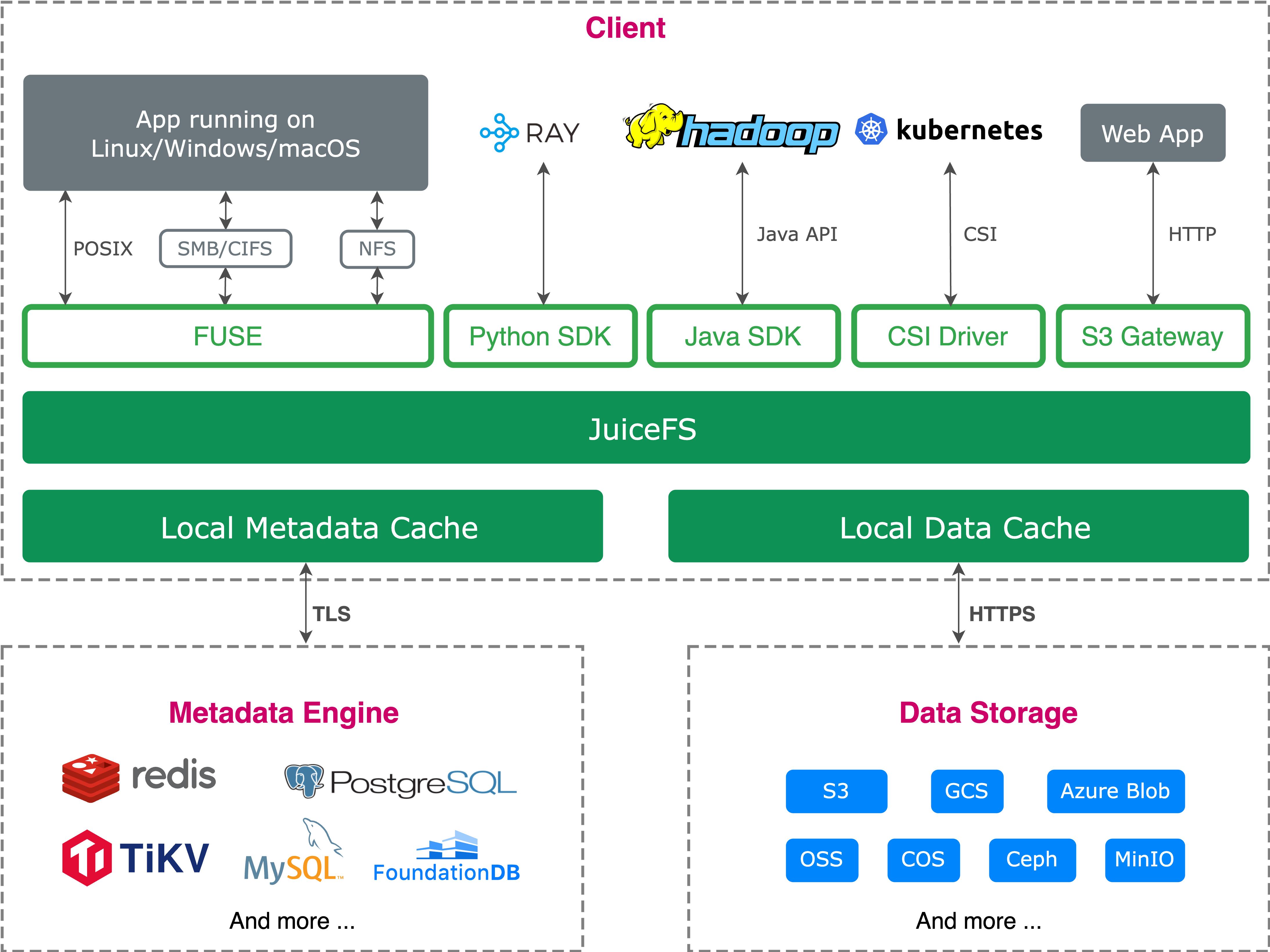
To help you compare these two architectures, here is a comprehensive table comparing JuiceFS and S3 Files:
| Comparison basis | JuiceFS | Amazon S3 Files |
|---|---|---|
| Architecture | Metadata and data decoupled; files are chunked and written to object storage | EFS‑based proxy; data is not chunked; 1:1 mapping based on file size (< 128 KB by default) |
| Core cost | Open source software; costs from object storage, metadata engine, and cache resources | In addition to S3 storage, pay for EFS storage ($ 0.30/GB) plus data sync fees |
| Read/Write amplification (random writes) | Very low in many cases. Because of chunking, a partial random write typically updates only the affected block, not the whole file | Can be very high in data production scenarios. Random modification of a large file leads to rewriting and retransmitting the entire object |
| Tiering strategy | Based on capacity and access heat; hot data is automatically warmed up into local disk/memory cache on compute nodes | Based on file size and access time. Small files (< 128 KB) are cached in EFS; large files bypass EFS and read/write directly to S3 |
| Small‑file performance | Relies on a fully in‑memory metadata engine (like Redis or TiKV); well suited for many small files and metadata operations | Depends on EFS performance and the NFS protocol |
| Large‑file throughput | Can use local NVMe / memory cache to boost throughput | Depends on EFS gateway or S3 direct performance; large‑scale parallel throughput is tied to capacity quotas |
| Cache consistency | Strong consistency (close‑to‑open) enforced by the independent metadata service | NFS close‑to‑open. But when concurrent modifications conflict between S3 and the file system, local EFS data is discarded into lost+found and S3 is forced as the source of truth |
| POSIX compatibility | Nearly 100% compatible. Supports hard links, atomic rename, and full lock semantics | Subset of NFSv4.1/4.2. Does not support hard links or atomic rename |
| Permission management | Supports standard POSIX permissions, ACLs, extended ACLs, and more | Supports standard POSIX permissions, ACLs, extended ACLs, and more |
| Encryption and security | In‑transit encryption and at‑rest encryption | In‑transit TLS encryption and at‑rest SSE‑KMS encryption |
| AI‑specific optimizations | Deeply optimized for AI‑common formats (such as LMDB and Safetensors) with mmap reads and local data warm-up | No AI‑specific optimizations; relies on basic streaming reads |
Summary
There is no silver bullet. The right choice depends on your specific scenario.
The launch of S3 Files fills a gap in the AWS official ecosystem: seamless, zero‑migration native conversion of S3 into a file system. Its design philosophy is clear: 100% format transparency with the S3 object ecosystem, with targeted optimizations for small‑file (<128 KB) read/write performance in AI scenarios.
When to choose S3 Files
If your core need is to allow legacy applications, shell scripts, or traditional software to access existing S3 data as files without changing your architecture, or if you need a general shared file space that is primarily used for read‑only, small‑file, sequential workloads, then S3 Files is the more natural choice. Its native managed service, plug‑and‑play, and zero data migration can significantly lower the barrier to entry (though you may need to pay high EFS storage and sync costs for that convenience).
When to choose JuiceFS
If your workloads involve AI model training, data production, high‑performance computing (HPC), or big data analytics – facing tens of millions of small files, random reads/writes of terabyte‑scale large files, or demanding higher mmap performance, cache hit rates, and overall throughput – then JuiceFS is the better fit. Compared to S3 Files, JuiceFS’ data chunking, independent metadata engine, and more flexible caching system make it better suited for heavy‑workload, long‑running production and AI training/inference file system scenarios.
If you have any questions for this article, feel free to join JuiceFS discussions on GitHub and community on Discord.